This guide uses the standard twelve tone equal tempered layout found in most software instruments. You will build a small pattern, identify its pitches and transpose it without relying on confusing octave names.
Read the keyboard edge
The natural note names repeat A, B, C, D, E, F, G. On a piano keyboard, C is the white key immediately to the left of a group of two black keys. The pattern of two and three black keys repeats up and down the keyboard, making it easier to orient yourself.
Between C and D lies C sharp, which can also be called D flat. A sharp raises a named note by one semitone; a flat lowers it by one. In equal temperament, C sharp and D flat use the same keyboard pitch. These different spellings are called enharmonic equivalents, and the appropriate spelling depends on musical context.
There is no black key between E and F or between B and C. Those adjacent white keys are already one semitone apart. This matters when counting: moving to “the next white key” does not always move the same distance.
Ableton's major scale lesson includes a keyboard explanation of this uneven white key spacing. For broader context, begin with Music Theory for Producers.
TRY IT HERE
Build it. Hear it.
Change one note and listen to the relationship.
Ready when you are. Audio starts only when you press Play.
Keep experimenting in the piano LabCount movements, not destinations
Place a C in the piano roll. To move up four semitones, count the moves:
- C to C sharp
- C sharp to D
- D to D sharp
- D sharp to E
The starting C is zero. Counting it as one produces the wrong result. This is a common source of chords that are consistently one semitone too narrow.
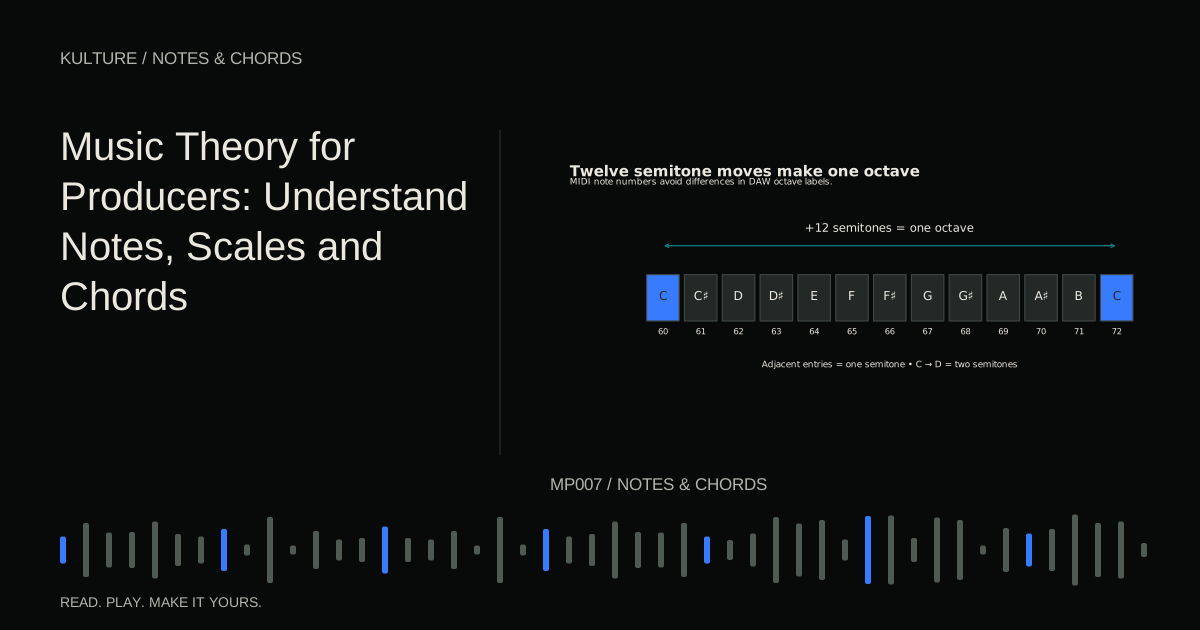
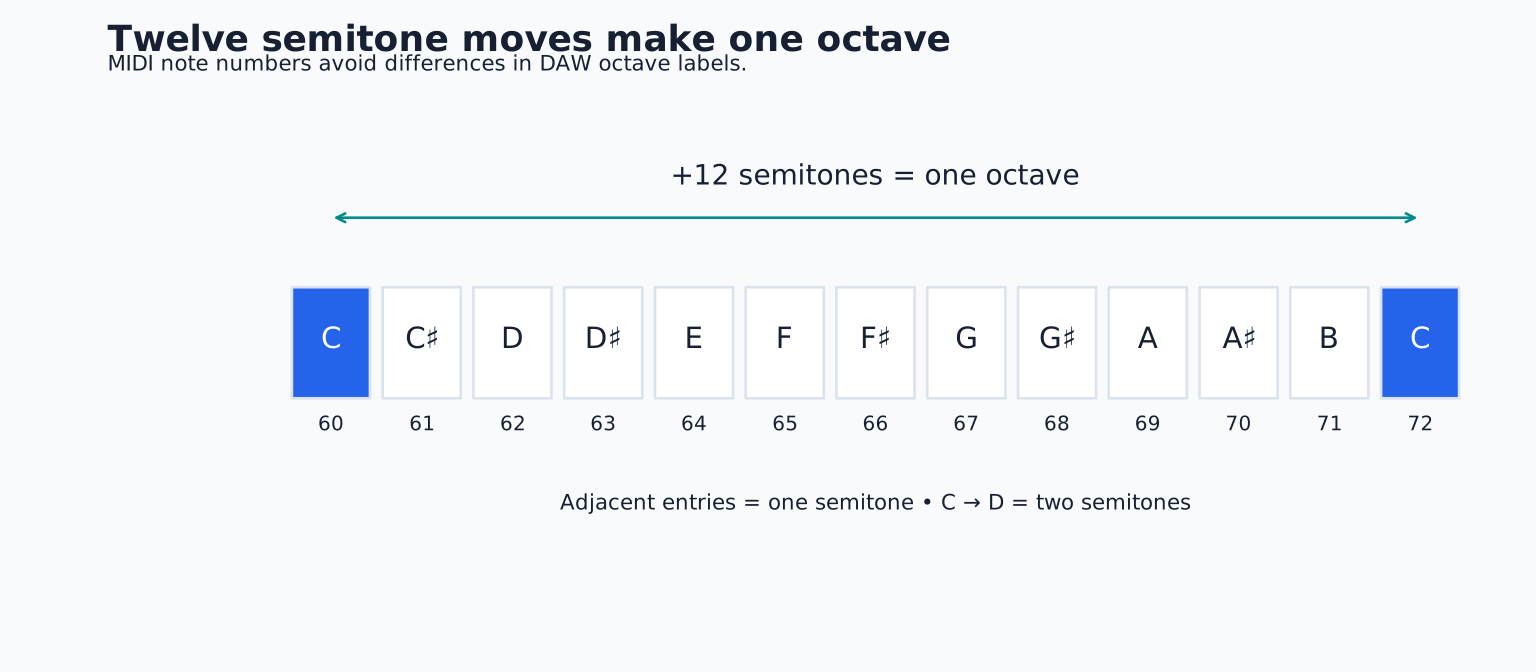
Continue from C through all twelve steps: C sharp, D, D sharp, E, F, F sharp, G, G sharp, A, A sharp, B, C. You arrive at the next C, one octave higher. Its frequency is twice that of the lower C. Moving down an octave halves frequency.
The octave relationship explains why a bass note and a higher melody note can share a name while occupying very different sonic roles. It does not mean the two notes will be equally audible through every speaker or equally effective in a particular sound patch.
Octave labels can disagree
Different DAWs and instruments may label the same MIDI note number with different octave names. Middle C is MIDI note 60, but a program may call it C3, C4 or another convention. If a tutorial says “play C2,” check its naming convention before assuming your screen should show the same label.
For unambiguous exercises here, use MIDI note numbers where available. Note 60 is C, 61 is C sharp, 62 is D, 64 is E and 67 is G. Adding 12 moves up an octave; subtracting 12 moves down. If your editor does not display numbers, use its documented middle C reference. The repeated keyboard layout identifies a C, but not which octave it occupies. For relative distance exercises, any comfortable register C will work.
A MIDI note number identifies a key instruction, not an absolute guarantee of sounding pitch. A synthesizer can transpose it. A sampler can play an incorrectly mapped sample. If note 60 sounds like D, inspect the instrument before rewriting your music.
Build a pattern you can measure
Load a simple piano, create a two bar clip in 4/4, and choose a quarter note grid. Put the following in bar 1, one note on each beat:
| Beat | MIDI note | Pitch class |
|---|---|---|
| 1 | 60 | C |
| 2 | 62 | D |
| 3 | 64 | E |
| 4 | 67 | G |
In bar 2, reverse the order: 67, 64, 62, 60. Each note should last about one beat initially. Play the loop and watch the rising and falling contour. Contour means the general direction of a melody, independent of its exact pitches.
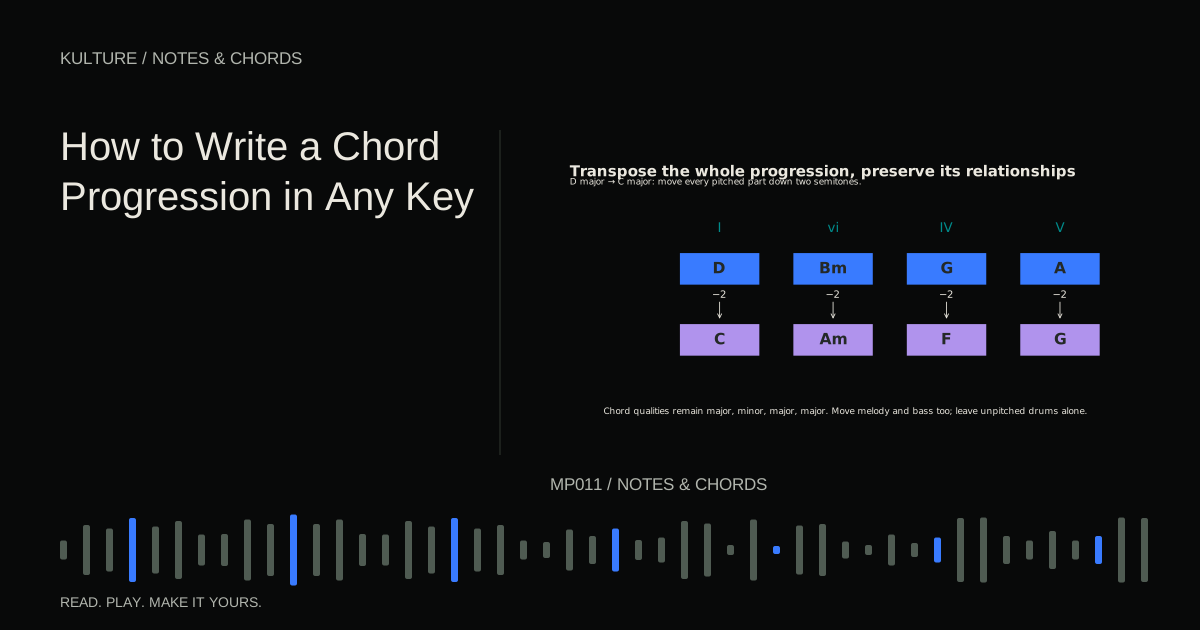
Select every note and move the selection up 12 semitones. The pattern should sound higher but retain its recognizable shape. Move it back, then up two semitones. It now uses D, E, F sharp and A. This operation is transposition: every note moves by the same distance.
If only some notes move, undo and check your selection. If a scale lock feature changes the interval sizes, temporarily disable it for this exercise. You are testing exact chromatic movement, not snapping to an allowed collection.
Note length is a different dimension
Changing a note's vertical position changes pitch. Dragging its right edge changes its MIDI duration. Moving the whole rectangle horizontally changes its start time. Beginners sometimes change multiple dimensions accidentally when dragging, so watch which handle or tool is active.
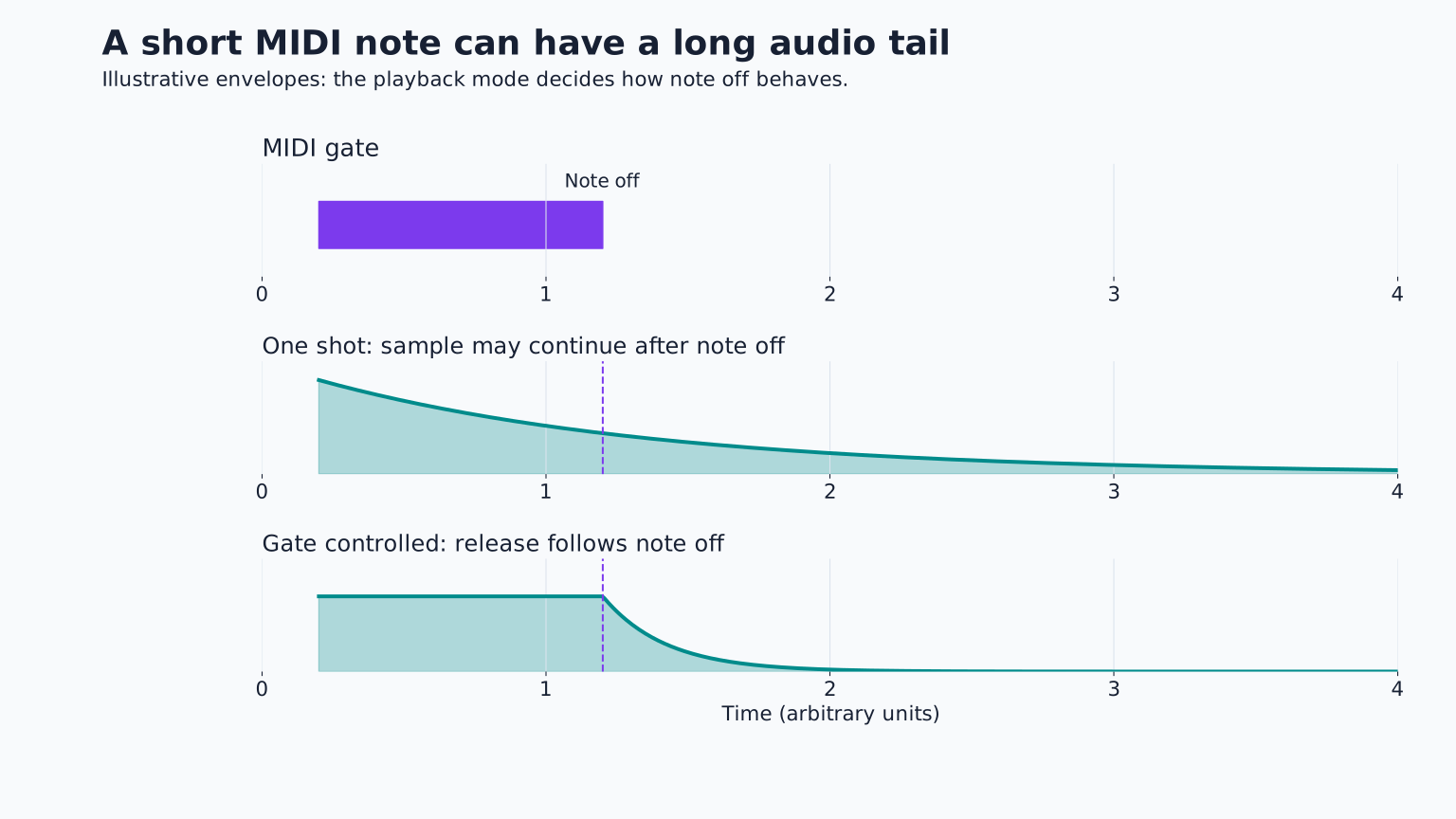
A MIDI duration of one beat does not ensure one beat of audible sound. A plucked sound may decay before the note ends; a pad may continue after release. The instrument's amplitude envelope controls how its loudness develops over time. This is why a correct looking piano roll can still sound too short or too smeared.
Use a sustained, uncomplicated instrument when checking note durations. Then audition your intended sound and adjust the performance to suit it. You are writing for an instrument, even when that instrument exists entirely in software.
Pitch, volume and tone are separate
A higher note is not automatically a louder note. MIDI velocity usually represents how strongly a key was struck and may influence loudness, brightness or several parameters. Timbre is the character that distinguishes a piano from a flute playing the same pitch.
Try the pattern on a piano and then on a soft synth. The notes remain the same, but the musical impression changes. If the synth has an octave shifted oscillator, you may hear more than one register from each note. Turn off extra oscillators or use a simpler preset to avoid confusing layering with incorrect MIDI.
Ableton's interactive pitch introduction is a useful way to hear pitch changes independently of a DAW's particular display.
Fix the misleading cases
If an octave jump seems to change the rhythm, check whether the instrument is a sampler using ordinary speed based transposition. Playing a sample higher can make it finish sooner; pitch and duration may be linked unless the sampler offers a suitable time stretch mode.
If two adjacent rows appear missing, a scale folded view may be hiding notes outside the chosen scale. Expand the full keyboard before counting semitones. If a drum instrument produces unrelated sounds on adjacent keys, that is expected: its MIDI notes select drum pads rather than a chromatic instrument.
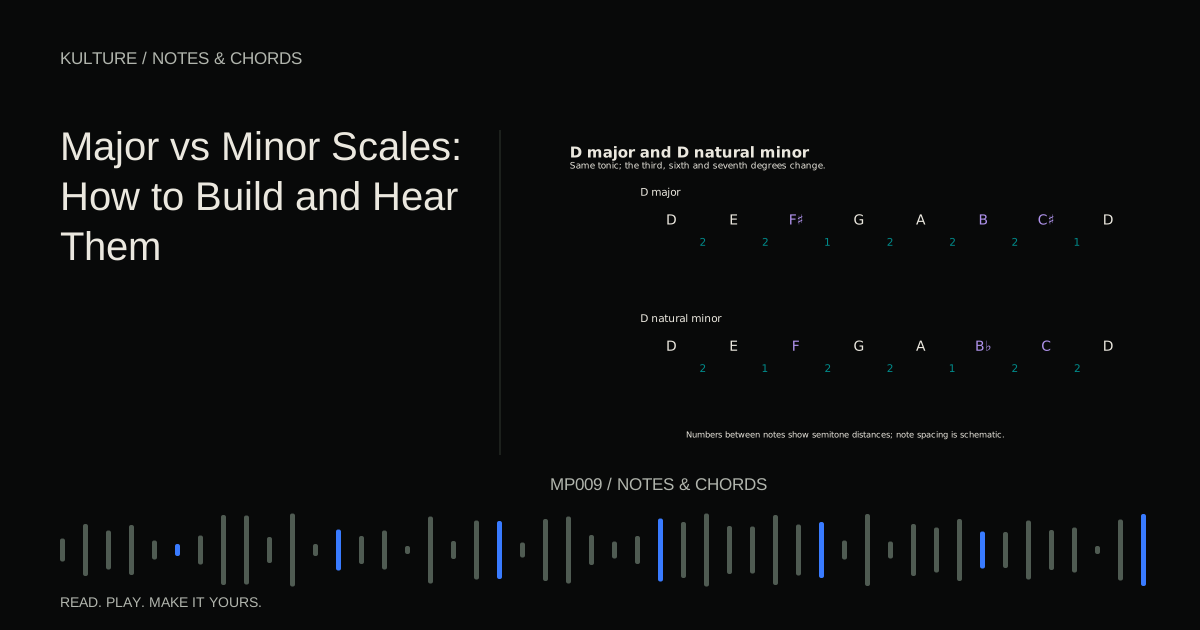
Finally, do not assume a black key note is “out of key.” F sharp belongs to G major, while F natural does not belong to that scale's basic collection. The key determines the collection; the keyboard colors simply show one familiar layout.
Practice: identify before you move
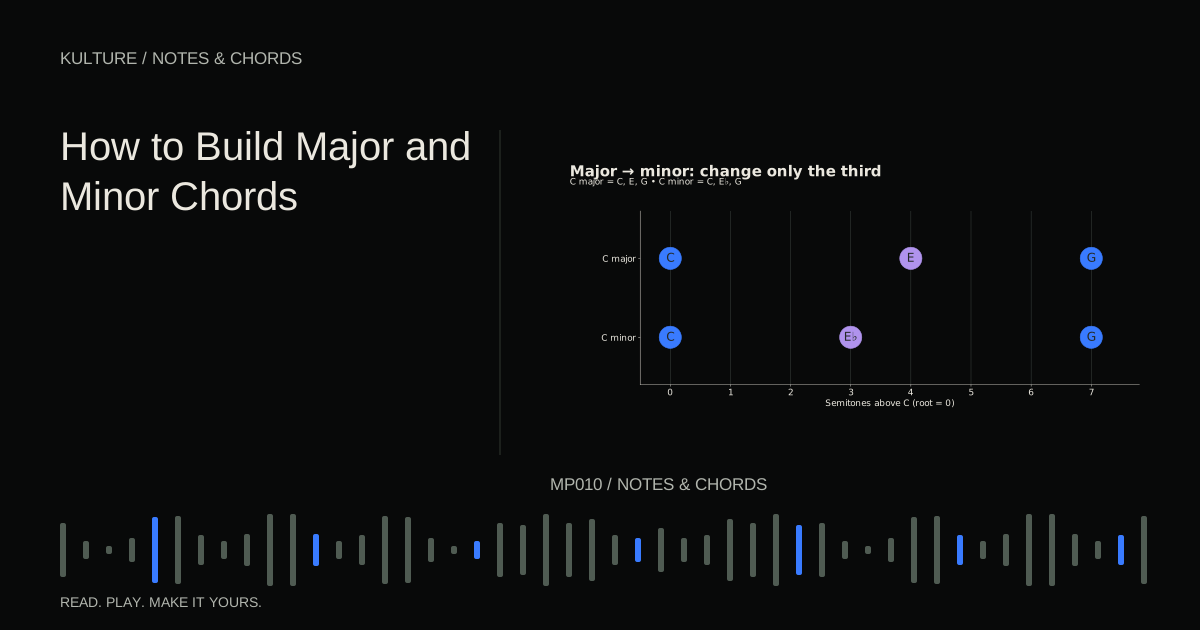
Write three notes with MIDI numbers 57, 60 and 64. They are A, C and E, forming A minor. Duplicate them an octave higher, then remove the original copy. Check that every note moved exactly 12 semitones. Next raise only the C by one semitone and listen: the chord becomes A major.
That single edit connects piano roll navigation to harmony. Continue with How to Build Major and Minor Chords, where semitone counting becomes a dependable construction tool.
TAKE IT INTO YOUR OWN MUSIC
Your next session.
Write three notes with MIDI numbers 57, 60 and 64. They are A, C and E, forming A minor. Duplicate them an octave higher, then remove the original copy. Check that every note moved exactly 12 semitones. Next raise only the C by one semitone and listen: the chord becomes A major.
Notes and progress stay in this browser.