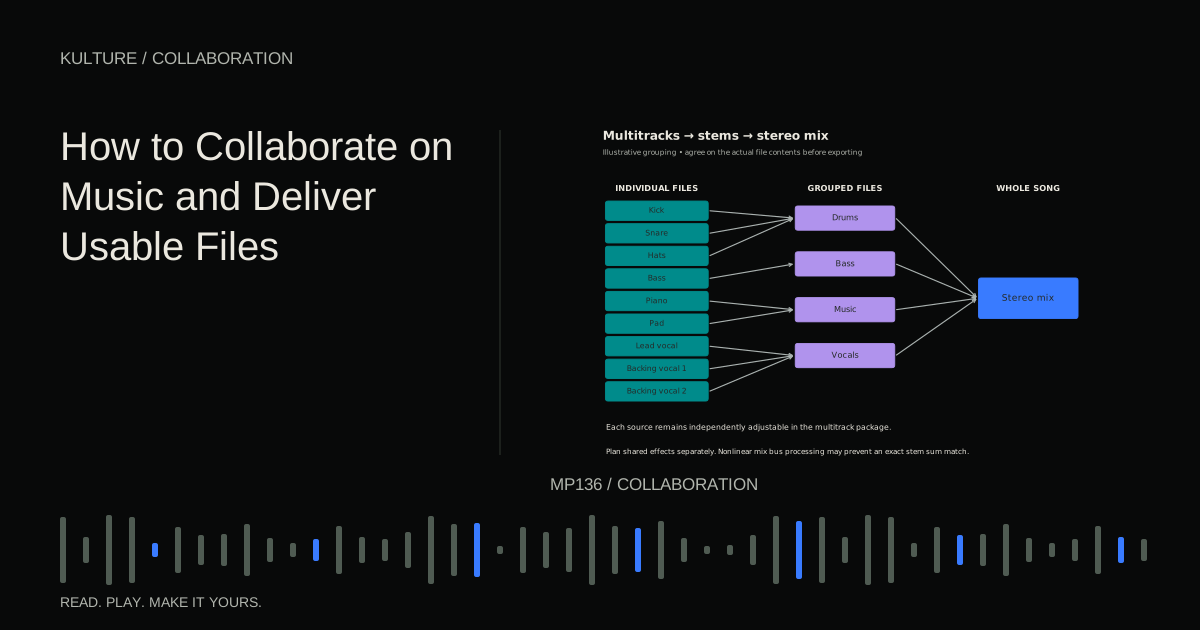
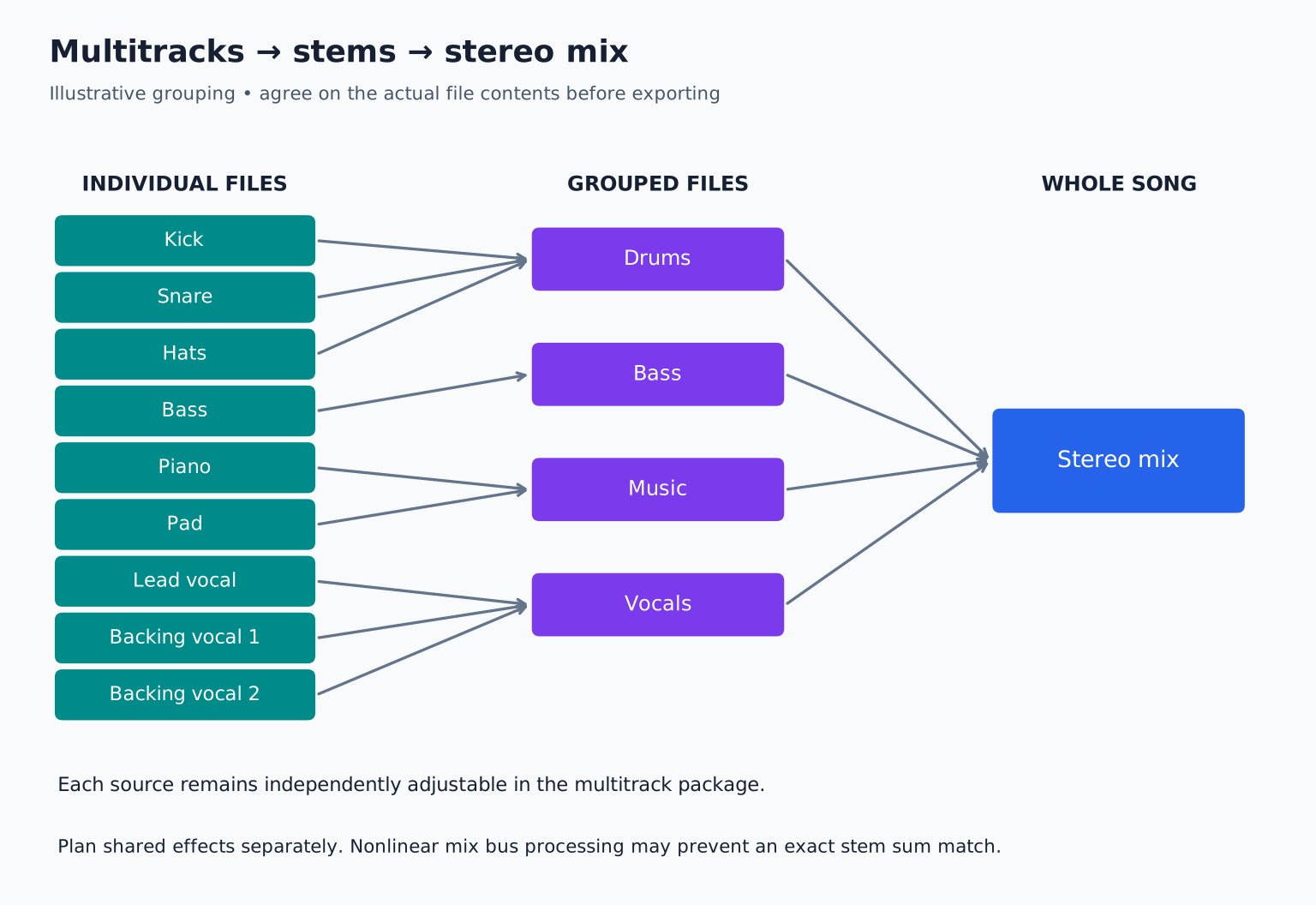
A stereo mix is the whole song combined. A multitrack package might contain separate kick, snare, hats, bass, piano, lead vocal, and backing vocals. A stem package might combine all drums into one stereo file and all backing vocals into another.
Choose according to the next job
For detailed mixing, individual tracks usually provide more flexibility. The engineer can balance the kick against the snare, edit a vocal, and process instruments separately.
For remixing, grouped stems may be enough, but the remixer may want particular elements separated. For live playback, stems often follow the channels a performer or engineer needs to control. For archival work, both a detailed package and a reference mix can be valuable.
Mastering normally starts from an approved stereo mix, though stem mastering is a separate service some engineers offer. Do not send a hundred tracks to someone expecting stereo mastering without discussing the scope.
Ableton's official stem guide uses grouped examples and notes the distinction from individual rendered parts. Your agreement with the recipient matters more than terminology debates.
TRY IT HERE
Make it your session
Turn the steps into a plan you can save.
Ready when you are. Audio starts only when you press Play.
Keep experimenting in the stem splitter LabA useful decision table
| Recipient needs to… | Likely starting delivery |
|---|---|
| Mix every instrument independently | Individual multitracks |
| Adjust broad musical groups | Grouped stems |
| Master the approved balance | Stereo mix |
| Replace the drums while retaining music | Separate drum elements or drum stem, as agreed |
| Run a live backing system | Performance specific stems and separate cues |
| Recreate instruments and edit notes | Audio plus MIDI and documented sounds |
Ask one question before exporting: “What do you need to change?” The answer usually reveals the right level of separation.
Make the timing unambiguous
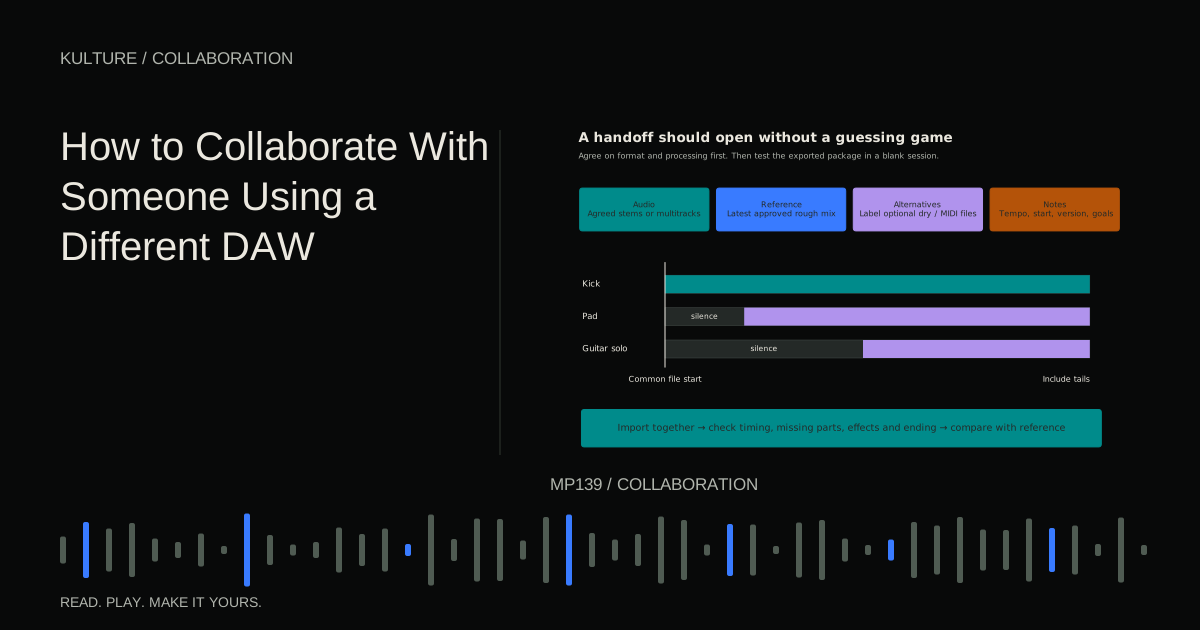
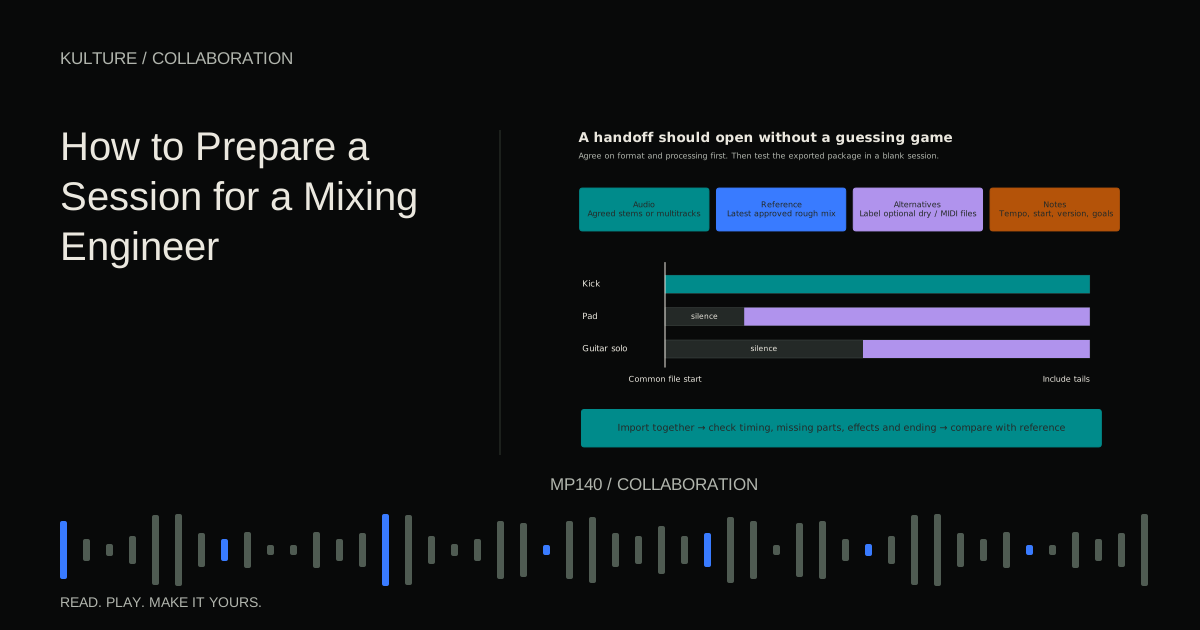
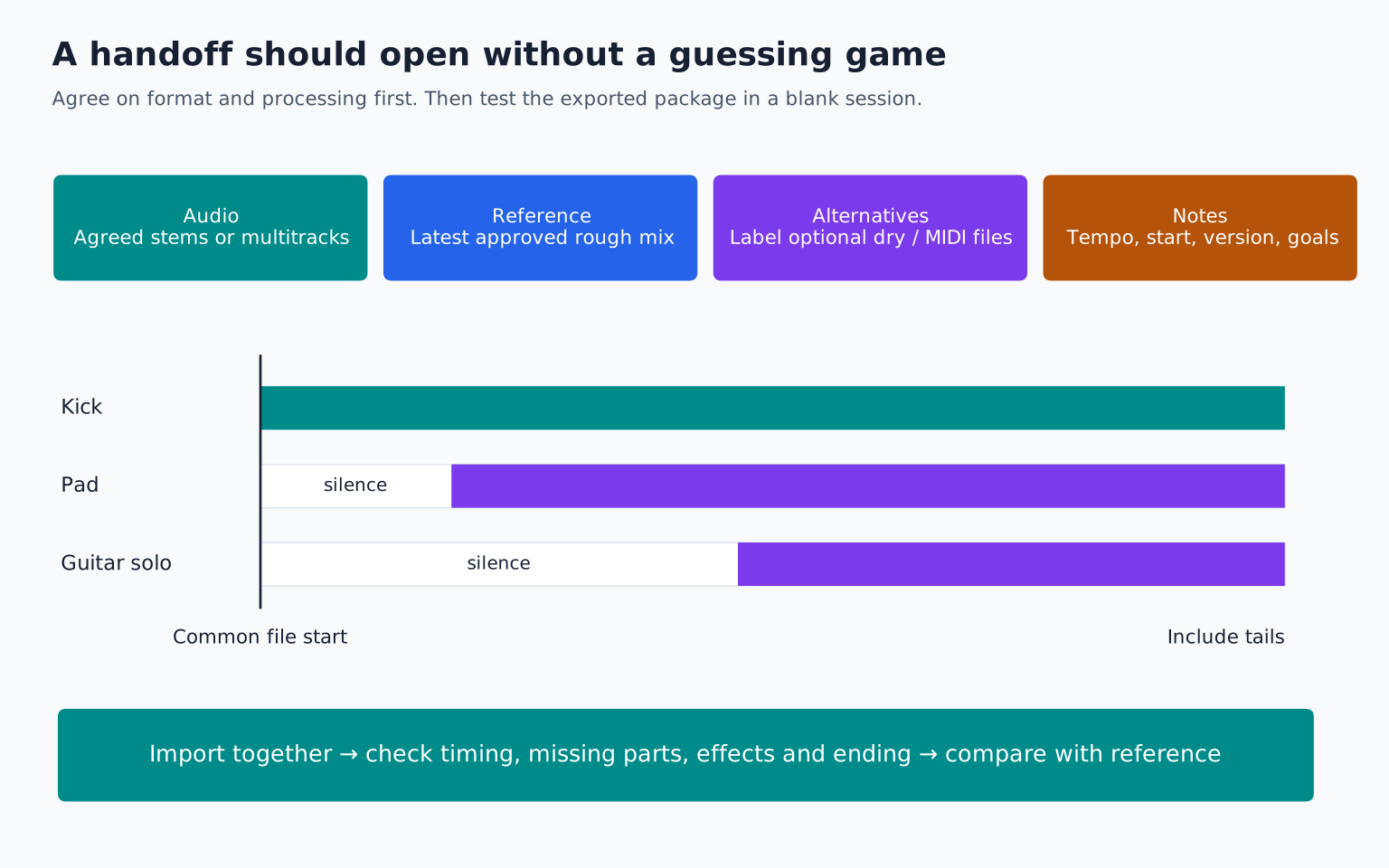
Export every file from the same start point, including silence before parts that enter later. Use a common end that includes the longest relevant tail when practical. The recipient should be able to import all files together and press play.
State tempo and time signature. If tempo changes, include a tempo map or clearly documented changes. Do not assume a filename containing “120” communicates a song that accelerates in its final section.
Disable automatic stretching on import when it would alter the delivered timing. The exact setting depends on the DAW, so the recipient should check their software's behaviour. A perfectly aligned export can become misaligned if the destination treats it as a loop and changes its tempo.
Decide what “processed” means
A dry file has some processing removed, but the term is ambiguous. Does dry mean no reverb, no compression, no tuning, or completely raw recording? State exactly what is included.
A vocal may be edited and pitch corrected but exported without reverb. A synth may be printed with distortion because that distortion defines the sound. Those are reasonable choices when labelled clearly.
Provide alternatives only when useful. For example, LeadVocal_Tuned_NoReverb.wav and LeadVocal_ApprovedFX.wav tell the engineer much more than Vocal_Dry.wav and Vocal_Wet.wav alone. Include a note identifying the intended version.
Shared effects need a plan
If several tracks feed one reverb, you can export the reverb separately or print appropriate effects into the stems. Either approach can work, but duplication is a risk.
Suppose drums and vocals both feed one ambience return. If the entire return is included in the drum stem and again in the vocal stem, summing those stems doubles that ambience. Conversely, omitting the return entirely makes the reconstruction too dry.
Create a routing list before exporting. Identify which file contains each shared effect. Test the sum in a clean session. The mixing session preparation guide covers how to document these decisions.
Why stems may not sum exactly to the mix
A nonlinear processor changes its behaviour according to the signal feeding it. If the full mix passes through a compressor, separately running the drum stem and vocal stem through that compressor does not generally produce files whose sum equals the original compressed mix.
Sidechains can create similar surprises. A bass part may pump with the kick in the full session but stop doing so when exported alone if the trigger is muted. Solo and export behaviour vary between DAWs and routing configurations.
Do not promise an exact reconstruction unless you have tested it. If exact summing matters, design the routing around that requirement or provide a separate full mix reference explaining the limitation.
A practical twelve track example
Imagine a session containing kick, snare, hats, percussion, bass, piano, pad, lead synth, lead vocal, two backing vocals, and a shared reverb.
For mixing, export the individual sound sources, preserve essential creative processing, and include the reverb as an identified effect return if agreed. Supply the rough mix so the engineer can hear the intended balance.
For a live performance where the lead singer performs live, you might create drums, bass, music, and backing vocal stems while omitting the lead vocal. Keep click and spoken cues on separate outputs, never accidentally embedded in the audience mix.
For a simple remix, the remixer may prefer drums, bass, harmonic instruments, lead synth, lead vocal, and backing vocals. Confirm that grouping before spending time exporting.
File format and level checks
Use the agreed uncompressed format and sample rate. Do not normalize every part independently unless specifically requested, because this changes their relative levels. Avoid clipping and preserve useful headroom without chasing an arbitrary peak value on every file.
Apple's Logic Pro export documentation illustrates that track export can include choices about processing and export scope. Menu details vary by version; verify them in your installed software.
Use mono files for genuinely mono sources when appropriate, and stereo files when stereo information matters. Do not collapse a stereo instrument merely to reduce file size without checking the result.
Your handoff test
Import the package into an empty project, align every file to the common start, and compare with the reference. Listen for missing parts, duplicated effects, changed timing, and incomplete endings. Count the files against your routing list.
Your exercise is to make both a detailed multitrack package and a four stem version of a short arrangement. Write one sentence describing what can and cannot be changed in each. Continue with cross DAW collaboration when the recipient uses different software.
TAKE IT INTO YOUR OWN MUSIC
Your next session.
Imagine a session containing kick, snare, hats, percussion, bass, piano, pad, lead synth, lead vocal, two backing vocals, and a shared reverb.
Notes and progress stay in this browser.