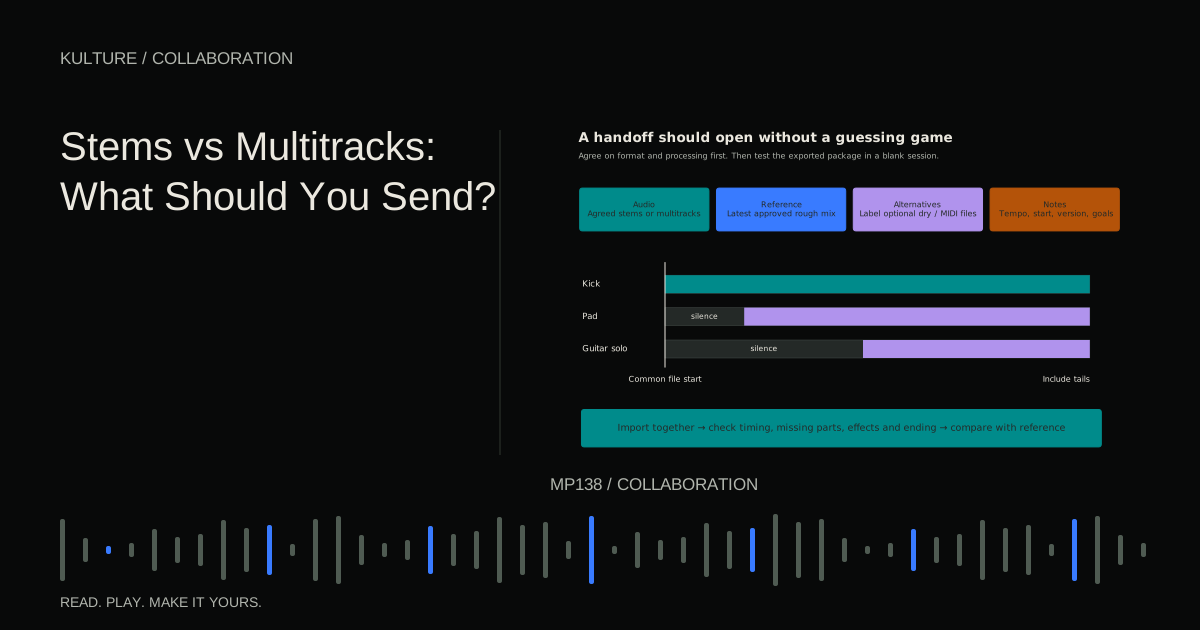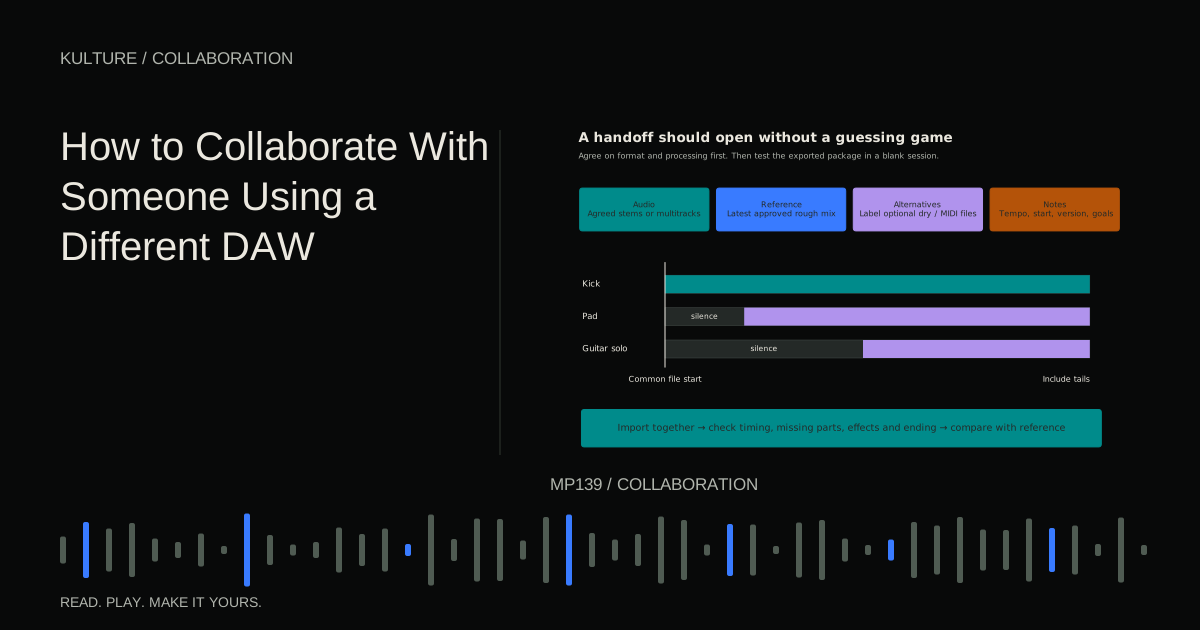
Ask the engineer whether they want a native session or audio multitracks, which formats they accept, and how they prefer effects and alternatives delivered. Their answer should guide the export.
Finish the decisions that belong before mixing
Confirm the arrangement, chosen takes, lyrics, and major editing decisions. If vocal comping or tuning remains part of the job, say so and confirm that it is included. A comp is an assembled performance made from selected sections of multiple takes.
Do not hide unfinished production inside a folder labelled “ready to mix.” The engineer may be able to help, but additional editing and arrangement work changes time and scope.
Keep a backup of the full production session before cleaning it. Do not permanently delete unused takes merely to make the handoff tidy. Create a separate delivery copy that contains the agreed materials.
TRY IT HERE
Make it your session
Turn the steps into a plan you can save.
Ready when you are. Audio starts only when you press Play.
Keep experimenting in the stem splitter LabName tracks for the person receiving them
Use descriptive names such as Kick_Main, Snare_Top, Bass_Synth, LeadVocal, and BGV_High. BGV means backing vocal; define unusual abbreviations in the notes.
Group related tracks in a logical order. Numbering can preserve that order across systems: 01_Kick, 02_Snare, 03_Hats. Avoid names that rely on your personal memory, such as CoolSound_7 or Audio_129.
Label muted alternatives clearly and place them outside the main import folder if they should not play by default. A mixer should not have to guess whether two nearly identical vocal files are doubles or alternate takes.
Preserve edits and clean boundaries
Listen for clicks at edits, abrupt noise changes, and missing breaths. Add appropriate fades where needed, but do not remove every breath or natural performance sound automatically. Some are part of the phrasing.
Check the beginning and end of every printed instrument. A synth may have a slow attack before the visible beat, or a reverb may continue after the final note. Export boundaries should preserve the intended sound.
If the engineer needs unedited source takes for a specific task, provide them separately from the approved edited version. Make it clear which file represents the current decision.
Decide which processing is creative
A guitar amp simulation, vocal distortion, rhythmic delay, or heavily designed synth effect may be central to the song. Print those sounds so the engineer can hear and preserve the intention.
Processing used only for rough balance may be more negotiable. Discuss whether to retain compression, EQ, tuning, and noise reduction. “Dry” should be defined precisely: no reverb is different from no processing of any kind.
A useful vocal delivery might include an edited, tuned vocal without ambience, plus a separate reference of the approved effect. Do not force the mixer to choose between an unedited raw recording and an irreversible effect heavy print if a better middle option exists.
Separate shared effects intelligently
If multiple parts feed a shared reverb or delay, decide whether to deliver that return separately. Identify its sources and purpose. A dramatic throw on one word may deserve its own print so it cannot be mistaken for accidental spill.
Avoid printing the same complete shared return into several files. When those files are summed, the effect may be duplicated. Also check sidechains: a compressor controlled by a muted kick trigger may behave differently during isolated export.
Ableton's stem and part export instructions illustrate why routing and export scope need attention. Verify the equivalent behaviour in your own DAW.
Align the audio and document the session
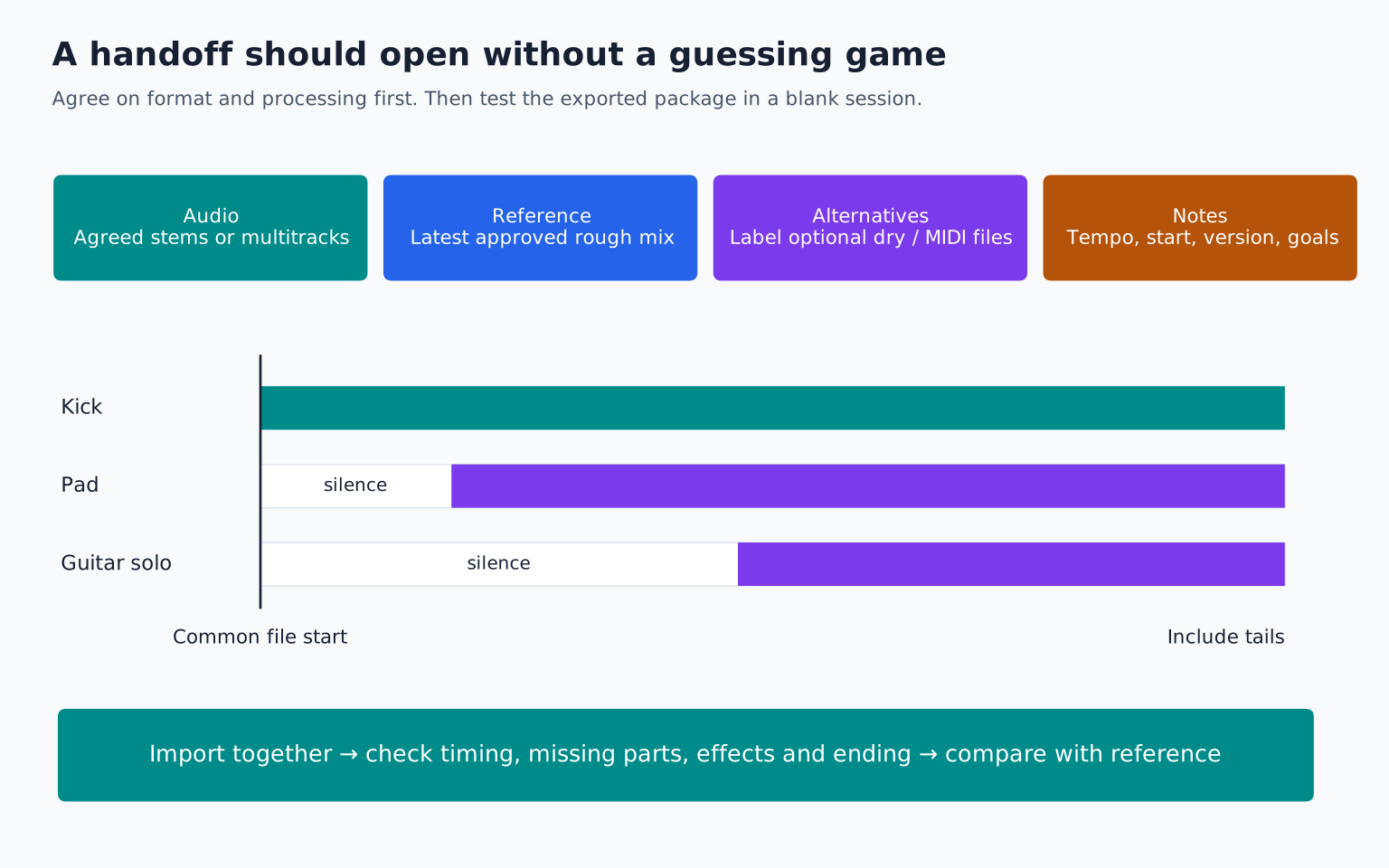
Export all parts from a common start point, preserving silence before later entries. State the sample rate, tempo, time signature, and any tempo changes. If the song has a free time opening, describe how the grid relates to it.
Use the requested uncompressed format. Avoid independent normalization because it alters relative levels. Keep audio free of accidental clipping and supply the rough mix so the engineer can hear the intended balance.
Do not change sample rates repeatedly to satisfy a habit. Follow the engineer's requested format and keep the original high quality sources. See cross DAW collaboration if the native session cannot be shared reliably.
Write notes that identify priorities
Limit the main note to the information that affects decisions. Describe the focus of the song, essential effects, known concerns, and any approved references.
For example: “The lead vocal should stay intimate in the verse. The distorted backing vocal in the final chorus is intentional. Please preserve the delay throw after the word at 2:14. The bass feels uneven in the second chorus; the notes and sound are approved, but the balance is open.”
This gives the engineer a useful problem to solve. A list of twenty preferred plugin settings is less useful unless those settings are necessary to recreate a sound.
Include the rough mix without making it a trap
The rough mix communicates arrangement and intention. Label any temporary master limiting. If you have listened to a loud rough for weeks, tell the engineer: it may explain why an initially quieter mix feels less exciting.
Compare revised mixes at matched level before asking for more compression. Level matched referencing helps separate real balance issues from loudness bias.
If something in the rough is non negotiable, state it. If it is merely a placeholder, state that too. The engineer should not have to infer your attachment from how polished a part happens to sound.
Run a clean session test
Open a new session and import the delivery files at the common start. Play them all the way through. Check for missing parts, accidental duplicates, changed timing, and truncated effects. Compare against the rough mix while accounting for any deliberately omitted processing.
Confirm that the file count matches your track list. If delivering a native session, collect its assets and test it from the delivery folder. A project that still references files on your desktop is not self contained.
Your exercise is to prepare one song for someone who has never seen the session. Include only the approved tracks, clearly separated alternatives, a rough mix, and a concise note. Then follow revision and sign off planning so the next stage is as organized as the handoff.
TAKE IT INTO YOUR OWN MUSIC
Your next session.
Open a new session and import the delivery files at the common start. Play them all the way through. Check for missing parts, accidental duplicates, changed timing, and truncated effects. Compare against the rough mix while accounting for any deliberately omitted processing.
Notes and progress stay in this browser.