These are routing ideas, not four completely separate kinds of sound. A return can itself feed a bus, and a bus can contain insert effects. Once you can follow the path, many apparently complicated mixer setups become straightforward.
Follow one instrument from source to output
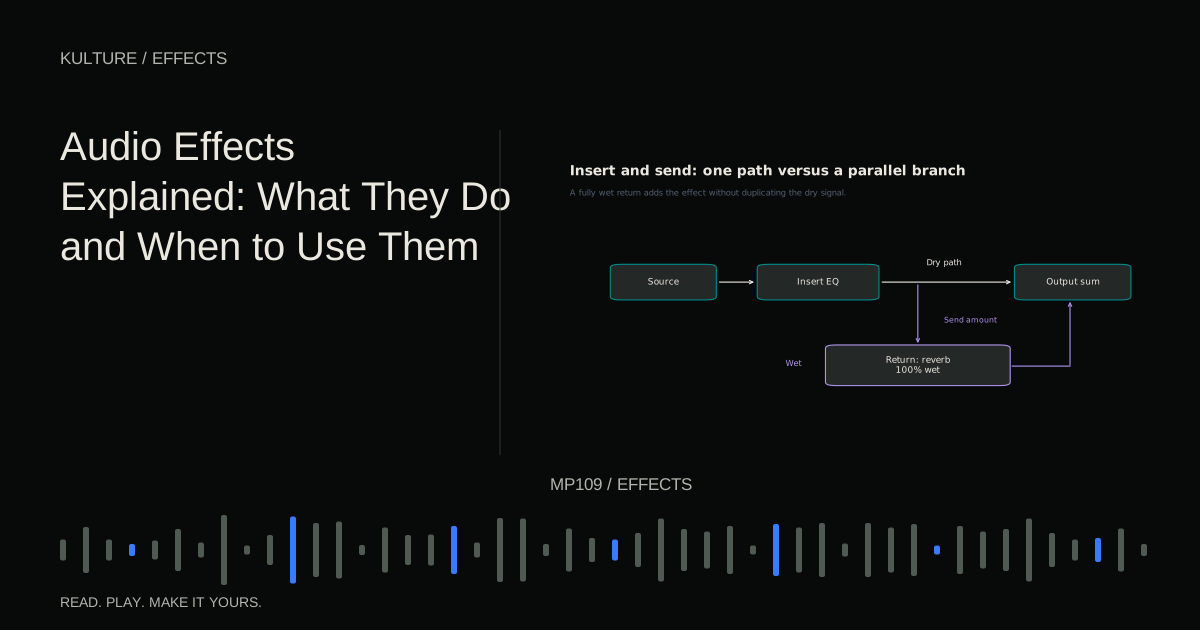
Imagine a synth track playing a melody. Its audio passes through any insert effects, then through the track’s level and routing stages toward the main output. Exact ordering and options vary by DAW, but this is a useful starting picture.
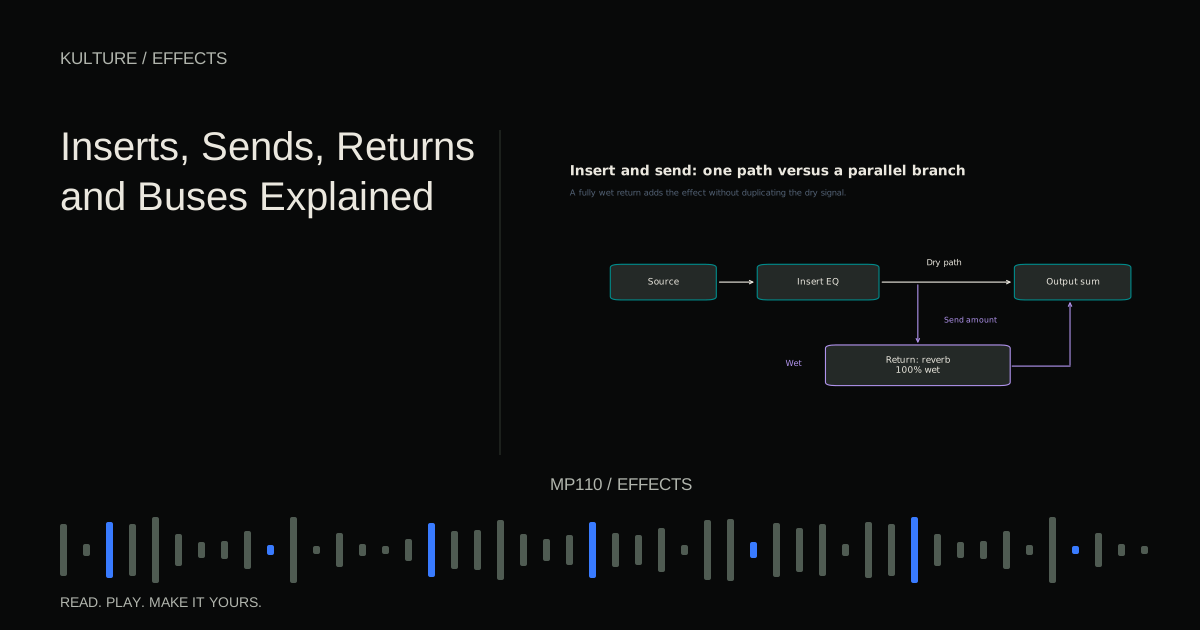
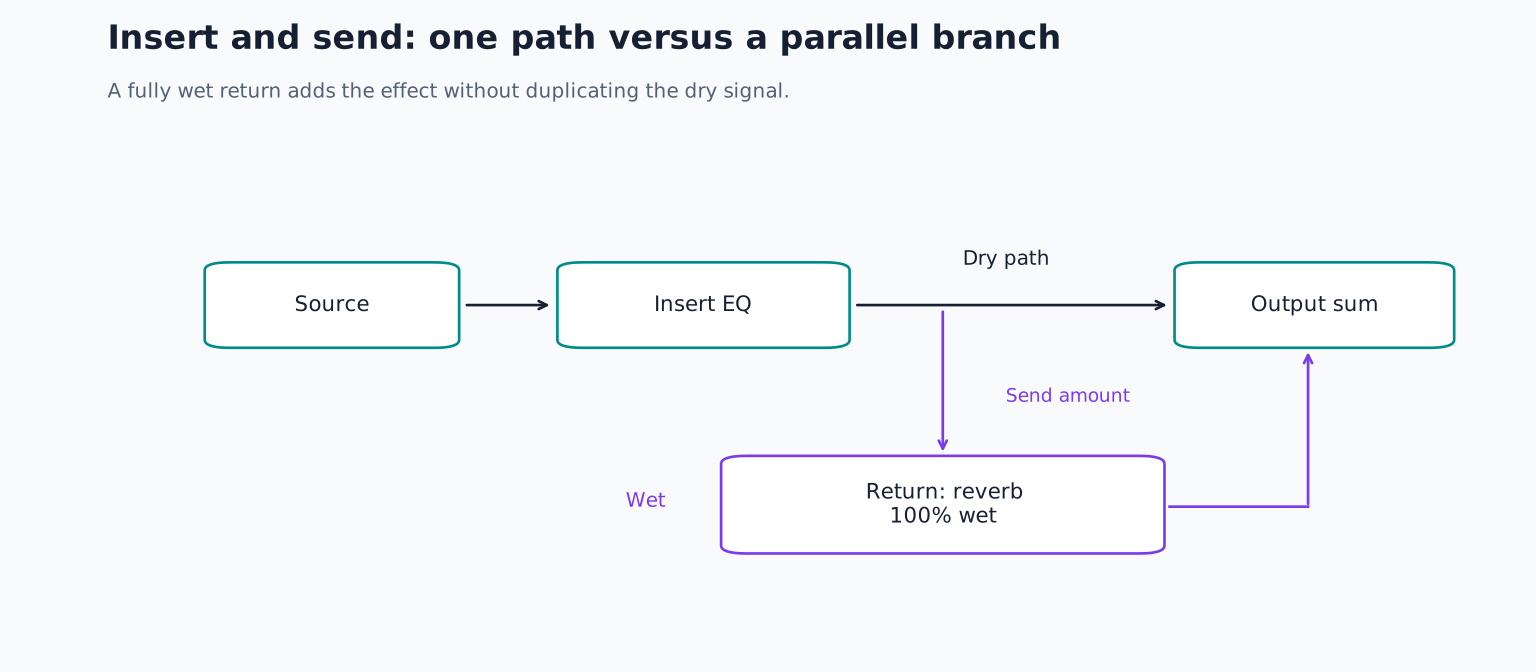
If you insert an EQ on that track, the signal flowing through that insert is equalized. If you insert a distortion effect, the track’s sound is reshaped there. The processor may have a dry/wet control, but it still occupies the track’s path.
A send creates an additional branch. The original melody can continue to the output while a portion travels to a reverb return. At the output you hear the dry melody plus the reverb return’s contribution.
Ableton’s routing documentation describes tracks, destinations and returns in a concrete DAW implementation. Other programs may use names such as aux, auxiliary track, effect channel or bus channel for related functions.
TRY IT HERE
Follow the signal
Put the stages in order, then check the route.
Ready when you are. Audio starts only when you press Play.
Keep experimenting in the synth LabBuild one shared reverb
Create two source tracks: a pluck melody and a snare pattern. Add an auxiliary or return track and put a reverb on it. Set that reverb fully wet so its output contains the effect rather than an extra dry copy.
Send a small amount from the pluck to the return. Raise it until you hear the space, then reduce it to a useful level. Add a smaller send from the snare and compare. Both instruments now share the same reverb settings while keeping separate send amounts.
The source faders control the original tracks. The send controls determine how much each source contributes to the effect path. The return fader controls the combined wet output. Those are three different decisions.
If the sound suddenly gets louder but barely more reverberant, check whether the reverb is passing dry audio on the return. You may be duplicating the source unnecessarily. A fully wet return is the ordinary starting point for this arrangement, not a requirement for every creative routing experiment.
Pre fader and post fader sends
A post fader send follows the source fader in the relevant signal path. Lowering the source generally lowers what feeds the return too, preserving a more consistent relationship between dry and wet level.
A pre fader send takes its signal before that fader. You can lower the source’s main output while the send continues feeding another path. This is useful for independent monitor mixes or certain creative effects, but it can be surprising if you expected the reverb to disappear with the source.
Test the behaviour rather than relying on an unfamiliar label. Play the pluck, move its fader down and listen to the return. In a normal post fader arrangement, the effect feed should reduce. In a pre fader arrangement, it may remain.
Mute behaviour and the precise tap point can vary. A pre fader send is not necessarily pre insert, and different DAWs expose different options. Read the routing details before assuming an effect or mute will affect every branch.
Create a bus for a group
Now add kick and hi hat tracks. Route kick, snare and hats to a drum bus or group channel. Route that bus to the main output. The drum bus receives their combined signal, letting one fader adjust the drum balance as a unit.
If you add a compressor on the drum bus, it reacts to the combined drums. A loud kick may influence gain reduction applied to snare and hats as well. That shared response can be useful, but it is different from compressing each drum independently.
Avoid accidentally leaving a duplicate direct route active if your DAW allows multiple output paths. Hearing both the direct drums and a duplicate bus path can change level or timing relationships. Trace the routing when the result seems unexpectedly loud.
For the drums, create a separate drum only reverb return, fed by the snare or other drums but not the pluck. Keep the earlier shared pluck and snare return routed directly to the main output; routing it through the drum bus would also place the pluck’s reverb under drum bus control. Decide where the new drum only return goes. Sending it to the drum bus lets the bus fader control dry drums and that drum only reverb together. Sending it directly to the main output separates those controls. Either can work if you understand the consequence.
Sends can do more than reverb
A parallel compression path sends a copy to a compressor and blends it with the original. A distortion return can add grit underneath a clean source. A delay return can receive only selected phrase endings through send automation.
For a simple parallel test, send the drum bus to a new return containing a compressor. Make the processed branch obviously dense, then keep its return fader down. Raise it gradually under the original drums until it adds useful body.
Check latency compensation and plugin behaviour if the blend becomes hollow. Parallel processing depends on how the paths combine. Some phase changing effects alter the relationship even when timing compensation is working correctly.
Do not send that parallel return back into its own input while learning. Routing feedback can build quickly, and it is unrelated to the basic blending exercise.
Common routing mysteries
If you hear an effect after muting a track, it may be a tail already in progress or a separate pre fader path. If one fader changes several instruments, they may feed a common bus. If the return seems silent, check the send level, return mute, effect wet setting and final destination in that order.
If a stereo effect sounds unexpectedly narrow, inspect whether a mono stage appears later in the path. If a source changes tone when a bus is bypassed, remember that the bus may contain processing affecting every routed track.
A quick sketch helps: source to inserts to bus to output, with a separate branch from send to return. Add only the branches that actually exist. You do not need a complicated diagram to discover an accidental duplicate or missing destination.
For practice, build a session with three drums, one drum bus and one shared reverb return. Make the snare wetter without changing the kick, lower all drums together, then lower only the reverb. If you can do those three things predictably, the routing is clear. Continue with reverb and effect order to decide what should happen inside each path.
TAKE IT INTO YOUR OWN MUSIC
Your next session.
If you hear an effect after muting a track, it may be a tail already in progress or a separate pre fader path. If one fader changes several instruments, they may feed a common bus. If the return seems silent, check the send level, return mute, effect wet setting and final destination in that order.
Notes and progress stay in this browser.