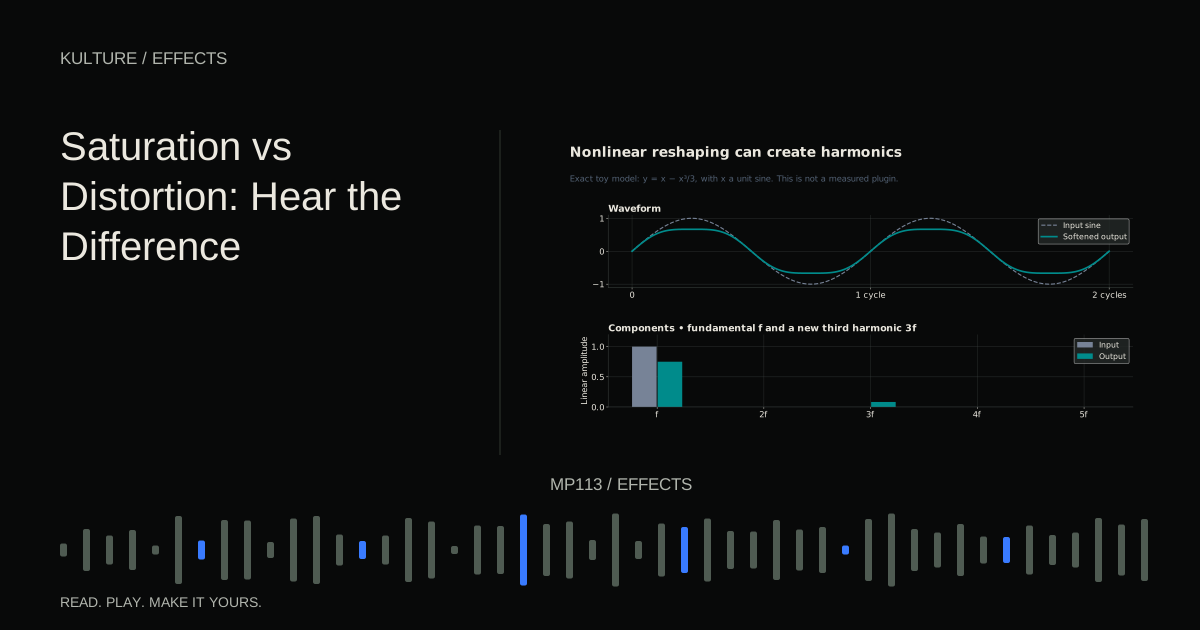
Judge the result by what changes: harmonic content, transient shape, sustain, noise and the way overlapping notes interact. A label such as tape, tube or warm is a starting description, not proof of a particular sound.
Begin with a simple tone
Load a sine based synth patch and play a middle register note at a conservative level. Disable effects and use a sustained amplitude envelope. Add a saturation or distortion processor with drive low and output controlled.
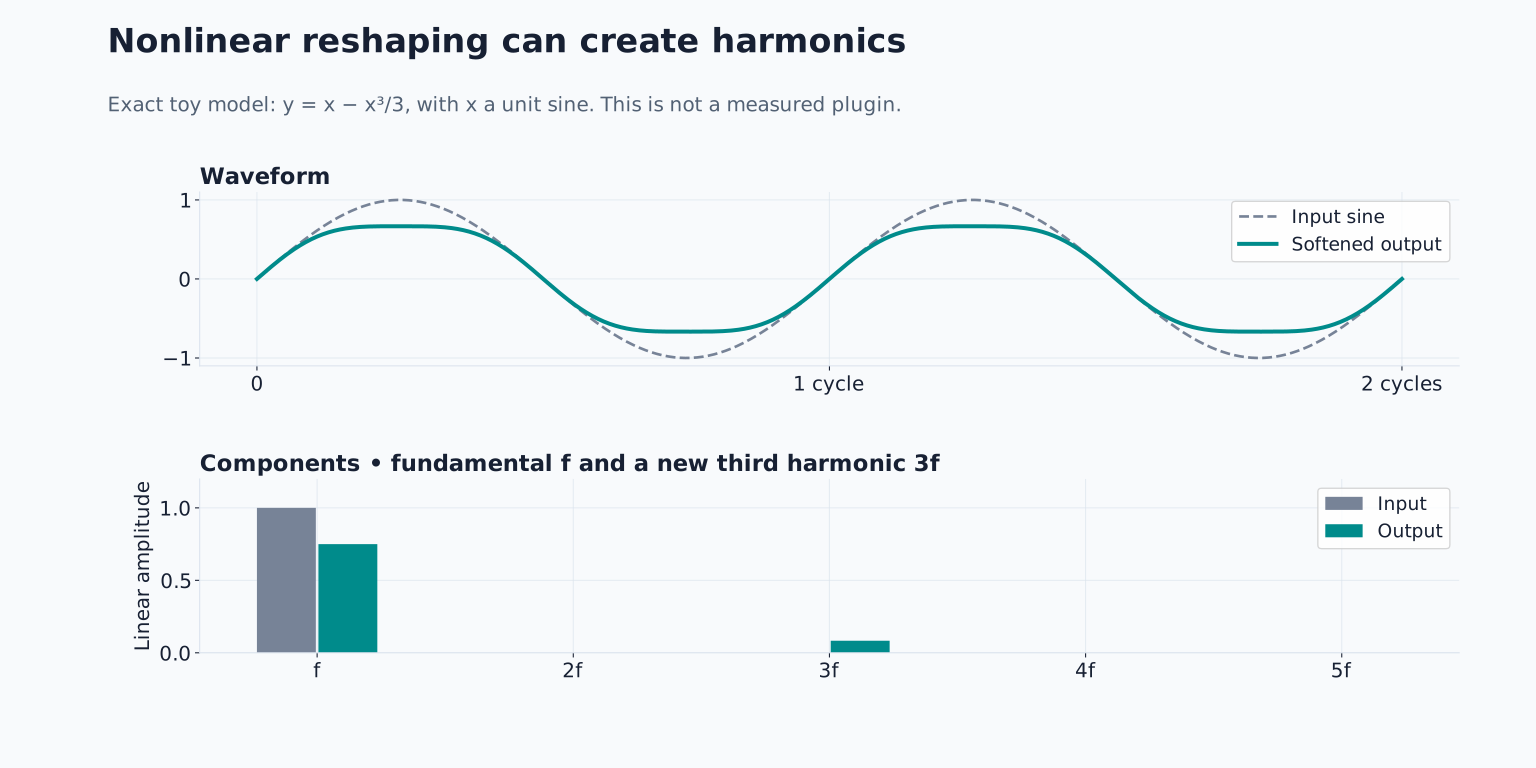
Increase drive gradually. A clean sine has a simple spectrum, so added harmonics are easier to identify than on an already bright sawtooth. You may hear the tone become more audible, buzzy or dense as the waveform changes.
If you use a spectrum analyzer, look for new components above the original fundamental. The display helps confirm a change, but your listening decides whether it is useful. FabFilter’s saturation and distortion overview provides a manufacturer reference for different nonlinear processing styles.
TRY IT HERE
Add harmonics
Compare clean and driven versions of the same sound.
Ready when you are. Audio starts only when you press Play.
Keep experimenting in the synth LabMatch the output before choosing a favourite
Drive often raises level as well as changing tone. Reduce output gain so the processed and bypassed versions are reasonably similar in perceived loudness. Otherwise the louder version may seem fuller and more detailed even when its distortion is not helping.
Toggle bypass on a short phrase rather than a single sustained note. Listen to the attack, the body and the gaps. Some processors alter the apparent sustain or background noise as much as the tone.
Automatic gain compensation can help, but it is not a guarantee of equal perceived loudness. Verify by ear at a comfortable level and use meters as supporting information.
Soft and hard clipping are useful comparisons
Clipping limits or reshapes waveform peaks. A hard clipping model has a relatively abrupt boundary; a soft clipping model bends the transition more gradually. The exact transfer curve determines the result, and additional filters or circuit models can change it further.
On a pluck, compare a mild soft clipping style with a more abrupt one. Keep the output matched. Listen for changes in edge and attack, not just total brightness.
A saturated sound can feel denser because peaks are reshaped while lower level material becomes more prominent after level compensation. That does not mean saturation is equivalent to a conventional compressor. Its response and generated harmonics are different.
Do not assume accidental digital clipping anywhere in the session is desirable just because a dedicated clipper can be used creatively. Uncontrolled overload may occur at the wrong point and cannot necessarily be repaired by turning down the final fader.
Use harmonics to help a bass translate
Create a bass phrase at 110 BPM using C, E flat, G and B flat in a low register. Start with a rounded patch that contains limited upper harmonics. Listen on your usual system without increasing level to compensate for missing deep bass.
Add a small amount of saturation and reduce output to match. The bass notes may become easier to identify because their upper harmonic information is more apparent. The goal is clearer note identity, not simply a larger sub bass meter reading.
If the low end becomes unstable or fuzzy, reduce drive or blend a processed layer underneath the clean bass. A multiband processor can focus distortion on a selected region, but it adds complexity and should follow a clear reason.
Check the bass with kick and chords. Harmonics that help on a small speaker can also compete with the melody. Continue with mixing kick and bass for the full relationship.
Chords reveal interactions that single notes hide
Play C, E flat and G together through the same processor. Nonlinear processing can create components related to interactions between input frequencies, often described as intermodulation. A setting that sounds clean on one note may become rough on a chord.
Try reducing drive, changing the chord voicing or distorting individual voices before they are combined. These approaches do not necessarily produce the same result because the processor receives different combinations of frequencies.
For a deliberate gritty chord sound, the interaction may be exactly what you want. Keep it if it supports the phrase. The exercise teaches why a preset cannot be evaluated only on one isolated note.
Filter before or after for different reasons
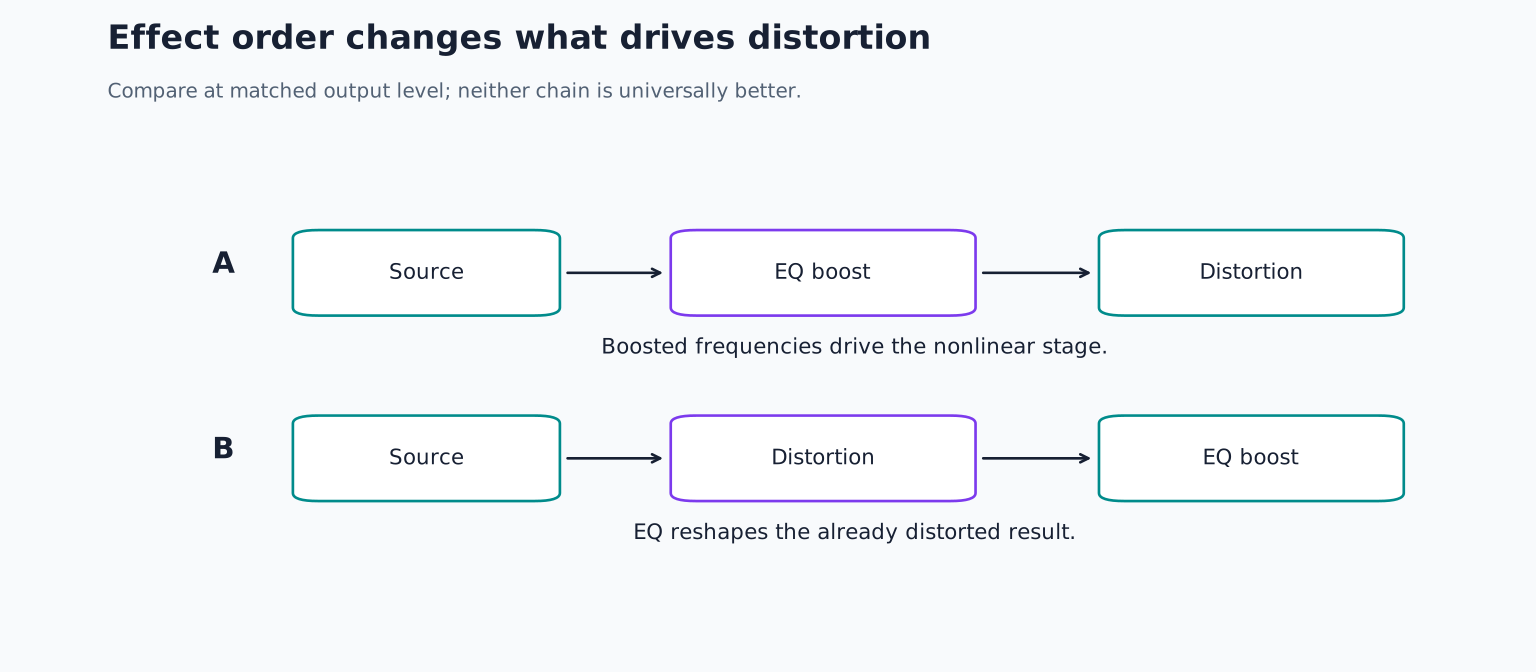
An EQ before distortion changes what drives the nonlinear stage. Reducing excessive low energy beforehand can prevent that region from dominating the response. Boosting a region can make it generate a different pattern of distortion.
An EQ after distortion shapes the already processed result. A low pass filter can soften newly generated high frequency material, but it does not undo the waveform interaction that created it.
Try both orders on a saved copy of your bass phrase. Keep the same EQ shape and drive initially, then level match the results. Effect order comparisons explain this process in more detail.
Understand oversampling as a tradeoff
Nonlinear digital processing can create frequencies above the system’s representable range, which may fold back as aliasing if not handled appropriately. Some processors offer oversampling to reduce such artifacts by processing internally at a higher rate with suitable filtering.
Oversampling can increase CPU use and sometimes latency. Its benefit depends on the algorithm, source and settings. Compare the available modes rather than assuming the highest setting always gives a meaningfully better result for every track.
For detailed controls, consult FabFilter’s band control reference or the manual of your own processor. Do not infer that identically named modes use identical models across products.
Make three purposeful versions
Save a clean version, a subtly denser version and an obviously distorted version of the same phrase. Match their loudness and describe what musical role each could play. The clean version may be best for a supportive bass; the aggressive one may become a foreground hook.
If every track in your mix uses heavy saturation, compare the combined result with several stages bypassed. Individual excitement can accumulate into harshness or lost contrast. Keep the distortion that adds a clear function, and remove the rest.
TAKE IT INTO YOUR OWN MUSIC
Your next session.
Save a clean version, a subtly denser version and an obviously distorted version of the same phrase. Match their loudness and describe what musical role each could play. The clean version may be best for a supportive bass; the aggressive one may become a foreground hook.
Notes and progress stay in this browser.