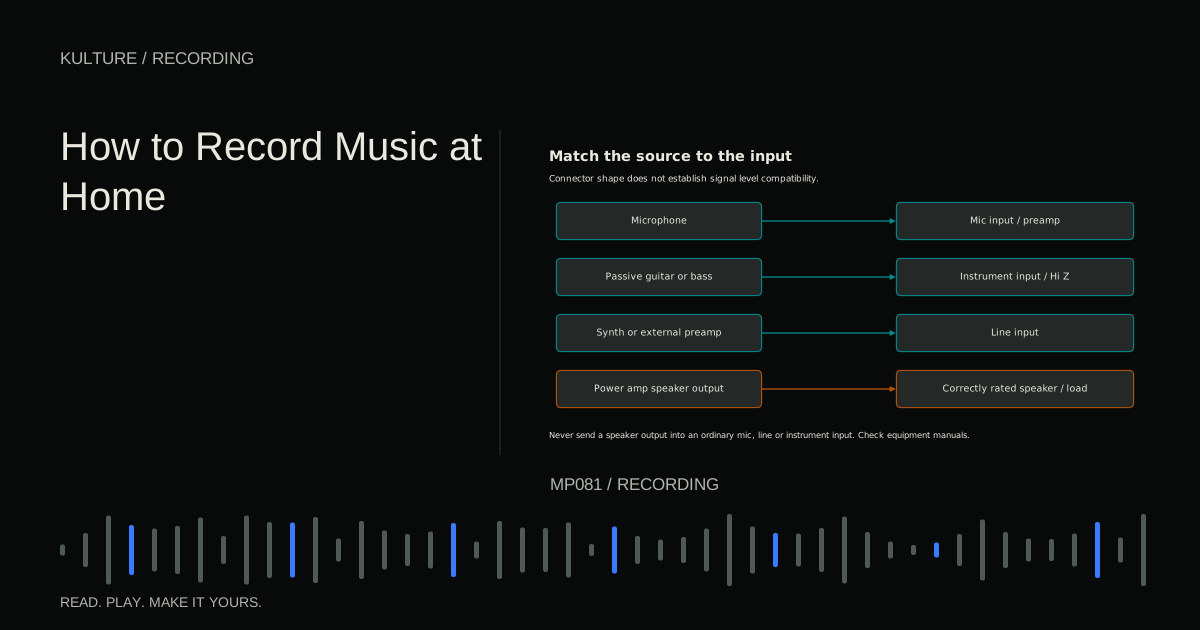
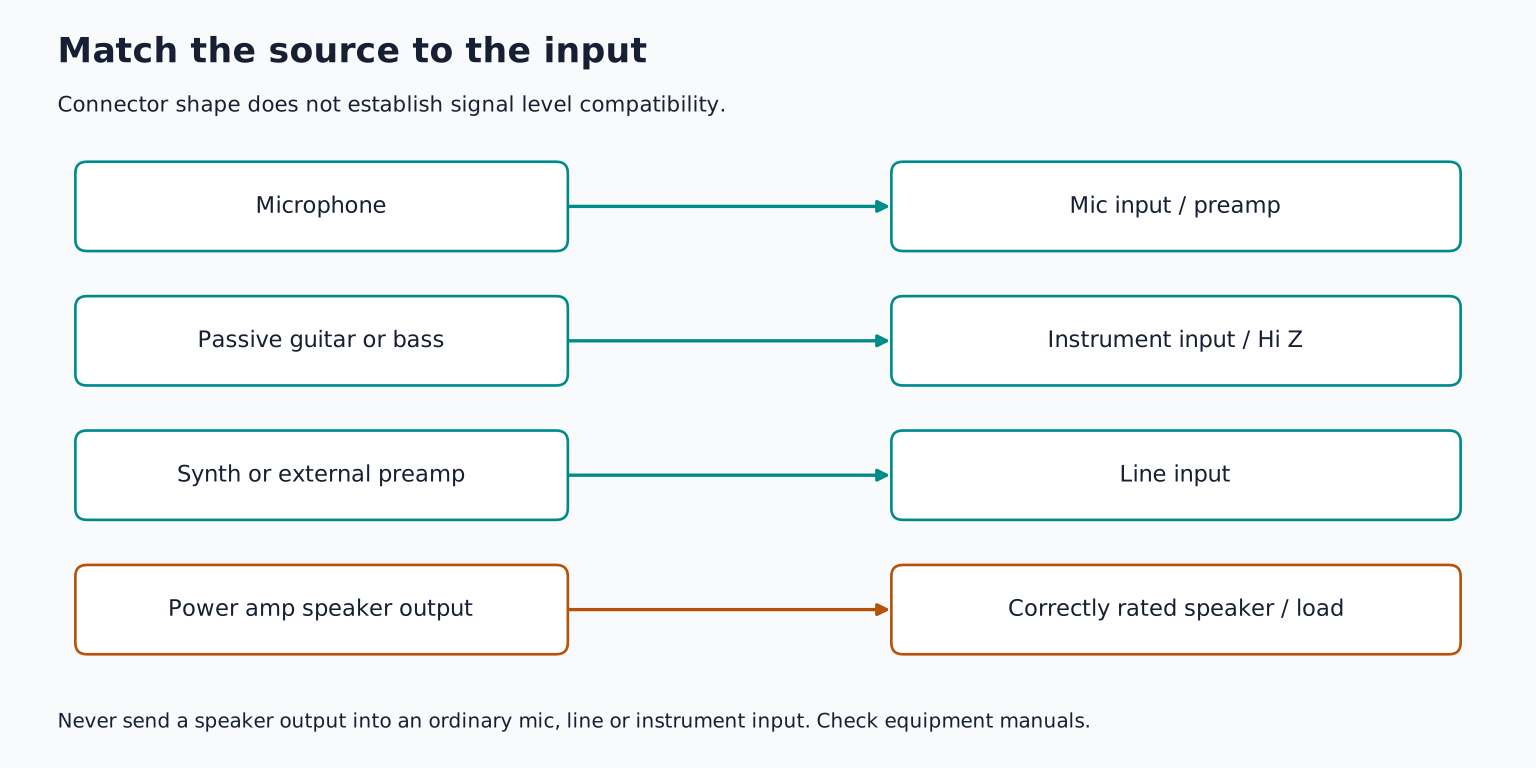
A microphone typically needs substantial amplification. A passive guitar pickup needs an input that will not load it excessively. A keyboard or outboard processor generally delivers an already amplified line level signal. A speaker output carries power intended to drive a loudspeaker and must be treated separately.
Start with the source, not the plug
Imagine three devices on your desk: a vocal microphone, an electric guitar, and a synthesizer. Each can eventually produce a recorded waveform, but their electrical outputs are different.
The microphone turns acoustic movement into a small electrical signal. A microphone preamplifier raises that signal before conversion to digital audio. The guitar pickup also produces a relatively small signal, but its interaction with the receiving input affects its tone. An instrument input, often labelled “Hi Z,” provides a high input impedance suitable for many passive pickups. Impedance describes how a circuit responds to alternating current; for this connection, it helps to think of it as the electrical load presented to the source.
The synthesizer's output circuitry can usually drive a line input directly. Sending it through an unnecessarily sensitive mic path can overload that path even if the DAW fader is low. Focusrite's level guide documents these categories and distinguishes them from speaker level.
TRY IT HERE
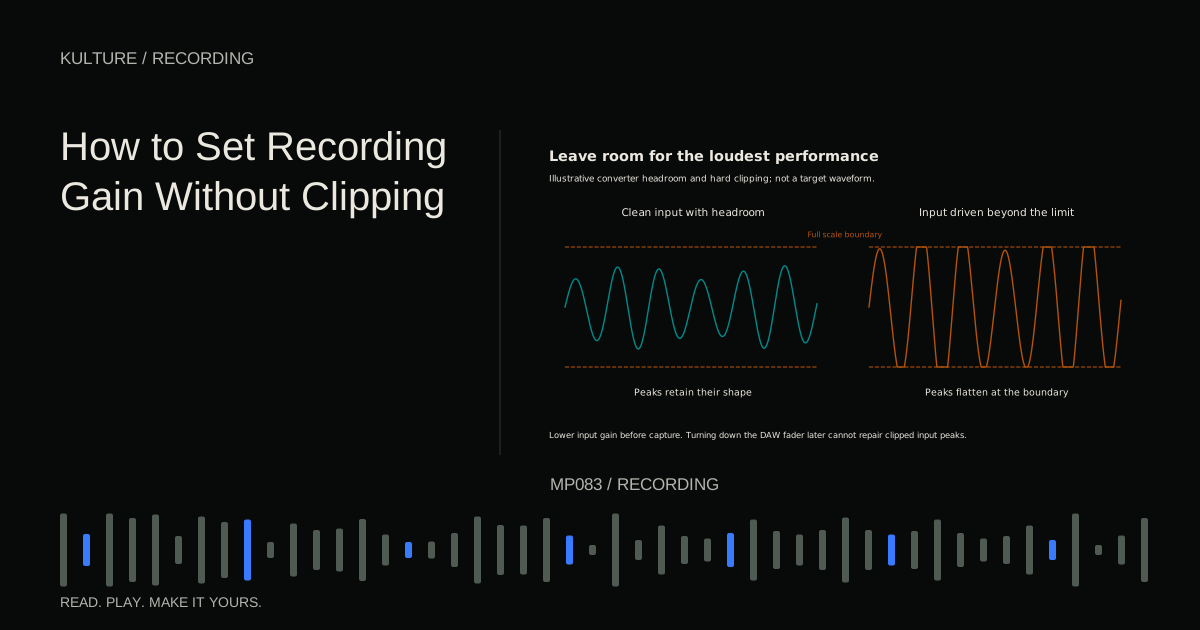
Leave room for the peaks
Raise input gain and see where the waveform clips.
Ready when you are. Audio starts only when you press Play.
Keep experimenting in the sample pads LabMic level and preamp gain
A quiet voice several centimetres from a low output microphone may need more preamp gain than a loud drum close to a sensitive microphone. There is no single correct “microphone gain” position. Gain is amplification, not a measure of how professional the recording is.
A mic input usually arrives through an XLR socket, but XLR is a connector format, not a guarantee of signal level. Some equipment outputs line level audio over XLR. Read labels and manuals instead of assuming every XLR connection should receive phantom power.
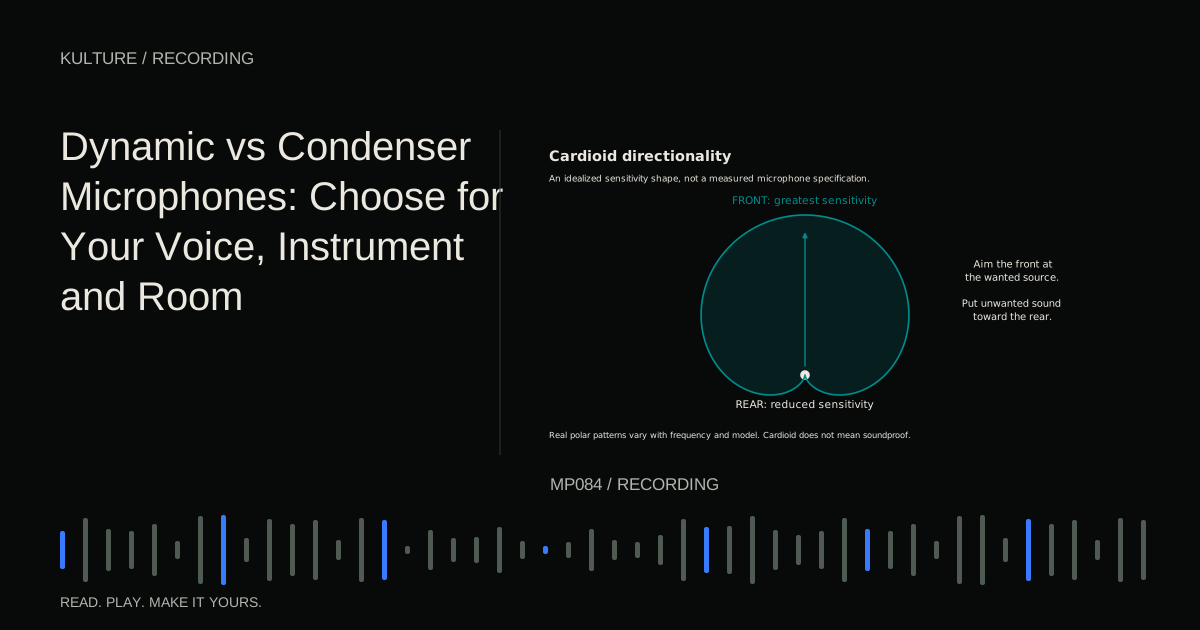
If the recording is too quiet, first confirm that you are recording the correct input and speaking into the correct side of the mic. Then check distance and power requirements before increasing gain. A large amount of gain cannot repair an incorrectly pointed mic or a missing signal.
A low output dynamic microphone can require a clean preamp with enough available gain. An inline booster is one possible tool, but it is not automatically necessary. Some boosters require phantom power while preventing it from reaching the microphone; others work differently. Verify the exact product rather than treating every accessory as equivalent.
Instrument level is more than loudness
Plug a passive electric guitar into an input configured for line level and it may record quietly or sound less lively. Raising the gain can make it louder without correcting an unsuitable electrical load. Selecting the interface's instrument mode changes the appropriate input behaviour.
An active bass, which uses powered electronics, can deliver a much stronger signal than a passive instrument. Begin conservatively and use a pad if the manufacturer provides one for this purpose. A pad attenuates the signal before a stage that might overload. It is not the same as lowering a DAW fader afterward.
A DI, or direct injection box, commonly converts an unbalanced instrument signal into a balanced signal suitable for a microphone input. Many DIs also provide a through output to an amplifier. Active and passive designs have different requirements and strengths. Use the box's manual to identify input, output, power, and any pad settings.
Do not remove a mains safety earth connection to cure hum. A DI's audio ground lift switch, when provided and used as instructed, is a different thing from defeating electrical safety grounding.
Line level and stereo outputs
Line level equipment includes many synthesizers, mixers, preamps, and effects processors. Some devices offer fixed outputs; others have a volume control. Set the receiving input to line, start with modest levels, and raise the source and receiver as needed while watching for overload at both ends.
Professional nominal line level is often specified as +4 dBu, while consumer equipment may use 10 dBV. These are different reference scales, not simply numbers you should compare by subtraction. Nominal level also does not mean the signal stays at one voltage: music has peaks above its average operating level. Check the maximum input and output specifications when connecting unfamiliar equipment.
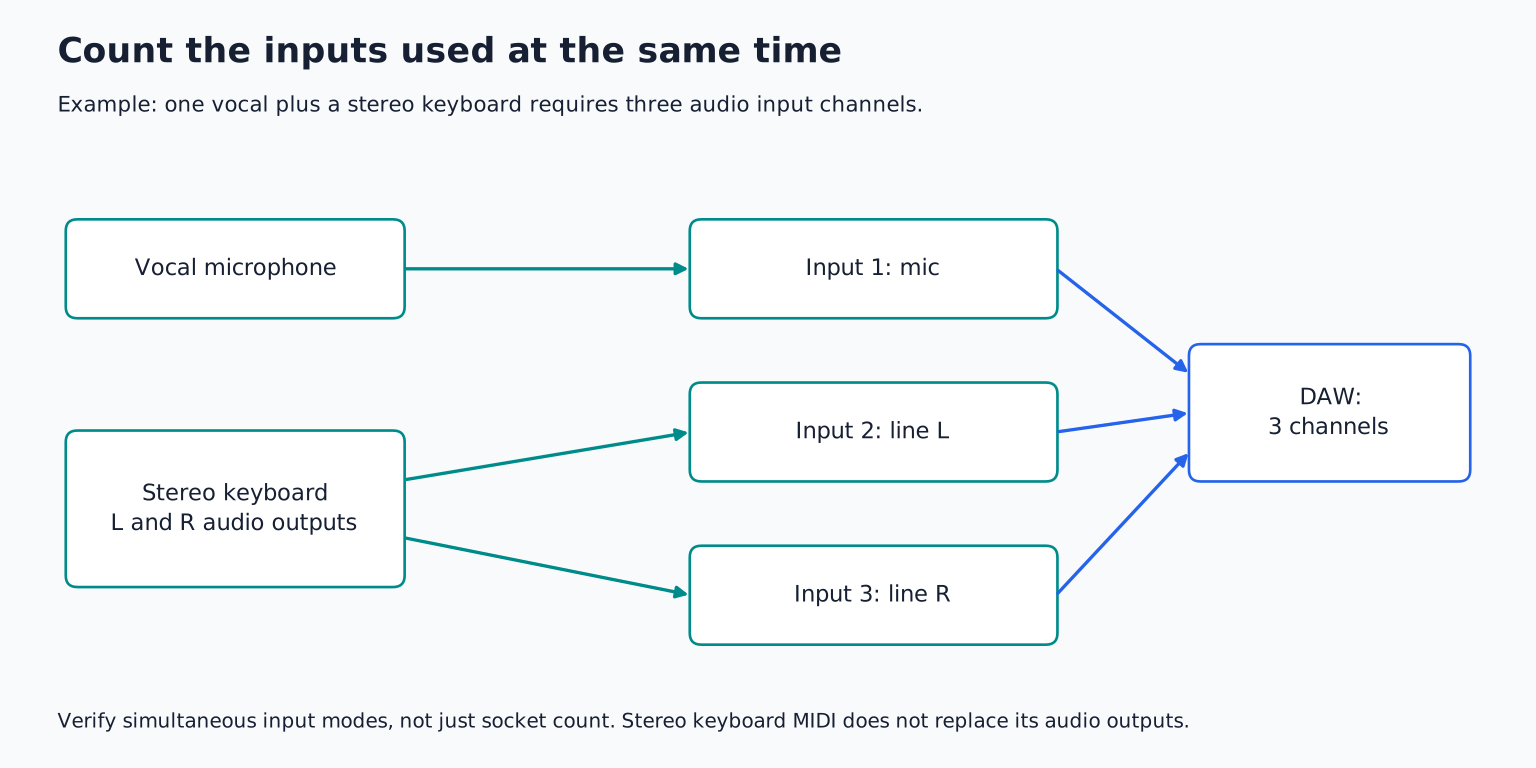
A stereo keyboard normally needs two input channels to preserve its left/right audio. One balanced TRS line connection is usually a single mono channel, even though a headphone connector uses a similar shape to carry stereo. TRS describes tip, ring, and sleeve contacts; their role depends on the circuit.
For a mono recording, use the keyboard's designated mono output if it has one. Do not combine left and right outputs with a random passive Y cable. Follow the device's connection instructions or sum signals through a suitable mixer.
Combo sockets need the right mode
An interface's combo input may accept both XLR and quarter inch plugs, but the paths and available modes can differ. On some interfaces the XLR path is a mic input while the quarter inch path can be line or instrument. Other products behave differently.
Before recording, identify four things: the source's output type, the cable wiring, the receiving socket, and the input mode. This takes less time than debugging a distorted take later.
For example, a safe beginner guitar path is guitar instrument cable interface instrument input mono DAW track. A synthesizer path might be left and right line outputs two appropriate cables two line inputs stereo DAW track. A vocal path is microphone balanced mic cable mic input mono DAW track.
Phantom power is not a signal level selector
Phantom power supplies compatible microphone electronics through a balanced microphone connection. It does not turn a line input into a mic input, and it is not a volume boost for every microphone.
Many condensers require it; ordinary passive moving coil microphones generally do not. Ribbon behaviour is manufacturer- and model specific. Active ribbons may require phantom power, while passive ribbons and unbalanced or faulty connections need special caution. Royer's phantom power explanation discusses circumstances where wiring and connection faults can create risk.
Mute speakers and headphones before changing connections. Turn phantom power off before plugging or unplugging microphones, allow discharge as the manufacturer instructs, and enable it only after verifying compatibility. If power is switched for a group of inputs, check every connected device in that group.
Speaker level: the connection you must not improvise
Never connect a power amplifier's speaker output directly to an audio interface's mic, line, or instrument input. It can damage equipment. A headphone adapter or DI that is not specifically rated for speaker level use does not make that connection safe.
Some guitar amplifiers also require a correctly matched speaker or load while operating. A line output does not necessarily remove that requirement. Silent recording through a load box requires exact compatibility with the amp's impedance, power, and operating instructions. If those specifications are unclear, record the speaker with a microphone instead and consult the manufacturer.
Recording electric guitar compares practical routes without treating every amplifier output as interchangeable.
Diagnose a bad connection in order
If the signal is weak, check routing, input mode, source volume, mic power, and cable before adding processing. If it is distorted at low DAW level, investigate an earlier overloaded stage. If it is dull, check instrument loading and cable condition. If one side is missing, confirm whether you have connected a mono balanced output or a stereo output.
For practice, draw the complete signal path for each device you own. Label every connection “mic,” “instrument,” “line,” or “speaker,” using the manuals. Then record a short test from one source and follow the gain setting lesson. Understanding what enters the input makes the meter much easier to interpret.
TAKE IT INTO YOUR OWN MUSIC
Your next session.
If the signal is weak, check routing, input mode, source volume, mic power, and cable before adding processing. If it is distorted at low DAW level, investigate an earlier overloaded stage. If it is dull, check instrument loading and cable condition. If one side is missing, confirm whether you have connected a mono balanced output or a stereo output.
Notes and progress stay in this browser.