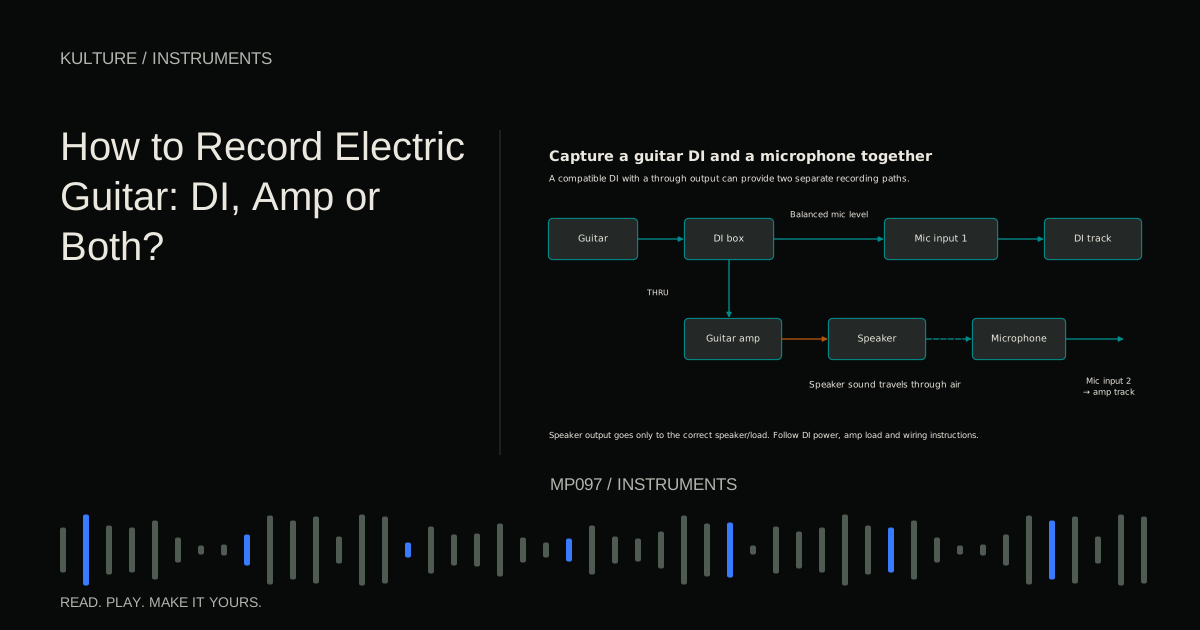
A DI recording captures the guitar's electrical signal before a conventional mic and speaker recording chain. An amp recording captures the sound radiated by the speaker through a microphone. Neither route is automatically more authentic or more professional; each preserves different choices.
Keep speaker outputs out of interface inputs
Never connect a power amplifier's speaker output directly to an interface's mic, line, or instrument input. A speaker output carries power intended for a loudspeaker and can damage lower level inputs.
Some amplifiers require a correctly matched speaker or load whenever operating. A recording output does not necessarily remove that requirement. Silent recording with a load box depends on exact impedance, power rating, and manufacturer instructions. An attenuator is not automatically a safe no speaker load in every mode. Radial's Headload manual, for example, includes configuration specific speaker requirements.
If you are unsure what an output does, stop and consult the exact amplifier manual. Use a microphone on a properly connected cabinet rather than improvising an adapter chain. Signal level basics explains the categories.
TRY IT HERE
Make it your session
Turn the steps into a plan you can save.
Ready when you are. Audio starts only when you press Play.
Keep experimenting in the sample pads LabRoute one: guitar into an instrument input
Connect the guitar with a suitable instrument cable to the interface's high impedance instrument input. Select instrument mode if required. A passive pickup can lose level or change tone when connected to an unsuitable line input.
Create a mono audio track and set gain using the strongest part. Active pickups or boost pedals can deliver more level than expected. If the input overloads at minimum gain, check the source output, input mode, and any manufacturer approved pad.
Add an amp simulation plugin for monitoring if desired. An amp simulator models aspects of an amplifier; a cabinet simulation or impulse response supplies the speaker and microphone style filtering that often makes distorted guitar sound complete. Check whether your chosen plugin already includes a cabinet stage before adding another.
Record a test and verify whether the file is dry or processed. Recording the dry input while hearing a plugin is a useful flexible workflow, but routing varies by DAW.
Make software monitoring playable
With an amp plugin, the performer normally needs DAW monitoring to hear the processed sound. Disable the duplicate direct dry path unless intentionally blending it. Use a stable low latency buffer and avoid unnecessary high delay plugins in the live path.
If the sound feels delayed, test a smaller buffer, reduce the plugin load, and check the audio driver setup. Do not compensate by moving recorded notes before establishing that the monitoring path is correct. Direct versus DAW monitoring walks through the choices.
Set the tone while playing the actual part. A saturated solo sound may become indistinct under fast chords. Often less distortion preserves articulation while still sounding heavy in the arrangement.
Route two: microphone on the amplifier
Set up the amplifier safely with its required speaker connection and ventilation. Keep the playing level appropriate for the space and avoid placing your ear close to a loud speaker to find a position.
Start with a suitable microphone near the speaker grille, aimed somewhere between the centre and outer area of one speaker. Record short tests while moving the mic laterally or changing angle. Nearer the centre often produces a brighter attack; toward the edge often changes that balance. The actual speaker and microphone determine the result.
Do not assume every speaker in a multi speaker cabinet sounds identical. If practical, compare them through recordings. Keep stands stable and cables away from hot amplifier surfaces and foot traffic.
Shure's recording techniques guide treats cabinet miking as a placement problem. Use the mic position to choose tone before reaching for extensive EQ.
Route three: capture DI and amp together
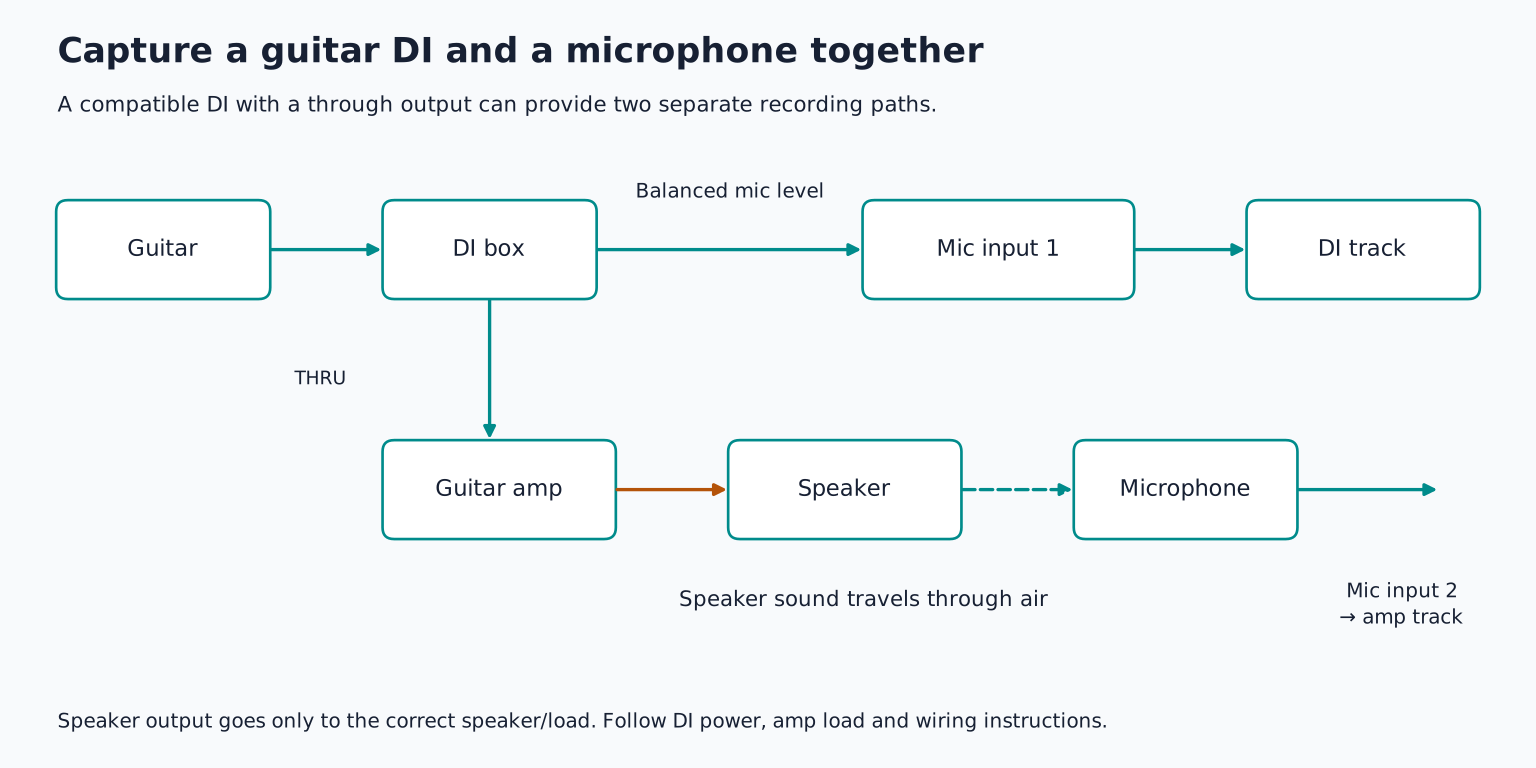
A suitable DI or splitter can send one path to the recording system and another to the amplifier. Follow its connection diagram. Some DIs provide a through connection for the amp and a balanced output for a mic input; power and loading vary by design.
Record the DI and microphone to separate tracks, label them clearly, and keep their original timing. The mic signal arrives later because of the physical and electronic path. The DI may also sound radically different before amp processing.
You do not have to blend both in the final mix. The DI can be a backup for a different amp sound later, while the mic captures the sound that inspired the take. This is often the main benefit of recording both.
Blend only after checking timing and tone
If you do blend, listen in mono and compare the combination with each track alone. A thin or hollow sound can result from phase relationships between the paths. Polarity reversal may improve or worsen the blend, but it is not the same as time alignment.
A small timing adjustment can help some combinations, yet aligning one visible transient is not a universal cure across all frequencies. Amp processing and speaker response also change phase. Preserve an untouched version and judge the musical result rather than maximizing a waveform match.
Sometimes one path already provides the best sound. Keeping both active because both were recorded can make the mix worse.
Reamping changes tone after the performance
Reamping sends a recorded signal back through external pedals or an amplifier so you can capture a new version. A dedicated reamp interface helps adapt the interface's line output to the level and electrical behaviour expected by the guitar equipment. Radial's reamping workflow explains the basic route.
Use a dedicated output, start at a low level, and prevent the returning microphone signal from feeding the same reamp output. Otherwise you can create feedback. Record the new microphone signal to a separate track.
Do not defeat mains safety grounding to cure hum. Use appropriate audio isolation or ground lift features only as their manufacturers instruct. Reamping is a controlled signal routing task, not permission to connect any output to any input.
Choose with a short comparison
Record one eight bar riff as a DI and, if the safe equipment path is available, through a mic'd amp. Compare clean, moderately driven, and more distorted versions at matched loudness in the backing track.
Listen for attack, chord definition, noise, and whether the player performed differently through each sound. Save the dry DI, the chosen tone, and a note of the routing. Then use multiple takes and comping to improve the performance without losing the tone decisions that made it work.
TAKE IT INTO YOUR OWN MUSIC
Your next session.
Record one eight bar riff as a DI and, if the safe equipment path is available, through a mic'd amp. Compare clean, moderately driven, and more distorted versions at matched loudness in the backing track.
Notes and progress stay in this browser.