The basic path is source microphone or instrument cable audio interface recording track. The interface converts an electrical audio signal into digital audio. Your digital audio workstation, or DAW, stores that recording and lets you edit, arrange, and mix it. Headphones let you hear the backing track without sending it straight back into the microphone.
This guide builds a small vocal and guitar session, but the same reasoning applies to a spoken introduction, a bass part, or a percussion overdub.
Decide what you are trying to capture
Before touching a gain knob, choose the result. A close, intimate vocal over programmed drums needs a different room balance from a singer and acoustic guitar performing together. Recording each part separately makes replacement and editing easier. Recording both together can preserve communication between voice and instrument, but the microphones will hear both sources.
Write a short recording plan: “One guitar part, one lead vocal, two chorus doubles; separate overdubs; relaxed performance at 90 BPM.” BPM means beats per minute. This is an example, not a recommended tempo for every song. A short plan keeps you from spending the session building unnecessary tracks.
If you have not chosen software, read What Is a DAW?. You need a program that can record audio, not a large collection of additional plugins.
TRY IT HERE
Make it your session
Turn the steps into a plan you can save.
Ready when you are. Audio starts only when you press Play.
Keep experimenting in the sample pads LabBuild the simplest working setup
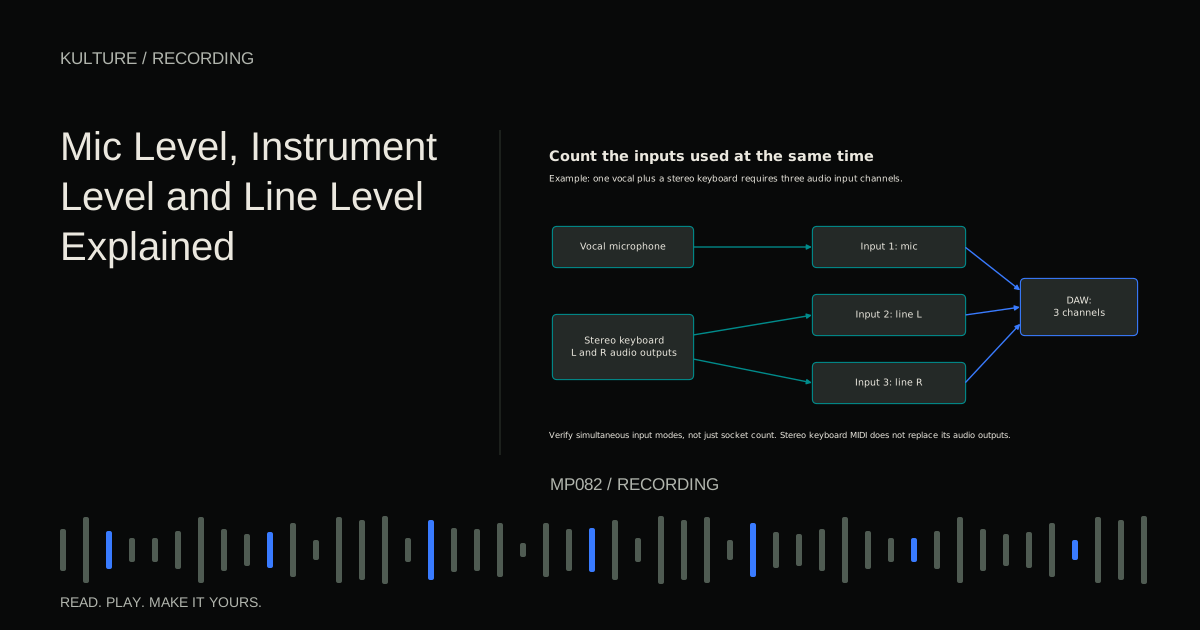
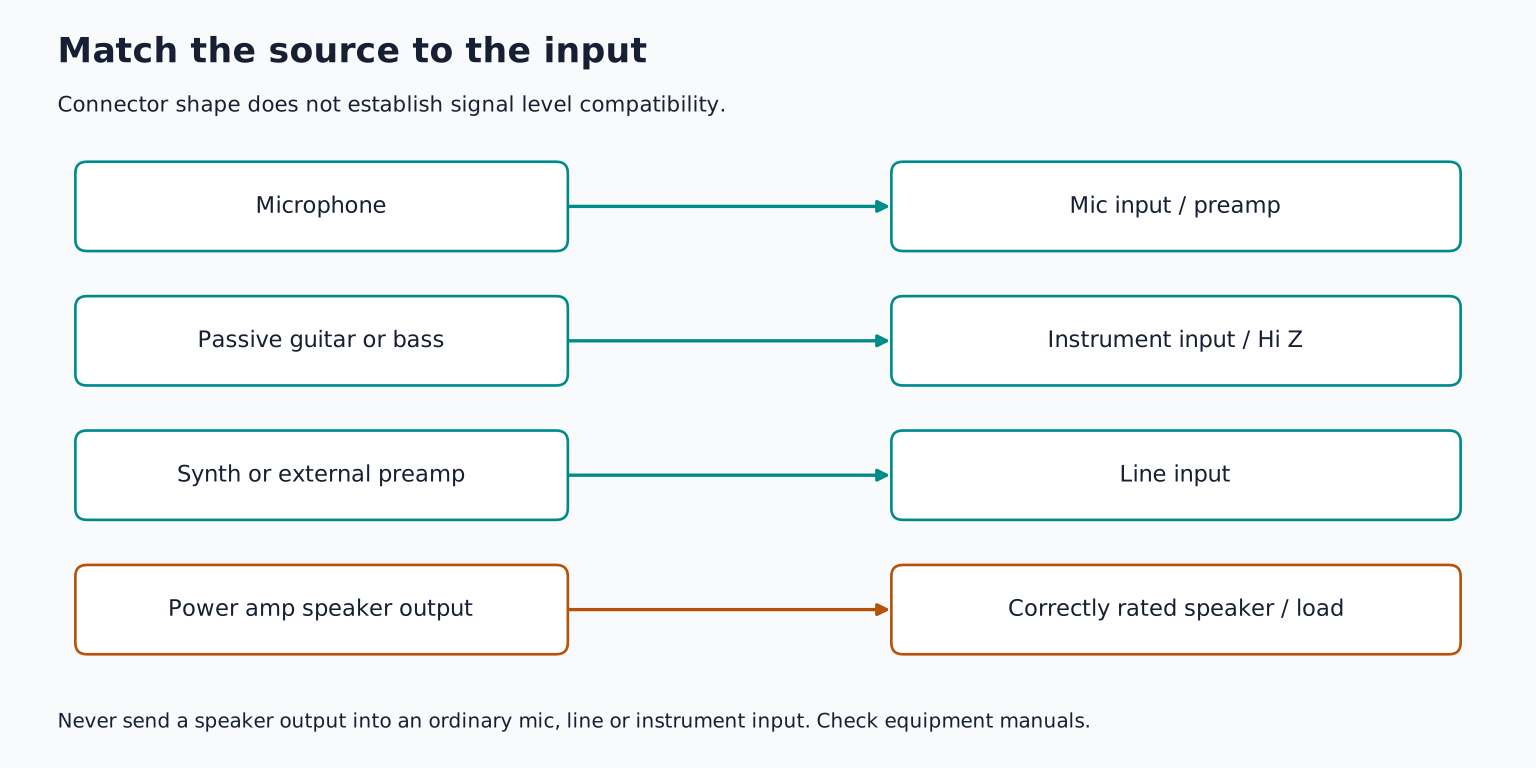
For a microphone, use a suitable mic cable and the interface's microphone input. For a passive electric guitar or bass, use a high impedance instrument input if the interface provides one. A keyboard's audio output generally belongs on a line input. The connector alone does not tell you which signal is appropriate.
Speaker outputs are a separate category: never connect a power amplifier's speaker output to an interface's mic, line, or instrument input. If an amplifier is involved, use a microphone, a manufacturer approved recording output, or a correctly specified load box system. Mic, instrument, and line levels explains these distinctions before you connect anything unfamiliar.
Check the microphone's power instructions. Many studio condensers need phantom power, often marked 48 V; passive dynamic microphones usually do not. Ribbon microphones and adapters require particular care. Do not infer compatibility from appearance. Mute monitoring, make connections with phantom off, and follow the equipment manuals when enabling power.
Place the interface where you can see its input meters without moving out of performance position. Keep a stable microphone stand clear of your feet. A chair that squeaks, a loose boom arm, or a cable touching a guitar can spoil an otherwise clean take.
Make the room less distracting
Record a few seconds of silence and a spoken sentence. Listen for computer fans, traffic, electrical hum, and a short ringing echo. These are different problems. Closing a window can reduce outside noise. Moving the microphone away from a noisy computer can improve the direct to noise balance. Soft furnishings can reduce some reflections, but do not soundproof the room.
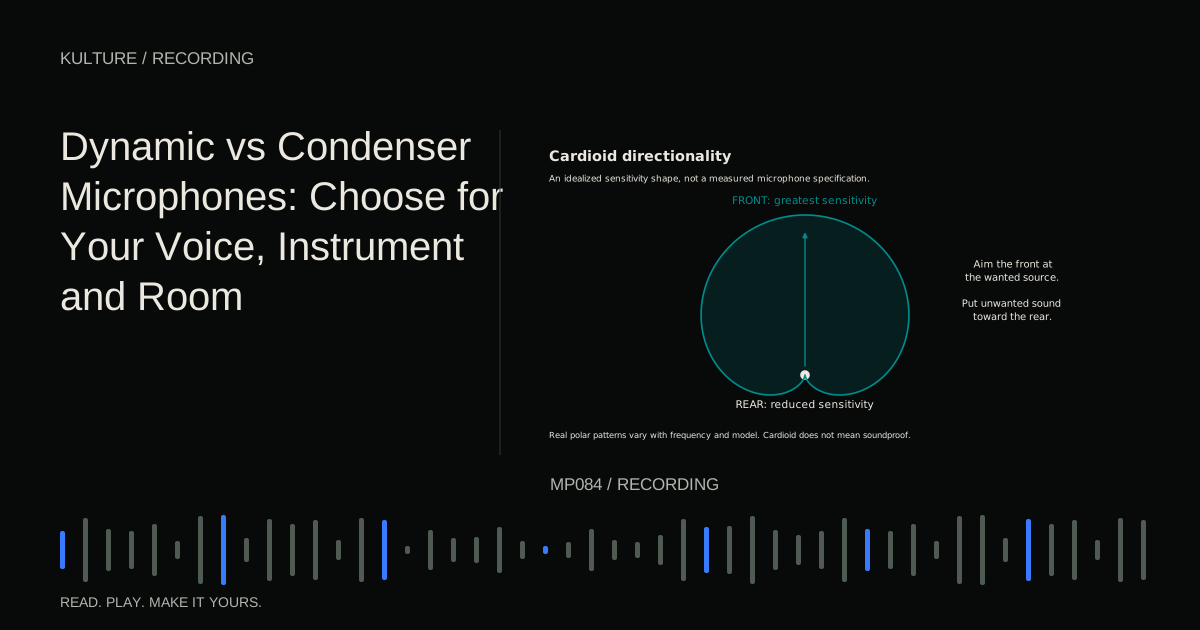
Try two or three positions rather than assuming the centre of the room or a corner is best. For a vocal, a useful starting point is a comfortable distance from reflective walls, with absorption where strong nearby reflections are returning toward the mic. Avoid enclosing the singer so tightly that the recording becomes boxy and uncomfortable. Leave ventilation and exits clear.
Microphone position is part of tone shaping, not just volume control. Shure's recording techniques guide explains how moving a microphone changes the balance between source and surroundings. Treat placement as a test: record the same short passage in each position and compare at similar playback loudness.
Create a session you can trust
Make a project folder with a clear name, such as “Evening Song 01.” Select the audio interface as the input and output device. Use a sensible supported recording format, such as 24 bit audio at 44.1 or 48 kHz, and keep that sample rate consistent through the session. There is no need to raise it simply because a larger number is available.
Create a mono track for one microphone. Mono means one channel; stereo means a linked left/right pair. Recording one mic into the left side of a stereo track does not make it wider. Name the track “Guitar Take” and choose the physical input you actually connected.
Arm the track for recording and watch its input meter while playing. Do not assume that hearing yourself proves the computer is recording: the interface may be sending your input directly to headphones. Record ten seconds, stop, disarm, and play it back. That test verifies the whole chain.
Set level from the loudest real passage
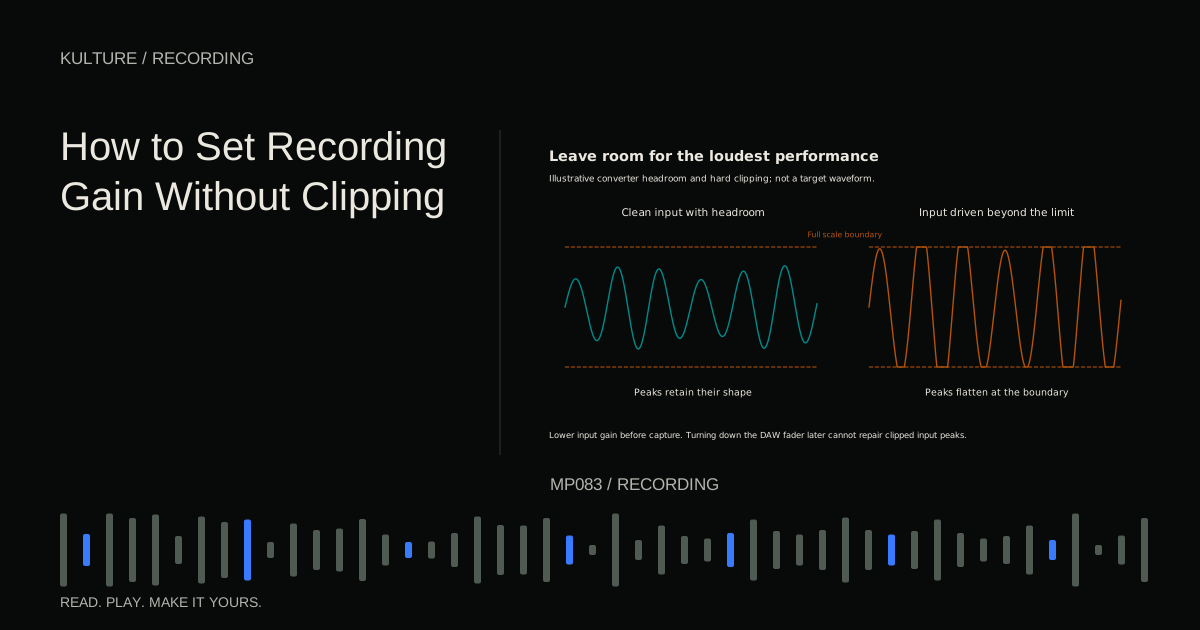
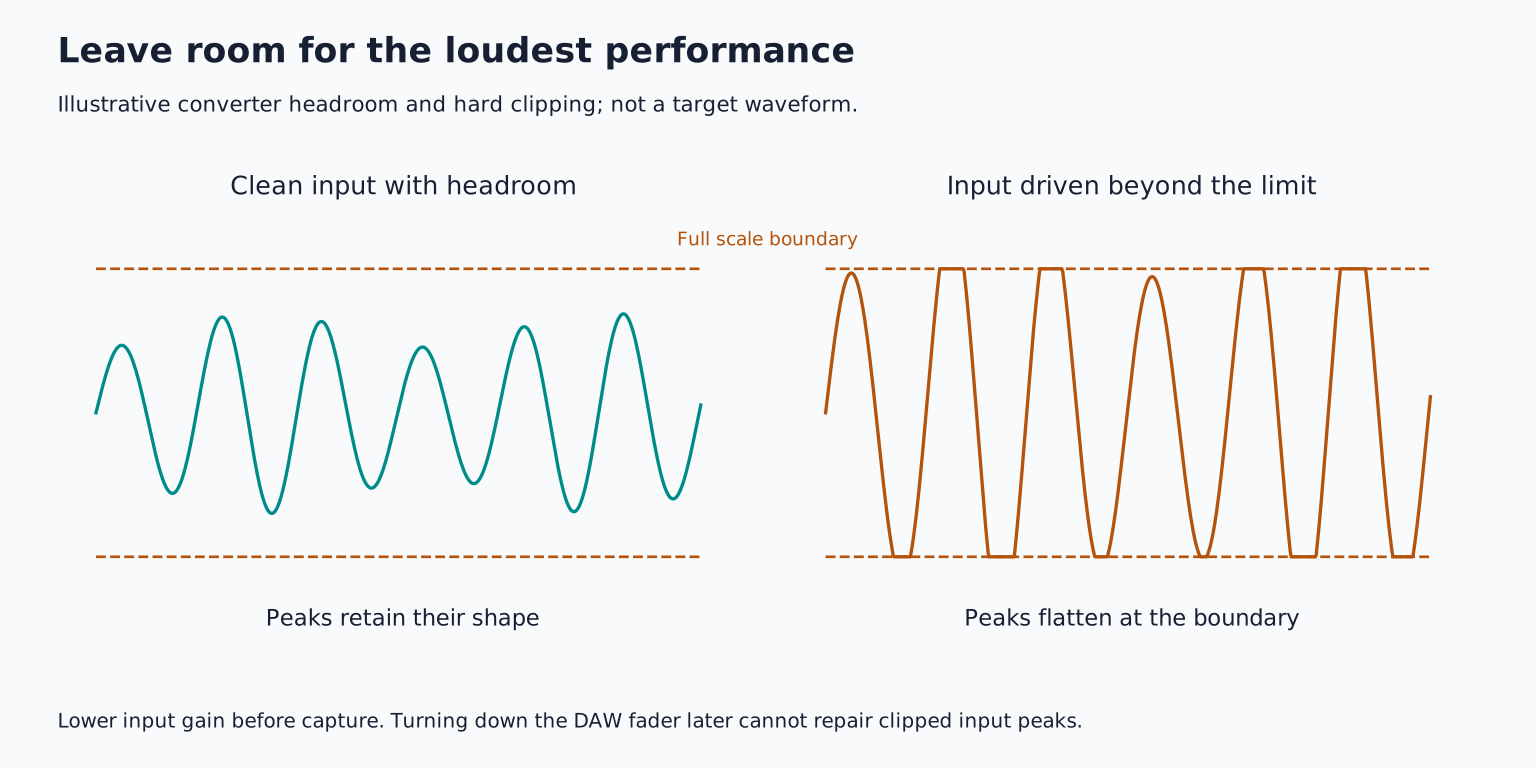
Ask for the loudest chorus or strongest strum, not a tentative soundcheck. Raise preamp gain until the signal is healthy while leaving comfortable headroom, meaning space below overload. Peaks around 12 dBFS are a workable starting example for an unpredictable performance; they are not a mandatory target. The performance, microphone output, and interface determine the gain setting.
The dBFS scale measures level relative to digital full scale. On a conventional recording input, reaching 0 dBFS leaves no further headroom. Turning down a track fader after recording cannot undo an overloaded input. Focusrite's gain setting explanation distinguishes healthy input level from simply making a meter look large.
If the headphones seem quiet, lower an excessively loud backing track or adjust the headphone mix. Do not sacrifice recording headroom to make the singer hear themselves.
Give the performer a usable headphone mix
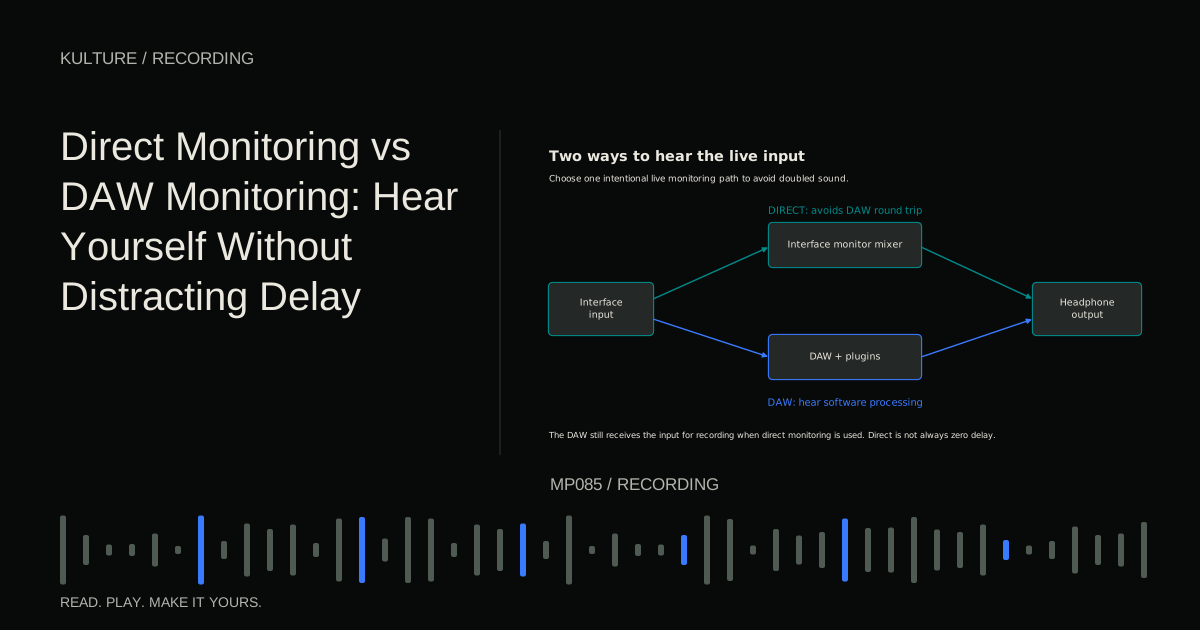
Choose one main monitoring path. Direct monitoring sends the interface input to headphones without the normal DAW round trip. DAW monitoring lets you hear software effects, but introduces delay determined by the system and processing. Hearing both paths together can create an echo or hollow tone.
For the first acoustic guitar take, direct monitoring is often the uncomplicated option. For electric guitar through a software amp, DAW monitoring may be necessary to hear the intended sound. Read Direct Monitoring vs DAW Monitoring if either path is confusing.
Keep listening comfortable and low enough to judge tone without strain. A louder headphone mix is not automatically a more inspiring one. Check that the click is audible to the performer but not leaking loudly into the mic.
Record a complete small arrangement
At the example tempo of 90 BPM, create an eight bar section with a two bar count in. Record three complete guitar takes. Start before the first note and leave the last chord to decay. Label takes immediately with useful observations: “steady,” “best ending,” or “chair noise bar 6.”
Choose the strongest complete take before editing. Then record the lead vocal over it, using the same section boundaries. Capture a few complete vocal passes and, if needed, a targeted replacement for one weak line. Start replacement recordings early enough that the singer can settle into the phrase.
Avoid making every take a running commentary on tiny mistakes. First listen for rhythm, expression, and continuity. A slightly rough consonant may matter less than a believable line. Fix a recurring recording problem before asking for another performance.
Review before packing away
Play the recording through from before the first entry to after the last decay. Check for distortion, missed starts, headphone bleed, room noise, and accidental double monitoring. Listen to each track alone briefly, then together. Problems that sound dramatic in solo sometimes disappear in the arrangement; clipping and missing audio still need attention.
Save the project, collect its audio into the project folder using your DAW's supported method, and create a second copy on another suitable storage location. A project file may contain only references to recordings elsewhere. Verify that the backup contains audio, not just a tiny session document.
Keep original takes. Editing can be nondestructive, meaning the DAW changes playback instructions without rewriting the source file, but a careless cleanup command can still remove material you need.
Your first finished recording exercise
Record a one minute performance with no more than three tracks. Spend ten minutes testing placement, record three takes, choose one, and make only obvious repairs. Export a listening copy and hear it away from the recording position.
Write down one performance improvement and one recording improvement for next time. “Move the microphone away from the sound hole” is actionable; “buy better gear” usually is not. Then learn how to comp multiple takes, using the material you have already captured.
TAKE IT INTO YOUR OWN MUSIC
Your next session.
Before touching a gain knob, choose the result. A close, intimate vocal over programmed drums needs a different room balance from a singer and acoustic guitar performing together. Recording each part separately makes replacement and editing easier. Recording both together can preserve communication between voice and instrument, but the microphones will hear both sources.
Notes and progress stay in this browser.