This article uses a subtractive synthesizer, which begins with a harmonically rich sound and removes or reshapes parts of it. Other synthesis methods build sounds differently, but the ideas of pitch, tone, loudness and movement remain useful. Ableton’s interactive Learning Synths provides a browser based way to explore these building blocks.
First, follow one note
Load a synthesizer and choose an initialized patch, sometimes called Init or Default. An initialized patch should be a simple starting configuration, although its exact contents depend on the instrument. Disable delay, reverb, distortion and unison if they are active. Unison means several voices play together for one note; it can make a sound bigger but hides what one oscillator is doing.
Play a single middle register note and hold it. You are sending a note instruction to the instrument, not recording an acoustic waveform. If that distinction is unfamiliar, read MIDI vs Audio.
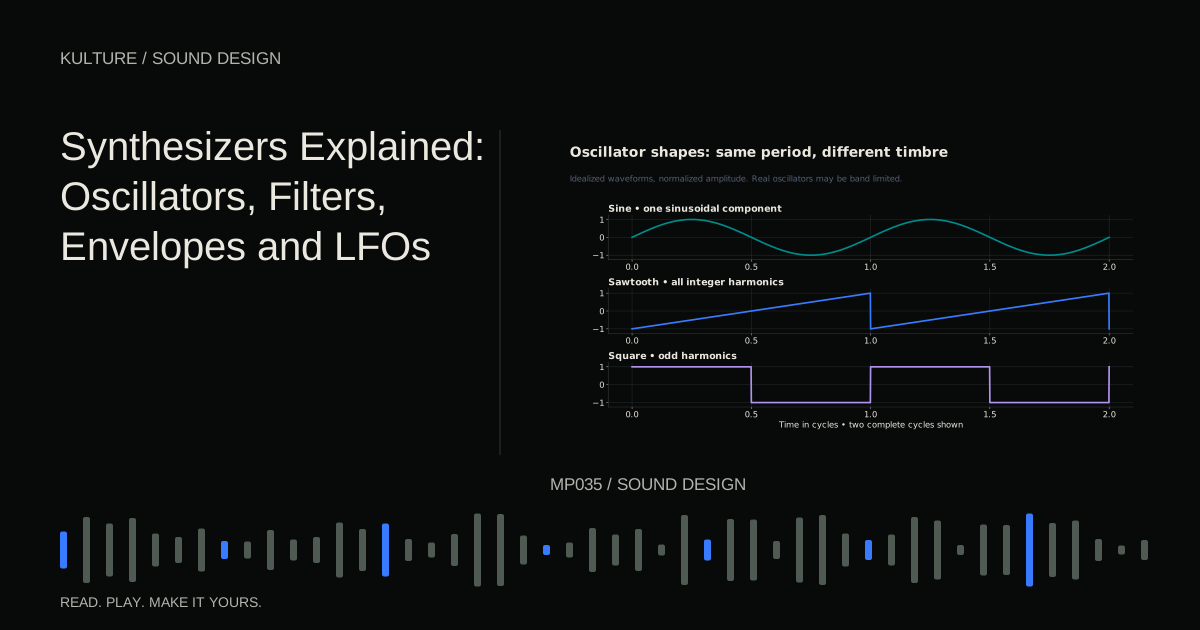
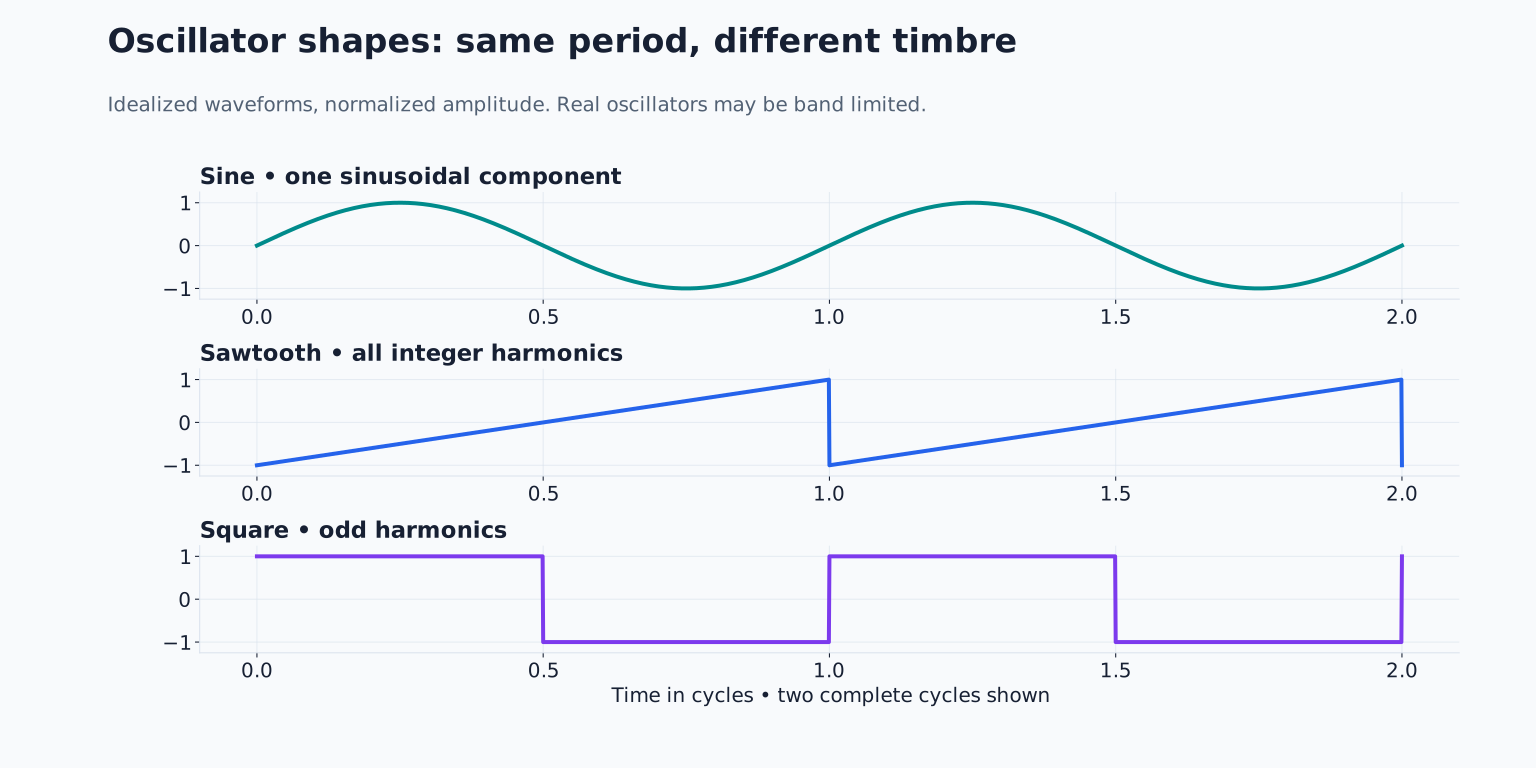
The oscillator repeats a waveform at an audible rate. Frequency is the number of repetitions per second, measured in hertz, or Hz. Doubling a note’s frequency raises it by one octave. The fundamental is the basic pitch; harmonics are components at whole number multiples of that frequency. Their relative strength helps distinguish different timbres, meaning different tone colours.
A sine wave is a simple starting tone. A sawtooth is brighter and buzzier. A square wave has a hollow character. These descriptions are useful comparisons, not promises that every implementation sounds identical. Filters, level and distortion can change your impression substantially.
TRY IT HERE
Shape one sound
Compare the attack, tail and filter on the same note.
Ready when you are. Audio starts only when you press Play.
Keep experimenting in the synth LabFilters: brightness before complexity
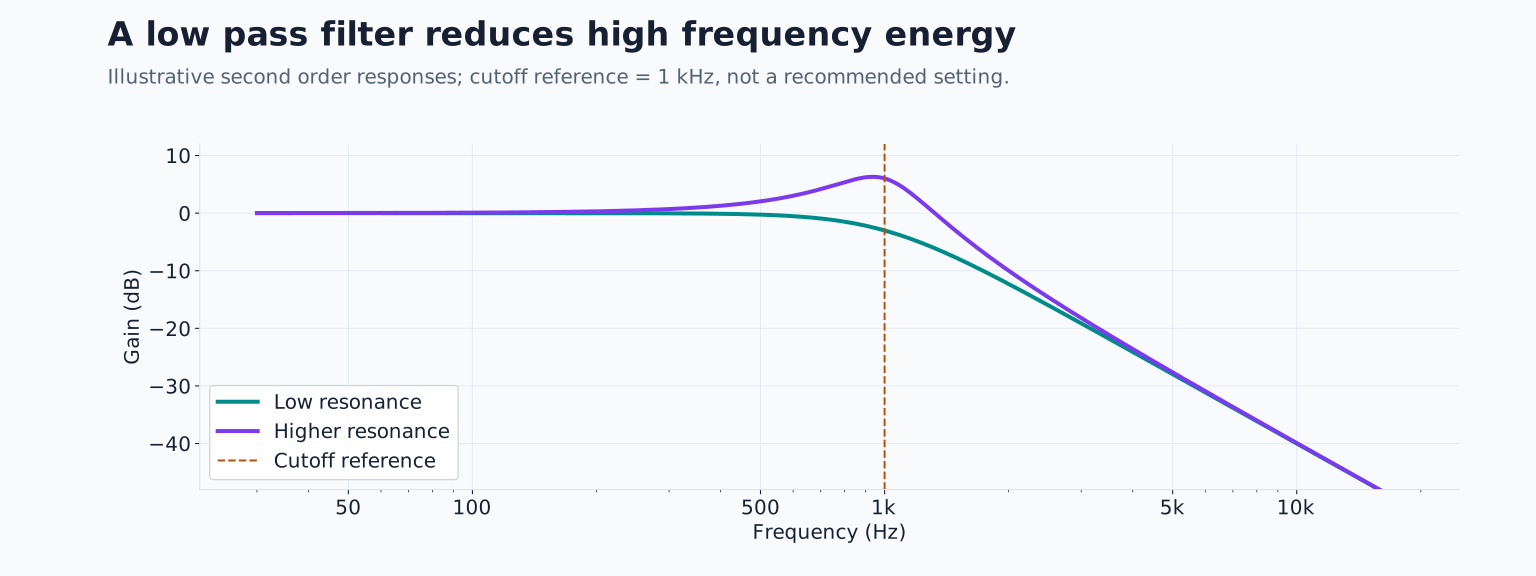
Choose a sawtooth and find the filter cutoff. A low pass filter reduces frequencies above its cutoff region. Lowering it usually makes a bright tone darker. It does not transpose the MIDI note; you are changing the distribution of energy within that note.
Move the cutoff slowly while holding the note. Start open, then close it until the sound feels muted. If it disappears completely, raise it again. Try the same sweep on a sine wave: there is much less harmonic material to reveal or remove, which explains why the change may feel less interesting.
Resonance emphasizes the area around the cutoff. Add a little and repeat the sweep. The moving emphasis may sound more vocal or whistling. Keep playback low while exploring because some filters can become much louder or self oscillate at high resonance. You do not need maximum resonance to hear the principle.
Filter slope describes how quickly attenuation increases beyond the cutoff. Compare available slopes using the same note and roughly matched volume. A steeper slope often separates the remaining low frequencies from the removed high frequencies more decisively, but the best choice depends on the sound’s role.
Envelopes: the shape of a single event
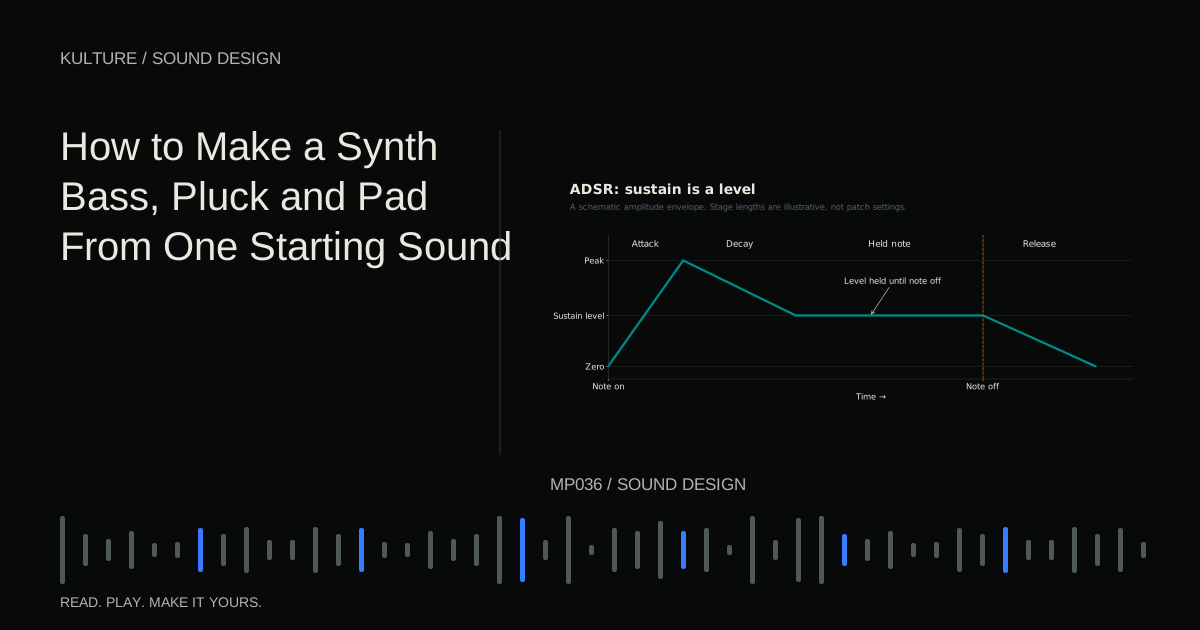
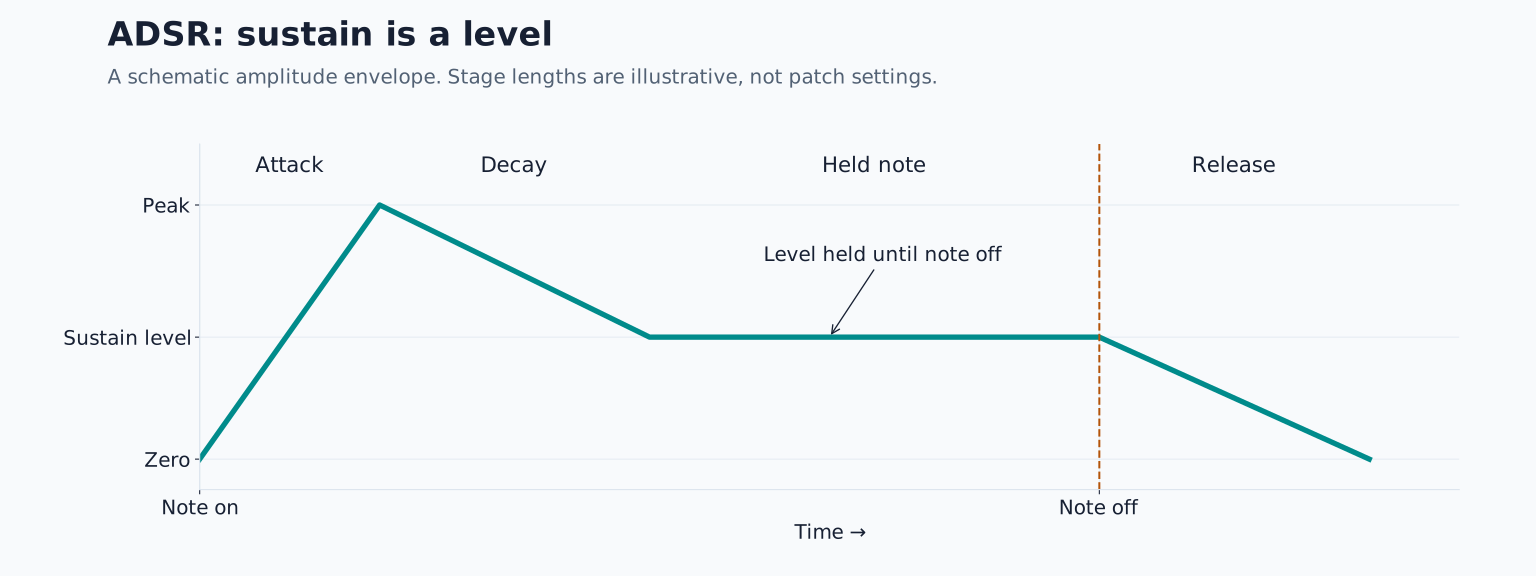
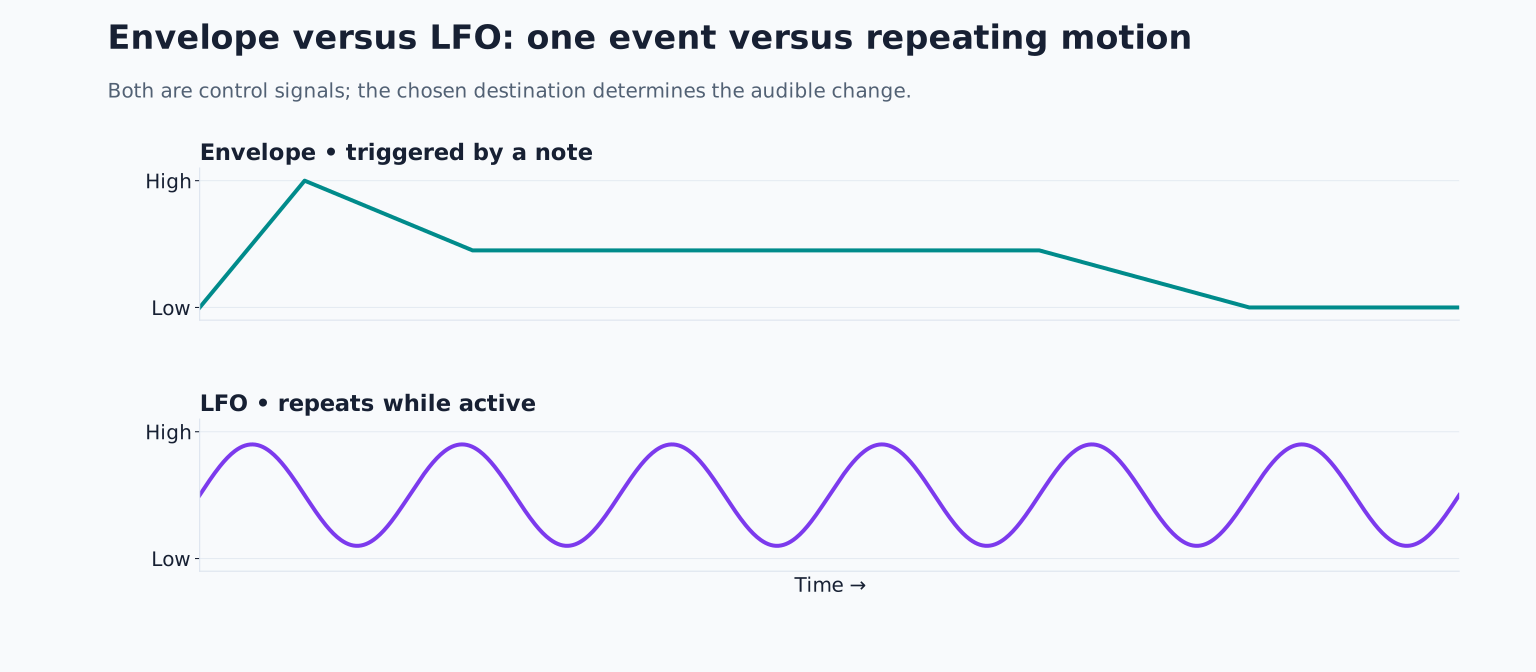
An envelope changes a parameter over the life of a note. A common version has four stages: attack, decay, sustain and release, abbreviated ADSR.
- Attack is the transition toward the initial peak.
- Decay is the transition from that peak toward the held level.
- Sustain is the level maintained while the note remains held.
- Release is the transition after the note ends.
Sustain is a level, unlike the other three controls, which describe time. An amplitude envelope controls loudness. A filter envelope controls cutoff when routed there. These can have independent shapes.
Set amplitude attack to approximately 10 milliseconds, decay to 300 milliseconds, sustain to a moderate level and release to 150 milliseconds. These are listening example values, not an ideal patch. Hold a note for two seconds, then release it. Increase attack to one second and hear the beginning swell. Restore the short attack, lower sustain to zero, and hear the sound die away even though your finger remains on the key.
Now shorten the MIDI note dramatically. A sound with a long release can continue after the note instruction ends. Conversely, a sound with zero sustain can finish while a long MIDI note is still present. This distinction explains many apparent piano roll timing mysteries.
LFOs: repeating movement
A low frequency oscillator, or LFO, produces a control movement. At slow rates it can repeatedly open a filter, raise and lower volume or bend pitch. The destination determines what you hear: pitch movement can produce vibrato, while level movement can produce tremolo.
Route a sine shaped LFO to cutoff, with a small amount and a rate around one cycle per second. Hold a note. You should hear repeated brightening and darkening. If you hear nothing, check three things: the routing exists, its amount is not zero, and the base cutoff leaves room for movement.
An LFO can run freely or synchronize to musical time, depending on the instrument. A tempo synchronized one bar cycle completes one movement over a bar. Whether it restarts on every note also matters. Retriggering creates a repeatable beginning; free running movement can give consecutive notes different tone shapes.
Build one understandable patch
Program four quarter notes at 100 BPM: C, E flat, G and E flat in a comfortable middle register. Use one sawtooth, no unison and no effects. Make the notes short enough that their endings remain distinct.
First adjust the amplitude envelope until each note feels gently struck. Next close the low pass filter until the phrase loses its bite. Add a positive filter envelope amount so each note briefly opens the filter, then darkens. Finally add a very slow, shallow LFO to cutoff. You now have three independent decisions: what generates the tone, how each note develops, and how the phrase moves across time.
Compare the patch with the LFO disabled, then with the filter envelope disabled. Naming what disappears is more valuable than memorizing settings. Save a version before adding effects so you can return to the actual synthesis.
When the controls seem unresponsive
A filter cannot brighten a tone by revealing harmonics that are not present. A slow envelope cannot reach its peak if every note releases immediately. An LFO may be routed to an inactive oscillator. A monophonic patch permits only one note at a time, while a polyphonic patch permits chords. Check these basic relationships before assuming the instrument is broken.
For practice, make three versions of the same patch: one short, one sustained and one slowly moving. Keep the oscillator unchanged. Then continue with making a bass, pluck and pad from one starting sound. You will be changing the sound’s musical job rather than merely collecting presets.
TAKE IT INTO YOUR OWN MUSIC
Your next session.
A filter cannot brighten a tone by revealing harmonics that are not present. A slow envelope cannot reach its peak if every note releases immediately. An LFO may be routed to an inactive oscillator. A monophonic patch permits only one note at a time, while a polyphonic patch permits chords. Check these basic relationships before assuming the instrument is broken.
Notes and progress stay in this browser.