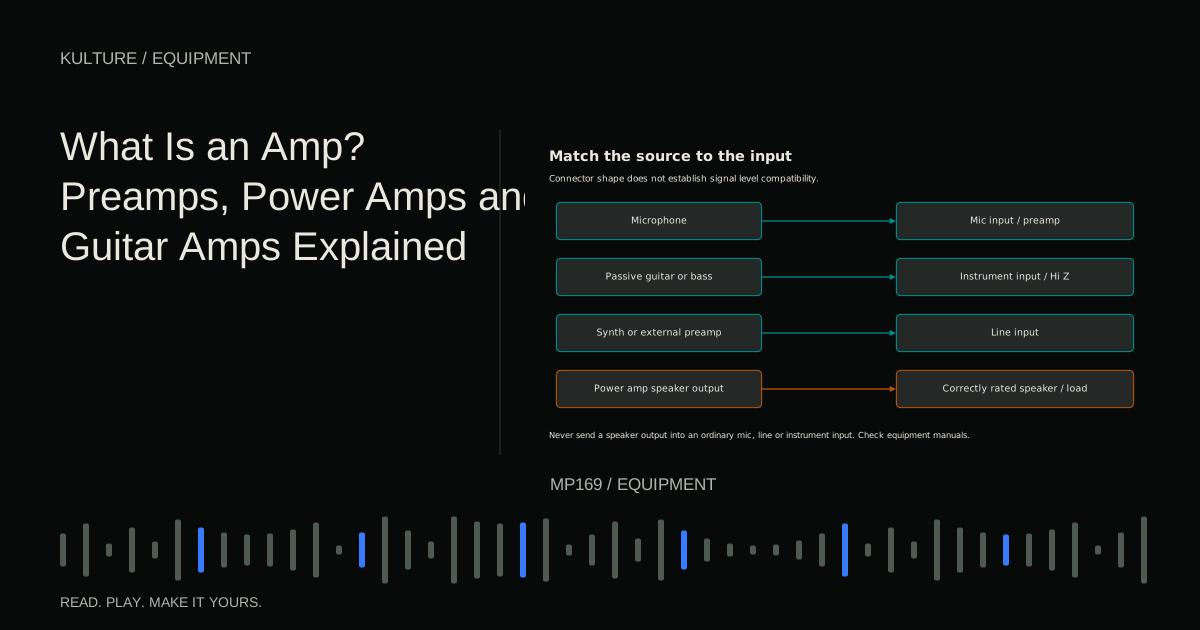
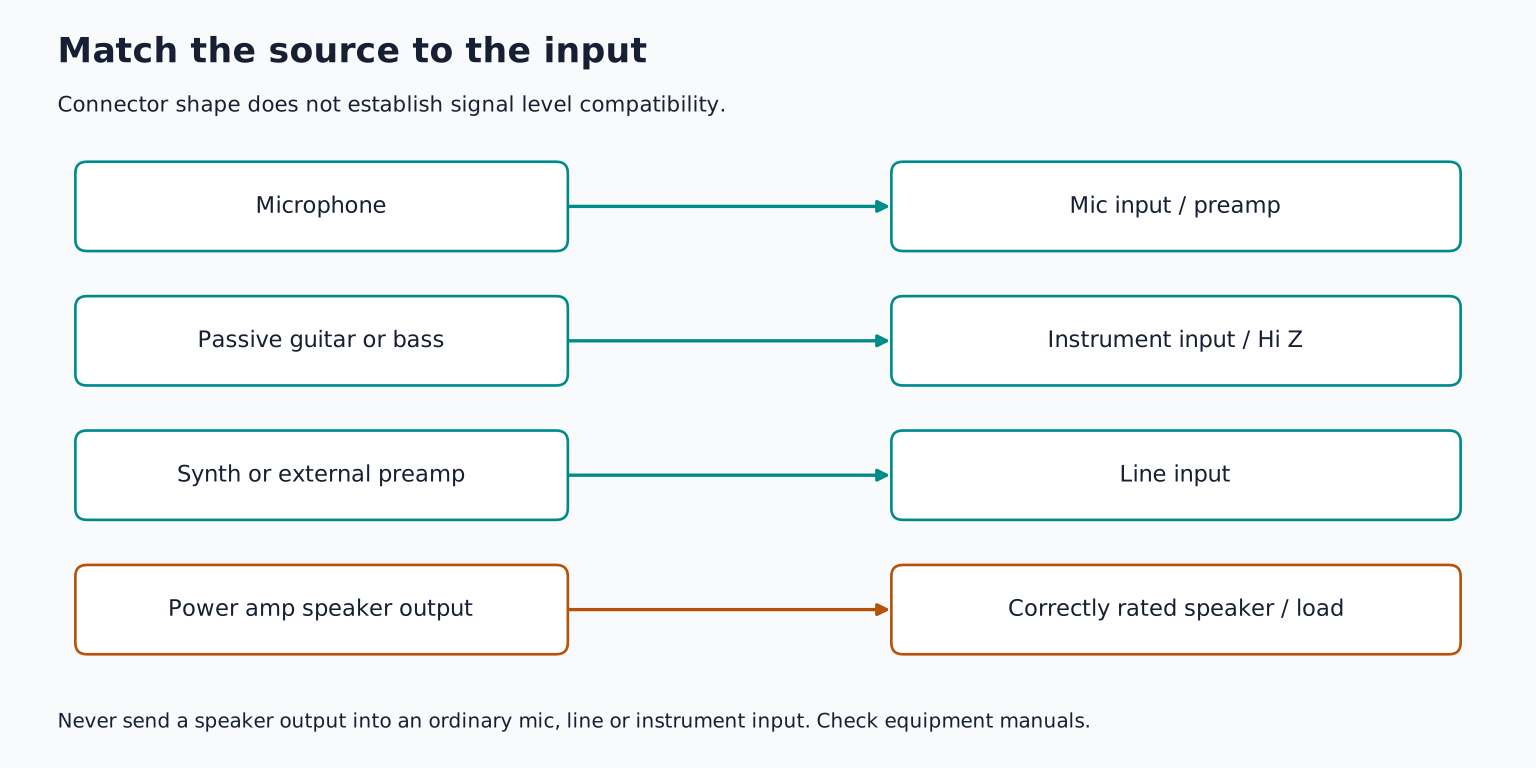
The most important practical rule is simple: never connect a power amplifier's speaker output directly to an audio interface's microphone or line input. A speaker output carries power intended for a suitable speaker or load, and can damage equipment connected incorrectly.
Follow a signal from source to speaker
Consider a singer recorded through an interface:
Microphone microphone preamp analog to digital converter DAW digital to analog converter headphone amplifier headphones.
The microphone preamp raises a small signal to a useful level for the next stage. The headphone amplifier drives the headphones. Both amplify, but they work with different signal levels and loads.
For a passive studio speaker, a separate power amplifier supplies the needed power. An active studio monitor contains its own amplifier, so it normally receives a suitable line level signal from the interface rather than another amplifier's speaker output.
Understanding the stage is more useful than asking whether a device “has an amp.” Most recording systems contain several amplification stages already.
TRY IT HERE
Make it your session
Turn the steps into a plan you can save.
Ready when you are. Audio starts only when you press Play.
Keep experimenting in the sample pads LabWhat a preamp does
A microphone produces a relatively small electrical signal. A microphone preamp raises it while ideally adding acceptably little noise and distortion for the task. Gain is the amount of amplification applied.
An audio interface with microphone inputs usually includes microphone preamps. You do not automatically need a separate external preamp to record professionally useful audio. An external unit may offer a particular tonal character, more gain, additional controls, or a needed connection, but it should solve a specific problem.
Line level sources, such as many synthesizer outputs or external preamp outputs, require appropriate line inputs. A combo XLR/jack socket can support different modes, but the connector shape does not erase the distinction between microphone and line level.
Focusrite's analog connections explanation describes input gain and the roles of different connections. Its line input guidance also shows why you should check the actual circuit and model rather than assume every line input bypasses every preamp stage.
Gain and volume are related but not identical
On a recording interface, input gain affects the level entering the recording path. The monitor or headphone volume changes how loudly you hear playback. Turning down headphones does not prevent input clipping, and lowering a DAW fader cannot repair distortion already recorded.
On a guitar amplifier, a gain control often changes how strongly an early stage is driven, while a master volume control changes a later level. Depending on the circuit, increasing gain can add distortion and sustain as well as loudness.
Labels are not perfectly standardized across all amplifiers. A single volume vintage style amp behaves differently from a multi channel high gain design. Fender's gain versus volume explanation provides a useful introduction, but the specific amplifier manual determines its controls.
Try this concept in a software amp at a comfortable level: increase preamp gain, then reduce the plugin's final output so playback loudness remains similar. Listen for changes in texture and note sustain rather than mistaking louder for better.
What a power amp does
A power amplifier supplies enough electrical power to move a speaker. Its output is designed for a specified load, commonly described by impedance in ohms. Power ratings, allowable speaker loads, and connection requirements depend on the amplifier.
A passive speaker needs an appropriate power amplifier. An active speaker has amplification built in. Connecting an interface's ordinary line output directly to a passive speaker will not provide the intended drive; connecting a power amp output to an active speaker's line input can be dangerous to the equipment.
Guitar amplifiers, especially tube designs, can have important load requirements. Do not operate one without the required speaker or manufacturer approved load arrangement. Do not assume a small volume setting makes an incorrect connection safe.
Speaker cables and instrument cables are also built for different jobs. Use the cable type specified by the amplifier and speaker manufacturer, not merely a cable with plugs that fit.
A guitar amp is a system
A traditional guitar setup commonly includes a preamp, tone controls, a power amp, and a speaker cabinet. A combo contains the amplifier and speaker in one enclosure. An amp head contains amplification but normally needs a separate suitable cabinet or approved load setup.
The guitar speaker is part of the sound. Its frequency response and behavior differ from a neutral playback monitor. Recording a guitar amp through a microphone captures the combined amplifier, speaker, microphone position, and room.
An effects loop may place processing between parts of the amplifier's signal path, often around the preamp and power amp stages. Its send and return levels vary by design. Do not treat an effects send, headphone output, line output, and speaker output as interchangeable recording connections.
Fender's presence control explanation illustrates how controls can operate at different stages of an amplifier rather than all acting as the same kind of tone knob.
Record guitar through one of three clear routes
Microphone the speaker
Place a suitable microphone near the cabinet, connect it to an interface microphone input, and adjust placement while recording short tests. Small position changes can alter brightness and body. Keep monitoring controlled and follow WHO safe listening guidance, including hearing protection in noisy environments and quiet breaks, around loud amplifiers.
Record a dry instrument signal
Connect the guitar to a suitable high impedance instrument input or DI route, then use a software amp and cabinet simulation. The recording can remain clean while you change the playback tone later.
A DI, or direct box, commonly converts an unbalanced instrument signal into a balanced microphone level signal for a microphone input. It is not automatically a speaker load device. Radial's DI explanation describes that role.
Use an approved amplifier recording output or load system
Some amplifiers provide a documented line, recording, USB, or headphone output. Some specialized load boxes accept speaker level output and provide suitable recording outputs. Use only a configuration explicitly supported for the amplifier and load device, including impedance, power handling, cabling, and whether a speaker must remain connected.
A cabinet simulation pedal alone is not necessarily a load box. A DI with a speaker level capability may still require a connected speaker. Universal Audio's OX connection diagrams demonstrate why these systems need model specific wiring instructions.
Headphone amps solve another problem
A headphone amplifier drives headphones from a line or digital audio source, depending on the device. Your interface already includes one if it has a headphone output. An additional unit can be useful for several performers, independent cue mixes, or a specific compatibility need.
More amplifier power is not automatically better sound. Headphone impedance, sensitivity, output capability, and listening requirements interact. First check whether your existing output provides clean, comfortable monitoring without strain.
Do not use an amplifier purchase to compensate for an excessively loud backing mix. Lower competing tracks and improve the cue balance. See the headphone selection guide for the relevant distinctions.
Identify the stage before buying
Write your actual path on paper and label every output and input. For example: guitar instrument output interface Hi Z input software amp interface headphone output. That setup already contains the necessary recording and listening amplification for many home tasks.
Your exercise is to compare clean and driven versions of a short guitar phrase while matching final playback level. Then identify which stage changed the tone and which control changed listening volume. Before connecting any hardware, verify its manual's signal type and allowed destination. Use the equipment glossary to decode unfamiliar labels without assuming that matching plugs imply compatible signals.
TAKE IT INTO YOUR OWN MUSIC
Your next session.
Write your actual path on paper and label every output and input. For example: guitar instrument output interface Hi Z input software amp interface headphone output. That setup already contains the necessary recording and listening amplification for many home tasks.
Notes and progress stay in this browser.