This guide groups common abbreviations by the job you are trying to do. You do not need to memorize them before making music. Use them to answer practical questions such as “Can this keyboard record sound?” or “Why does this cable fit but sound wrong?”
The software and musical instructions
DAW: digital audio workstation. This is the software environment where you record, arrange, edit and mix music. Its tracks can hold recorded audio, musical instructions for instruments, or other control information. A DAW is not necessarily an instrument itself, although most include instruments and effects. Start with what a DAW does if tracks and mixers are unfamiliar.
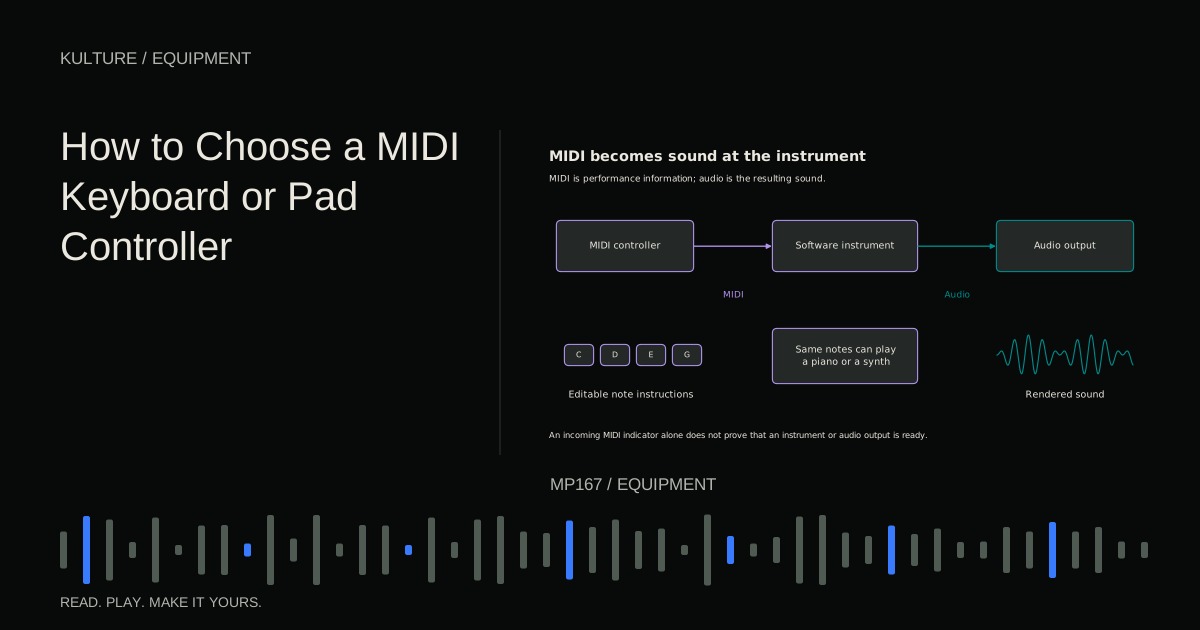
MIDI: Musical Instrument Digital Interface. MIDI communicates events such as note on, note off, pitch and controller changes. It does not carry the sound of a piano or microphone. A MIDI keyboard tells an instrument what to play; the instrument generates audio. The MIDI Association's overview explains that distinction and the relationship between messages and connected devices.
CC: control change, often called continuous controller in everyday use. MIDI CC messages can control functions such as modulation, sustain or an assigned software knob. The receiver determines the response. A knob sending MIDI does not automatically control whichever parameter you happen to be looking at.
VST: Virtual Studio Technology. This is Steinberg's plugin technology for instruments and effects. AU: Audio Unit is Apple's plugin architecture. AAX: Avid Audio Extension is the plugin format used by Pro Tools. These names describe software compatibility, not sound quality. A great effect in an unsupported format will not load in your DAW. Steinberg describes VST and ASIO, while Avid documents AAX.
ASIO: Audio Stream Input/Output. This is an audio driver system commonly used with professional interfaces on Windows. It helps software communicate with audio hardware; it is not an effect or a file format. Use the interface manufacturer's supported driver when appropriate rather than assuming any driver with ASIO in its name is equivalent.
An example: a USB keyboard sends MIDI to your DAW; an instrument plugin turns those messages into audio; the audio driver sends the resulting sound to your interface. Changing one part does not replace the others.
TRY IT HERE
Make it your session
Turn the steps into a plan you can save.
Ready when you are. Audio starts only when you press Play.
Keep experimenting in the sample pads LabPlugs, sockets and cable labels
XLR names a connector family. In home recording you will often see three pin XLR connectors on microphones and balanced audio connections. Do not memorize a made up expansion such as “external line return.” The connector shape alone does not prove the signal is microphone level, or even that it is analog audio.
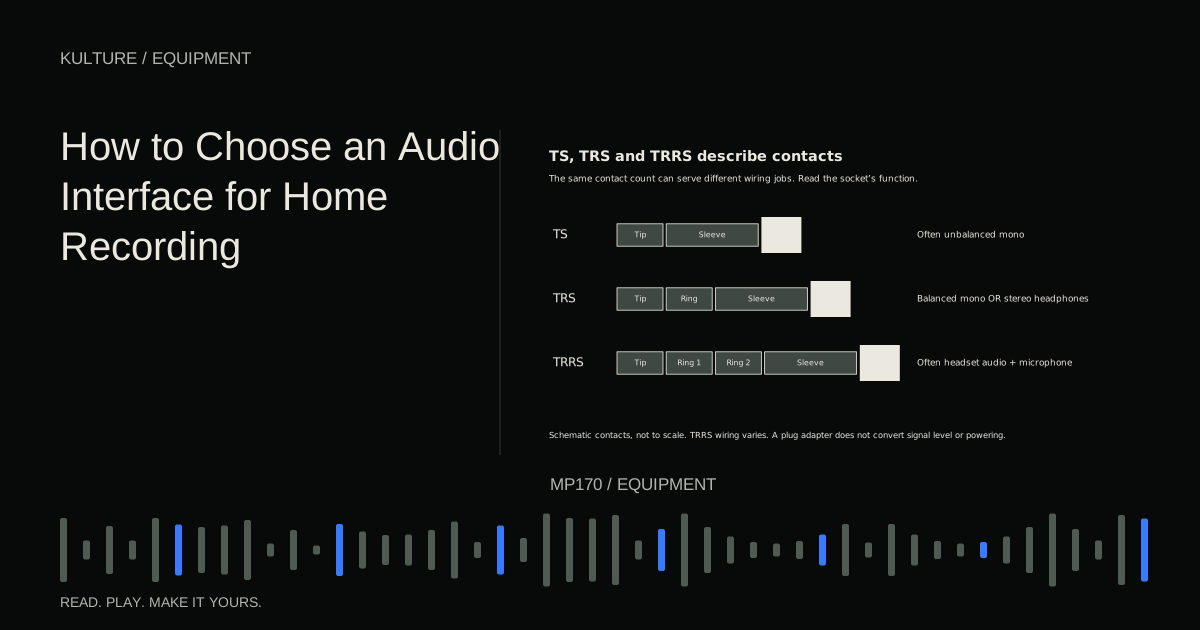
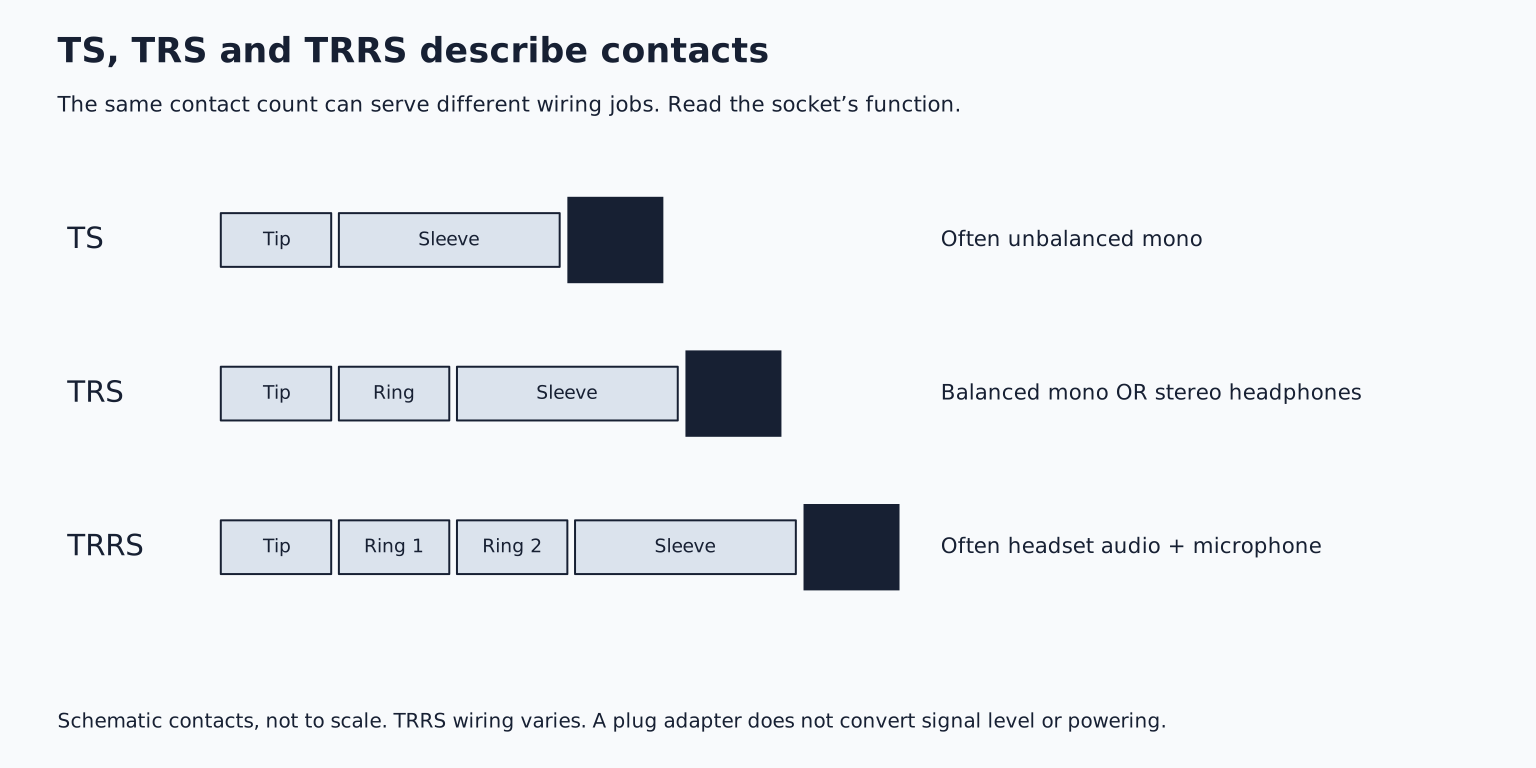
TS: tip sleeve. A quarter inch TS plug has two electrical contacts. It commonly carries unbalanced mono instrument signals, such as an electric guitar connection. “Quarter inch” describes the plug's size; TS describes its contact arrangement.
TRS: tip ring sleeve. This plug has three contacts. It can carry balanced mono audio, as on many interface line outputs, or unbalanced stereo audio, as on many headphone outputs. Those are different wiring jobs. Balanced TRS is not automatically stereo, and a balanced line output is not automatically a headphone output.
A balanced connection uses two signal conductors and a reference/shield arrangement to help reject interference at a suitable receiver. It does not mean “left and right.” Rane's interconnection guide shows why connector type, wiring and the connected equipment must all be considered together.
TRRS: tip ring ring sleeve. Four contact connectors are common on headsets carrying headphones plus a microphone. An adapter may need to separate those functions correctly. A headset microphone is not necessarily compatible with an interface's XLR microphone input just because adapters exist.
USB: Universal Serial Bus. USB can carry digital audio, MIDI, other data and power, depending on the devices and connection. USB C describes a connector shape, not a guarantee of a particular speed, power capability or audio function. A charge only cable can prevent a device from appearing at all.
DIN refers to the German standards organization, Deutsches Institut für Normung. Musicians often use “DIN MIDI” to mean the familiar five pin MIDI connection. MIDI is the message system; five pin DIN is one physical connection used to transport it. USB MIDI carries MIDI through a different connection.
Before buying an adapter, write down the output's signal type and the destination's required input. “These plugs fit” is not a compatibility test.
Getting sound into and out of the computer
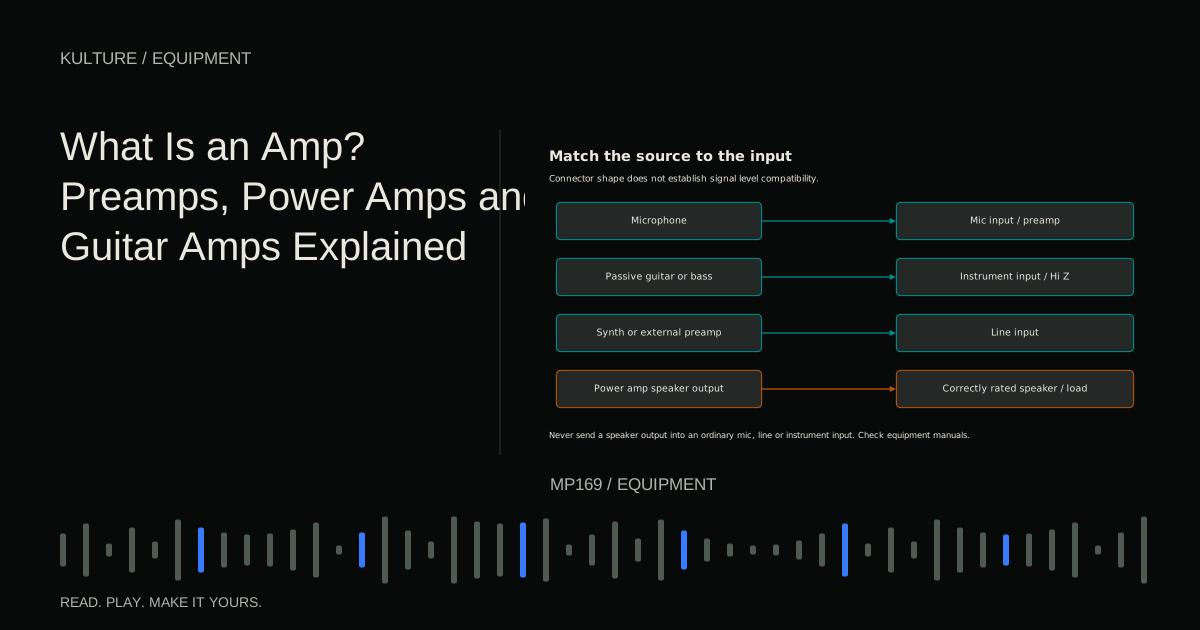
DI: direct injection, also commonly called a direct box. A DI commonly converts an unbalanced instrument signal to a balanced, microphone level signal suitable for a mic input. Its impedance and level handling matter as much as the connector. Active and passive designs have different requirements. Radial's DI explanation describes the basic role.
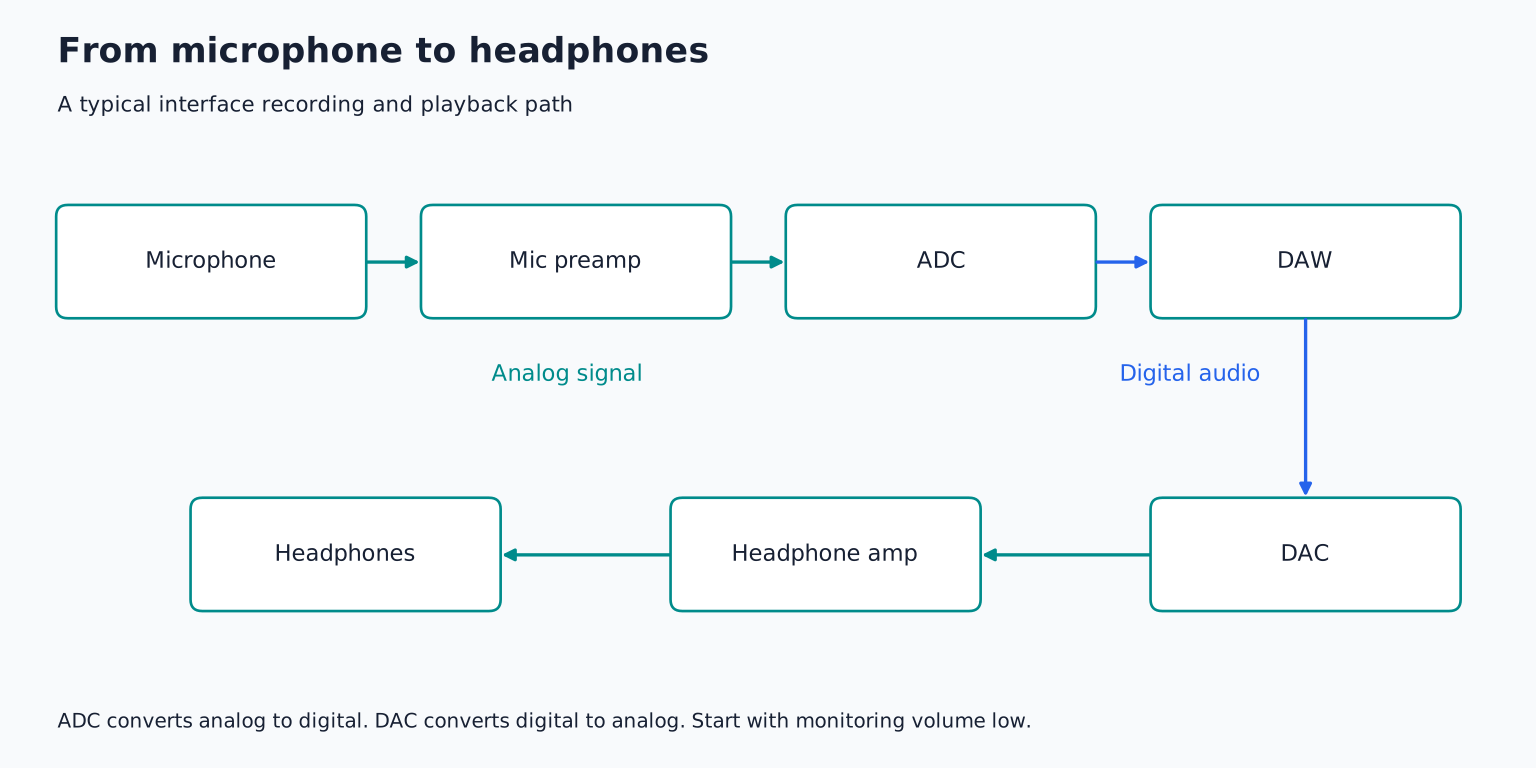
Preamp: preamplifier. This is a shortened word rather than a set of initials. A microphone preamp raises a small microphone signal to a useful working level. Increasing its gain affects the recorded input; raising the headphone volume affects your listening level. They are different controls.
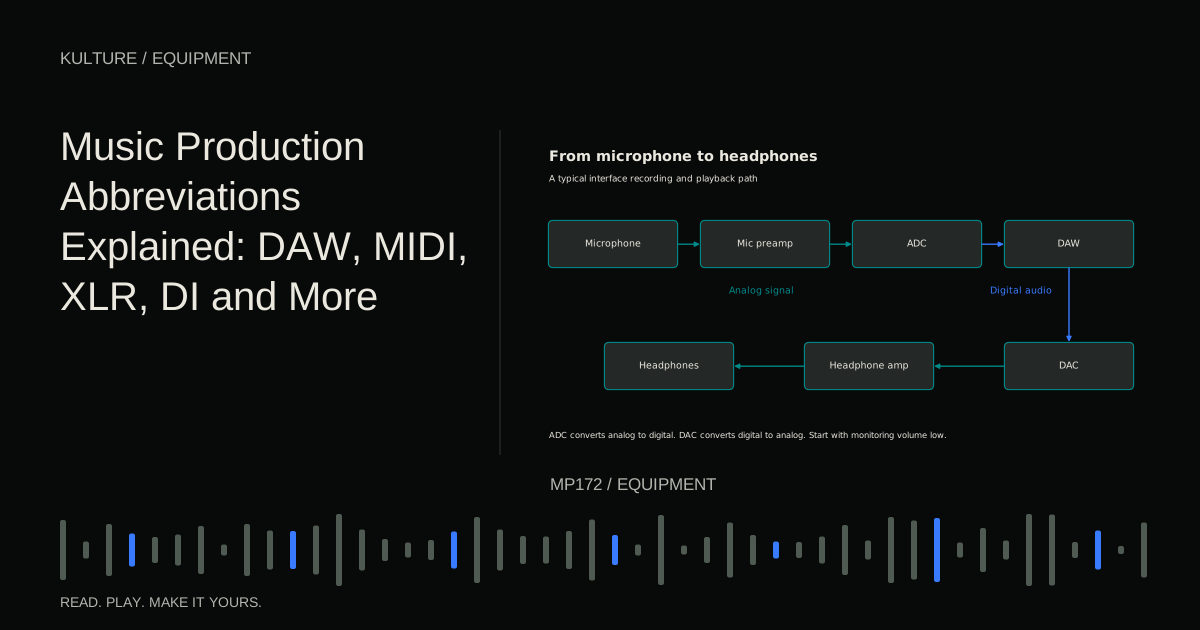
ADC: analog to digital converter. This converts an analog electrical signal into digital samples. DAC: digital to analog converter turns digital samples back into an analog signal. An interface typically contains both, alongside input and output circuitry. A microphone's sound reaches the computer through the ADC; playback reaches analog headphones or speakers through the DAC and appropriate amplification.
48 V, often written +48V: this commonly labels phantom power for compatible microphones and other devices. The V means volts. It is not a “make the microphone louder” setting. Some microphones need it; others do not. Follow the equipment manufacturer's instructions, especially for passive ribbons, unusual wiring and adapters. Turn monitoring down and switch phantom power off before changing microphone connections, following the manufacturer's shutdown and connection sequence. Shure explains phantom power.
Never connect a power amplifier's speaker output to an ordinary interface mic or line input. A similar looking socket does not make that high power signal safe.
Tone shaping and synthesizer controls
EQ: equalization. EQ changes the level of frequency regions. It can reduce low rumble, soften an aggressive region or alter a sound's overall balance. Its usefulness depends on the source and arrangement rather than a universal preset.
HPF: high pass filter. This lets higher frequencies pass while attenuating lower ones. LPF: low pass filter does the reverse. The name tells you what passes, not what is removed. Filter slopes are gradual, so a cutoff frequency is not usually an absolute wall.
ADSR: attack, decay, sustain, release. These are common stages of an envelope, a changing control shape. Attack describes the initial rise; decay moves toward the sustain level; sustain is the held level; release describes what happens after the note is released. Sustain is a level, not a duration. An amplitude envelope controls loudness, while a filter envelope changes a filter parameter.
LFO: low frequency oscillator. An LFO creates repeating modulation. It might move pitch for vibrato, volume for tremolo or a filter for a repeating tonal change. Its rate may be measured in hertz or synchronized to musical note values. It does not have to produce a directly audible tone to change what you hear.
Try a sustained instrument note. Lengthen its amplitude attack and listen for the slower entrance. Then change the release and stop playing: the difference happens after note off. This separates two controls that beginners often confuse.
Time, frequency and level measurements
BPM: beats per minute. BPM describes tempo. In a typical 4/4 project at 120 BPM, a quarter note beat lasts half a second and a four beat bar lasts two seconds. Different meters and beat unit conventions need context.
Hz: hertz, or cycles per second. kHz: kilohertz, meaning thousands of cycles per second. A 1 kHz tone oscillates 1,000 times per second. A 48 kHz sample rate describes 48,000 samples per second per channel. Frequency and sample rate use related units but describe different things; a 48 kHz recording is not a 48 kHz musical pitch.
dB: decibel. A decibel expresses a ratio on a logarithmic scale. The reference matters. A fader change of 6 dB is not a statement that the room is at a particular sound pressure level.
dBFS: decibels relative to full scale. This describes digital level. On a conventional sample peak meter, 0 dBFS is the full scale reference. Leave recording headroom rather than trying to hit it. Some floating point processing paths can represent levels above that reference internally, but converters and fixed point outputs still have limits.
dBTP: decibels true peak. True peak metering estimates peaks in the reconstructed waveform that may fall between stored samples. It answers a different question from a simple sample peak meter.
RMS: root mean square. RMS describes a mathematical effective level over a measurement window. It can help characterize signal energy but does not by itself describe perceived loudness.
LUFS: loudness units relative to full scale. Loudness meters use frequency weighting and time based measurements to better represent program loudness. Integrated LUFS summarizes a measured program; short term measurements describe shorter intervals. The EBU loudness resources explain standardized loudness measurement. A broadcast recommendation is not a universal creative target for every music release.
None of these digital meters tells you your exact listening exposure. That also depends on the amplifier, headphones or speakers, settings and environment.
Audio files you will export
WAV: Waveform Audio File Format. AIFF: Audio Interchange File Format. These are audio file containers commonly used for uncompressed PCM audio. PCM: pulse code modulation describes a common way of representing sampled audio. A file extension alone does not tell you every detail about encoding, bit depth or sample rate.
MP3: MPEG Audio Layer III. MP3 uses lossy compression to reduce file size by discarding information. It is useful for convenient listening copies, but it is not the ideal intermediate format for repeated editing and re exporting. Keep your editable project and an appropriate lossless export alongside any compressed sharing copy.
Read a setup description without guessing
Consider: “USB MIDI controller, VST instrument, interface line outputs on balanced TRS, WAV export.”
The controller sends instructions through USB. The VST instrument generates audio in a compatible DAW. The interface turns digital playback into analog line level signals. Each balanced TRS output commonly carries one channel, so a stereo speaker setup needs left and right connections. The WAV is an exported audio file, separate from the editable project.
For practice, trace your own setup in five lines: controller or microphone, connection, software track, output device and saved file. Label each item as a device, signal, connector, protocol or format. Where you cannot identify the signal, check the manual before connecting hardware. Then use MIDI versus audio to resolve recording questions, or the audio interface guide to turn the terminology into a practical buying checklist.
TAKE IT INTO YOUR OWN MUSIC
Your next session.
Consider: “USB MIDI controller, VST instrument, interface line outputs on balanced TRS, WAV export.”
Notes and progress stay in this browser.