The steps below work conceptually in most DAWs. A clip might be called a region, pattern, event, or item. Use your software's note editor for pitched instruments and its drum sequencer or piano roll for drums. If you need the exact controls, choose the matching lesson in the DAW guide.
Give the project a small boundary
Create a new project at 96 BPM in 4/4 time. Save it in its own folder as Stock Sounds 01. We will build four bars, then expand them into a sixteen bar arrangement lasting about forty seconds.
Use A minor as the starting note collection: A, B, C, D, E, F, and G. You do not need to memorize every scale to begin. These notes keep the example easy to enter on a piano roll, and the chord choices below tell you exactly what to draw.
Load a plain kit, a short bass preset, a piano, and a pluck or bell. Audition a few sounds, then commit provisionally. Avoid a preset with a complicated built in rhythmic sequence; it can obscure the rhythm you are trying to write.
A stock sound is included with your software or its licensed content library. Its use is still governed by the applicable license. If you plan to release music based on included loops, consult that product's terms rather than assuming every downloaded sound has identical rights. The sample pack license guide explains what to check.
TRY IT HERE
Make it your session
Turn the steps into a plan you can save.
Ready when you are. Audio starts only when you press Play.
Keep experimenting in the sample pads LabWrite the drum pattern before changing the tone
Create a one bar drum clip. Divide the bar into sixteen equal steps. Count them as “1 e and a, 2 e and a, 3 e and a, 4 e and a.” In this example, each step is a sixteenth note.
| Sound | Step numbers |
|---|---|
| Kick | 1, 9, 12 |
| Snare or clap | 5, 13 |
| Closed hi hat | 1, 3, 5, 7, 9, 11, 13, 15 |
The kicks on steps 1 and 9 mark beats 1 and 3. The extra kick on step 12 falls before beat 4. The snare lands on beats 2 and 4. The hi hat supplies an eighth note pulse.
If you are using a piano roll, locate the actual kick and snare notes by auditioning the kit. Drum mappings vary; do not assume one octave label will work in every program.
Make alternate hi hats a little softer. For example, use a stronger strike on steps 1, 5, 9, and 13, with gentler hits between them. Velocity controls the instrument's response and may change tone as well as level. The goal is a repeating accent pattern, not random numbers everywhere.
Repeat the bar four times. In bar 4, remove the final hi hat and add a quiet snare on step 16 if the kit responds well. Listen to whether that last hit leads naturally back to bar 1. If it merely sounds crowded, keep the simpler version.
For an interactive explanation of pulse and grid positions, use Ableton's beat and tempo lesson.
Put harmony underneath the rhythm
On the piano track, create a four bar clip. Enter one chord per bar:
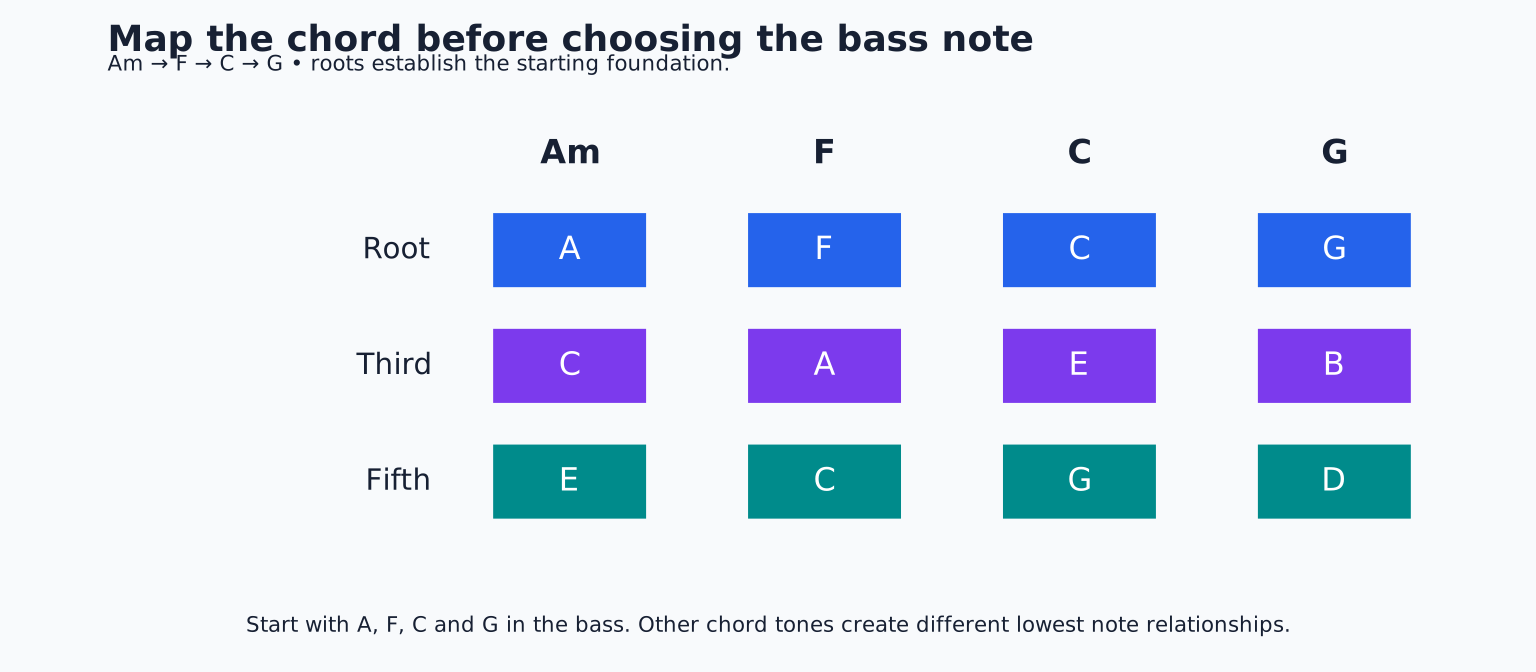
- Bar 1: A, C, E.
- Bar 2: F, A, C.
- Bar 3: C, E, G.
- Bar 4: G, B, D.
Start each chord on beat 1 and let it last most of the bar. Place the notes in the middle of the keyboard rather than in the bass register. If a chord sounds too low or muddy, move the whole chord up an octave and compare.
Now change the rhythm: shorten each chord to two beats, and add another shorter copy on beat 4. The first version sustains smoothly; the second leaves a gap and creates a push into the next bar. Choose the version that supports the drum pattern.
Listen to chord transitions in context. If one note seems to jump out, lower that note's velocity or reconsider its register. Do not add compression simply because the preset is a piano. First decide whether the issue is the performance, the sound choice, or the balance.
Let the bass explain the chord movement
Use A in bar 1, F in bar 2, C in bar 3, and G in bar 4. Place them roughly two octaves below the piano's middle area, adjusting by ear for the bass preset.
Begin with a short root note on beat 1 and another on beat 3 of each bar. End the notes before the next kick if the combination sounds cluttered. Then try moving the second bass note to the “and” after beat 3. That creates a different relationship to the drums without changing the harmony.
Compare these two rhythms while the piano plays. The best choice is the one that makes the whole phrase move clearly. A busy bassline is not automatically more interesting than a sparse one.
If the low end becomes cloudy, temporarily mute the piano. If the bass and kick now sound clear, move the piano upward or change its voicing. If the low end remains unclear, shorten the bass release or try a less sustained kick. This isolates the arrangement before reaching for EQ.
Add a melody with room to breathe
On the pluck track, write this four bar idea using eighth notes unless a longer duration is indicated:
- Bar 1: E on beat 2, G on the “and” after 2, A on beat 3 held for one beat.
- Bar 2: C on beat 3, A on beat 4 held for one beat.
- Bar 3: repeat bar 1.
- Bar 4: D on beat 3, B on the “and” after 3, G on beat 4.
Leave the other positions empty. Those rests are part of the melody. They allow the listener to recognize the rhythm and prevent the lead from covering every chord change.
Try the final G one octave higher, then return it. Which version sounds like a better answer to the opening phrase? This is a small musical decision you can hear immediately, rather than an abstract search for the perfect preset.
Turn the loop into a miniature track
Duplicate your four bar section four times. Organize the parts as follows:
| Bars | Active parts | Purpose |
|---|---|---|
| 1 to 4 | Piano and lighter drums | Establish the idea |
| 5 to 8 | Drums, piano, bass | Add weight |
| 9 to 12 | All four parts | Present the main phrase |
| 13 to 16 | Piano, bass, occasional melody | Wind down |
For the last bar, replace G, B, D with A, C, E and let the final A bass note sustain if you want a resolved ending. Make the last clip independent first if your DAW uses linked pattern copies.
Use one change at each boundary: a removed drum hit, a cymbal, or a short melodic pickup. Adding every transition effect at once makes it harder to hear what the song actually needs.
Balance, export, and inspect
Pull the track levels down, then bring the drums up to a useful reference level. Add bass until its notes are clear, then piano, then melody. If the main output overloads, lower the contributing channels. Keep playback volume separate from the level inside the mix.
Add a modest reverb to the piano or lead only if it supports the phrase. Bypass it and compare. A longer tail may sound pleasant alone but smear the gaps you deliberately wrote.
Save the project, export the full sixteen bars with room for the final decay, and listen in a separate player. Check that you exported the arrangement rather than only one pattern. Listen once without touching controls and write down two changes, not twenty.
Your finishing exercise is to make those two changes and export version 02. Keep both versions. Next, use the eight bar arrangement lesson to extend the same musical decisions into a longer track.
TAKE IT INTO YOUR OWN MUSIC
Your next session.
Pull the track levels down, then bring the drums up to a useful reference level. Add bass until its notes are clear, then piano, then melody. If the main output overloads, lower the contributing channels. Keep playback volume separate from the level inside the mix.
Notes and progress stay in this browser.