The main choices are whether to record sources separately or together, whether to use microphones or direct connections, and how much room sound to capture. Each choice changes your editing freedom and the character of the result.
Choose the recording style first
An overdub session records parts one at a time. It gives you control over replacement, microphone placement, and processing. A live in the room session captures musicians playing together, preserving interaction but also recording bleed: sound from one source entering another source's microphone.
A concert recording has additional limits. You may not control the room, stage volume, microphone positions, or performance schedule. The recording must coexist with the sound engineer's job and the audience's safety.
Write a one sentence goal. “Capture a natural acoustic duo performance” leads to different choices from “record isolated rock instruments for detailed editing.” If you want both natural interaction and extensive isolation, recognize the compromise early instead of discovering it during mixing.
TRY IT HERE
Make it your session
Turn the steps into a plan you can save.
Ready when you are. Audio starts only when you press Play.
Keep experimenting in the sample pads LabMake an input plan
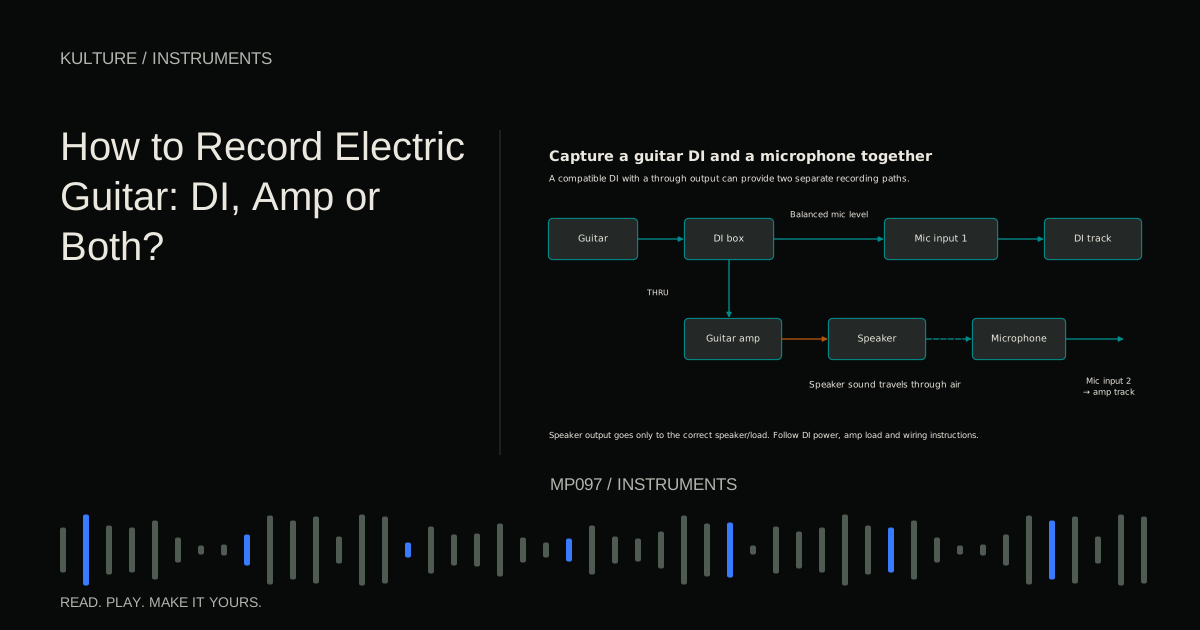
List every source and the input it needs. A microphone needs a mic input and suitable preamp. A passive guitar or bass often needs a high impedance instrument input or DI. A keyboard's audio outputs generally need line inputs. A stereo source needs two channels if you want to preserve its stereo output.
For a four input singer guitarist session, you might allocate one vocal mic, one acoustic guitar mic, and two optional room microphones. But if the room does not sound useful, those room inputs may add little. Start with the minimum arrangement that captures the musical essentials.
Label cables and tracks consistently. Input 1 should not be called “Vocal” in the interface mixer and “Guitar” in the DAW. A short input sheet prevents recording the wrong source or troubleshooting the wrong cable.
Review mic, instrument, and line levels before connecting unfamiliar equipment. A power amplifier's speaker output must never be connected directly to an interface's mic, line, or instrument input.
Make the instrument ready
Tune stringed instruments, check rattles, and listen for mechanical noises. A guitar with an unwanted buzz, a piano pedal squeak, or a loose drum fitting will still be present after you choose an expensive microphone.
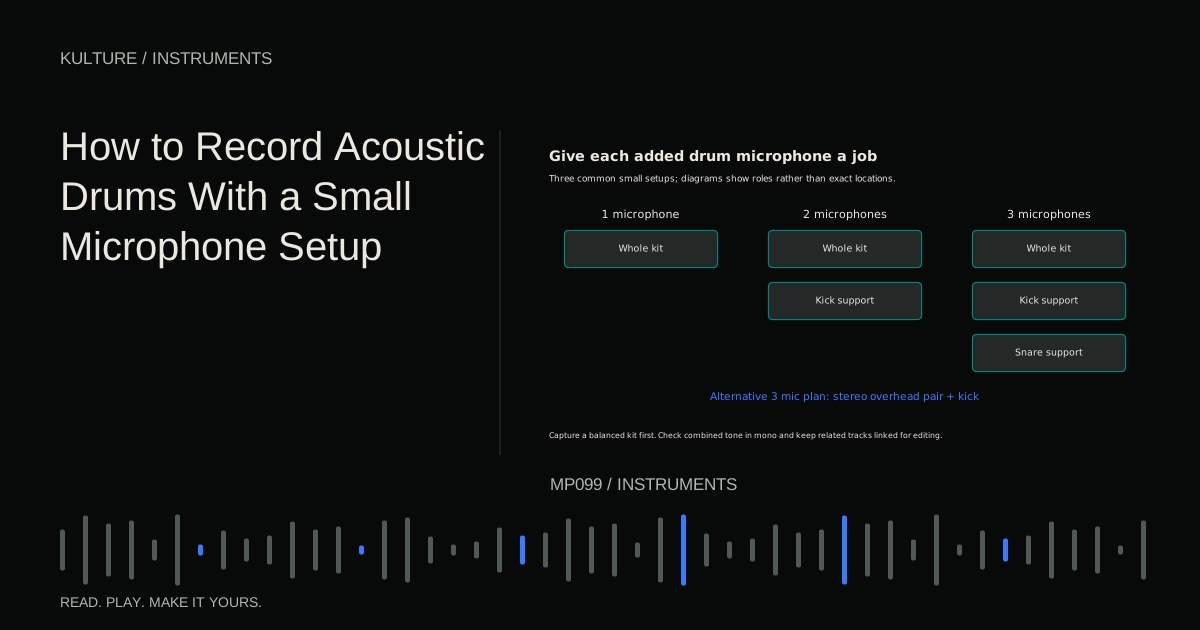
Ask the musician to play the actual part at its intended intensity. A gentle soundcheck does not reveal the peaks of a forceful performance. For drums, the drummer's balance between shells and cymbals is especially important when using few microphones.
Do not make invasive changes to someone else's instrument without agreement. Piano lids and panels, delicate finishes, amplifier connections, and drum tuning all require care. Keep stands, clips, and cables clear of moving parts and playing gestures.
Find tone with position
Move a microphone in meaningful small steps and record short comparisons. Closer placement usually increases direct sound relative to the room, while farther placement can blend the instrument more naturally with its surroundings. The best position depends on the source's size and how it radiates sound.
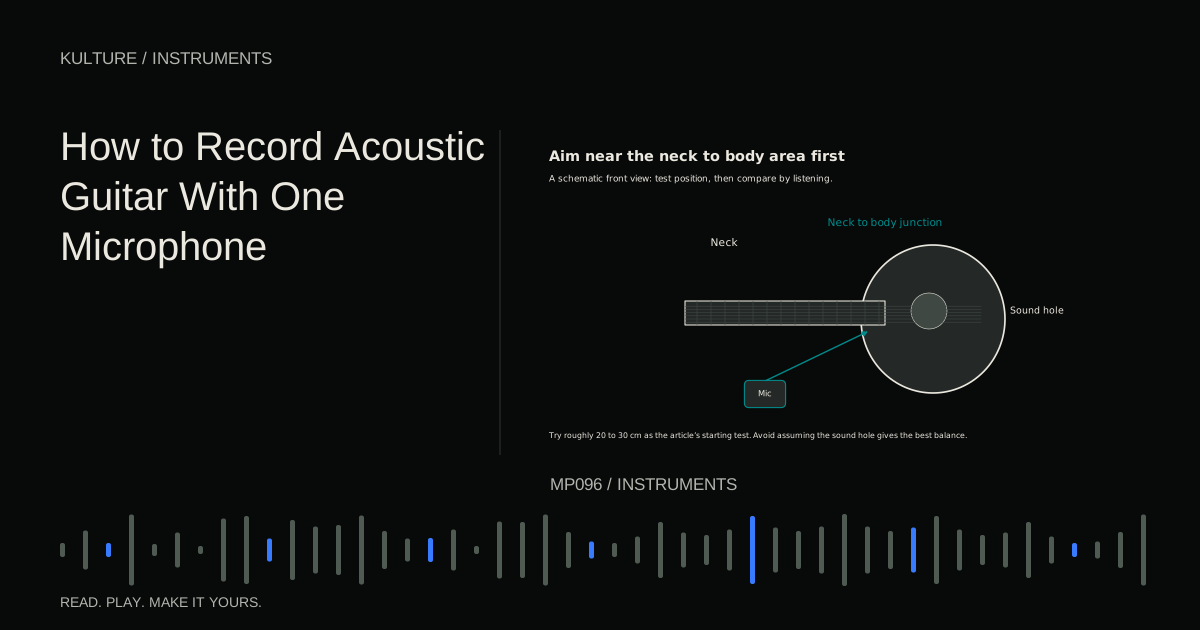
An acoustic guitar does not radiate identically from its sound hole, strings, and body. A piano is a large distributed source rather than one point. A drum kit is an ensemble of instruments that the player balances in real time.
Shure's microphone placement discussion emphasizes placement as a major part of recorded tone. Use EQ later for refinement, but first try to capture a balance that already makes musical sense.
Choose mono or stereo deliberately
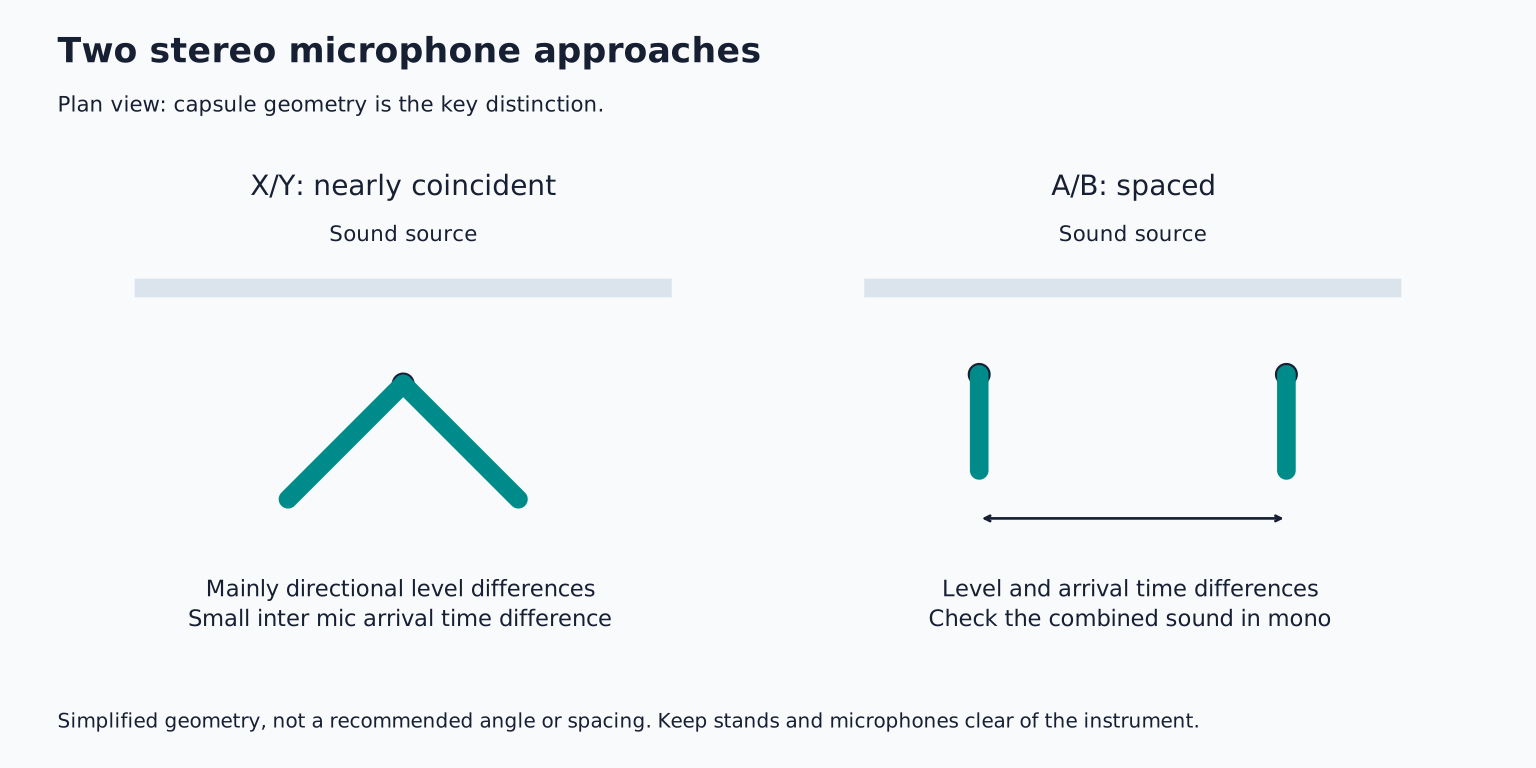
One microphone gives a mono recording. It can be an excellent choice for a guitar that needs a clear place beside a vocal. Stereo can capture width and space, but it uses more inputs and introduces relationships between channels that need checking.
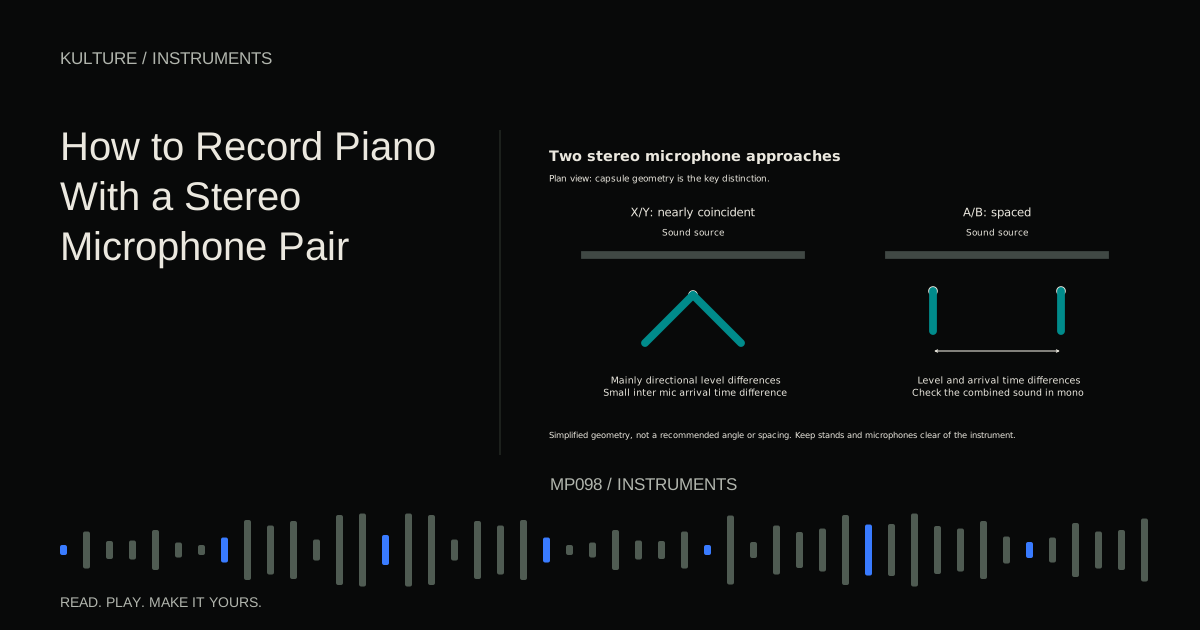
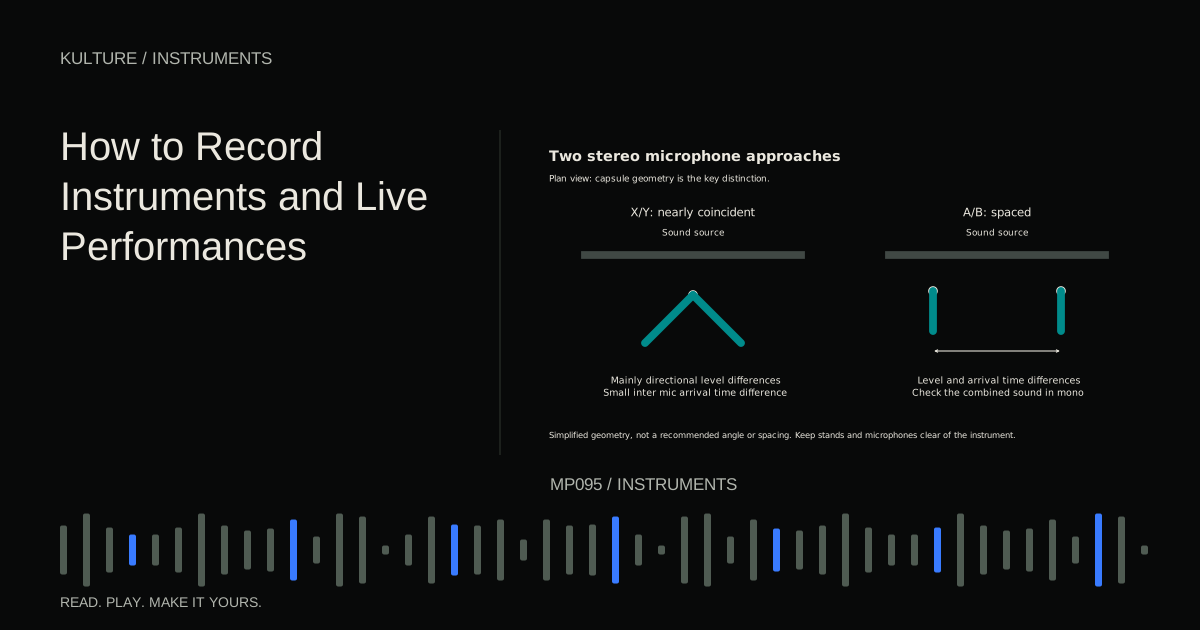
A coincident pair places directional capsules as close together as practical, angled apart. A spaced pair uses physical separation and therefore records arrival time differences as well as level differences. These are different stereo strategies, not simply “narrow” and “wide” presets.
Check stereo recordings in mono. If the instrument loses important body when the channels are summed, revisit spacing, orientation, or placement. A polarity switch can be a diagnostic comparison, but it does not solve every phase relationship caused by distance.
Give everyone a workable cue mix
A cue mix is the headphone or monitor mix used during recording. Musicians need enough rhythmic and harmonic information to perform, plus enough of themselves to control tone and dynamics.
For a live band, one shared mix may be adequate, but separate mixes can help when needs differ. An auxiliary send creates another mix from the input channels. A pre fader send generally allows the cue balance to remain independent of main fader moves, although the exact routing and mute behaviour depend on the mixer. Yamaha's aux send guide explains that distinction.
Keep monitor levels comfortable. Check each output from a low starting level, and communicate before changing routing. A feedback loop or unexpected full level signal can occur if an output is returned to an input that feeds the same output.
Manage bleed as part of the sound
Bleed is not automatically a flaw. It can make a group recording feel coherent. The problem is unwanted bleed that becomes louder, harsher, or temporally inconsistent when you process individual tracks.
Start with player and amplifier placement. Reduce unnecessary stage volume, orient directional microphone rejection toward troublesome sources, and use distance or suitable barriers where practical. Preserve sightlines and communication; a technically isolated performance can lose its musical connection.
Listen to the complete microphone set, not only each channel alone. A close guitar mic may sound clean in solo but combine badly with delayed guitar spill in a vocal mic. Moving one source or microphone can improve the whole recording more than adding a gate.
For more detailed planning, see recording a band live.
Set gain and record a rehearsal
Set every input using the strongest likely passage and leave headroom. Do not chase identical meter readings across different instruments. A snare's short peaks and a sustained keyboard's level behave differently.
Record part of a rehearsal and play it back. Verify that every source is captured, the correct tracks are armed, no inputs overload, and the monitor path is not accidentally being recorded as a second copy. Check the quieter section as well as the loud one.
Use a sample rate and file format supported reliably by the whole system. Confirm free storage and power. Disable sleep or interruptions through appropriate settings before an important recording, and test the setup for long enough to expose obvious instability.
At a live show, coordinate before connecting
Get permission from the performers, venue, and relevant production contacts before recording, and clarify how the recording may be used. Recording permission and permission to release or distribute the result are not automatically the same.
Ask the engineer for an agreed recording feed. Do not unplug stage cables, change phantom power, or alter console routing on your own. Confirm whether the feed is line level, stereo, pre- or post processing, and affected by the house mix faders.
A house mix is designed for the room, where loud instruments may already be audible from the stage. It may not sound balanced as a recording. TASCAM's live recording case study describes why additional room microphones can complement that feed. Keep those microphones on separate tracks so their contribution can be adjusted later.
Edit related tracks together
Multi microphone recordings preserve timing relationships between channels. Group related tracks when cutting or moving sections. If you move only a snare close mic while leaving overheads unchanged, you alter the combined sound and may expose an edit.
For an ensemble with substantial bleed, replace passages carefully. An old vocal can remain audible in a guitar mic underneath a new vocal overdub. Sometimes accepting a small imperfection is more convincing than forcing an isolated repair into an interconnected recording.
Keep original files and a clear session version before editing. Back up promptly and verify that the copied project contains the recordings, not just references to them.
Build a small recording exercise
Record a two person performance with no more than four inputs. Make an input sheet, capture a rehearsal, adjust one placement problem, and record two complete takes. Mix initially with only level and panning.
If you cannot get a useful rough balance, identify whether the issue is the performance, placement, room, or routing before adding plugins. Then choose the relevant next lesson: one mic acoustic guitar, stereo piano, or small mic drum recording. Each develops the same principle: capture a clear musical relationship first.
TAKE IT INTO YOUR OWN MUSIC
Your next session.
Record a two person performance with no more than four inputs. Make an input sheet, capture a rehearsal, adjust one placement problem, and record two complete takes. Mix initially with only level and panning.
Notes and progress stay in this browser.