![How to Make Drum Patterns: Rhythm and Groove for Beginners: Kick, snare and closed hat triggers on a sixteen step grid: [[1, 9], [5, 13], [1, 3, 5, 7, 9, 11, 13, 15]].](/assets/guide-art/how-to-make-drum-patterns-rhythm-and-groove-for-beginners-109f100272.svg)
This lesson builds a two bar groove from kick, snare and hi hat, then expands it into a short arrangement. All positions are examples rather than rules for a particular genre.
Understand the grid before filling it
Set your project to 100 BPM and 4/4. BPM means beats per minute. In this example, a quarter note is the main beat and each bar contains four beats. A sixteenth note grid divides each beat into four positions, making sixteen positions per bar.
Count them aloud as “1 e and a, 2 e and a, 3 e and a, 4 e and a.” If your sequencer numbers steps 1 to 16, the main beats are steps 1, 5, 9 and 13. The halfway points between beats are steps 3, 7, 11 and 15.
This mapping is worth learning because “step 5” and “beat 2” describe the same position on this particular grid. A different grid resolution changes the mapping. Ableton's interactive beat grid is a useful place to experiment with placements, and Beats, Bars and BPM explains the counting more slowly.
TRY IT HERE
Find the pocket
Tap the grid, change the tempo and hear your pattern.
Ready when you are. Audio starts only when you press Play.
Keep experimenting in the beat maker LabChoose three sounds with distinct roles
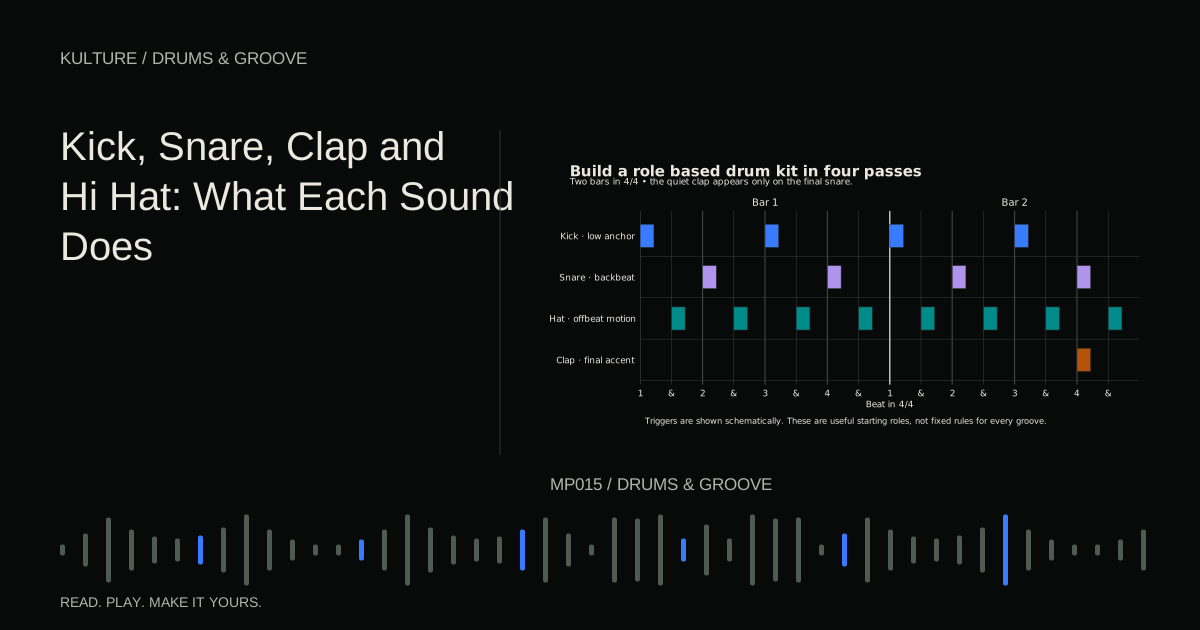
Use a short kick with a clear beginning, a snare or clap with an obvious attack, and a closed hi hat that does not ring for too long. A kick is a low drum sound that can anchor the pulse. The snare or clap often marks a backbeat. The hi hat supplies smaller rhythmic divisions and a sense of motion.
These roles are flexible. A kick can be sparse, a snare can carry a busy pattern and a hat can become the hook. Starting with conventional roles simply makes the interaction easier to hear.
Keep the sounds dry at first. Large reverb tails can disguise gaps and make it difficult to judge whether the pattern itself works. Set a comfortable playback level and lower individual tracks if the combined pattern overloads the output.
Build the skeleton
In bar 1, place a kick on beats 1 and 3: steps 1 and 9. Place a snare on beats 2 and 4: steps 5 and 13. Add closed hats on eighth notes: steps 1, 3, 5, 7, 9, 11, 13 and 15.
The pattern is deliberately simple. Listen to it for a few loops before adding anything. Can you count all four beats without watching the screen? Does the snare seem to answer the kick? Does the hat make the pulse easier to follow or merely louder?
A backbeat often emphasizes beats 2 and 4 in 4/4; Ableton's backbeat lesson demonstrates the concept. Not every style uses that placement, and half time patterns often place a major snare accent on beat 3 instead.
Mute the hats. If the kick and snare no longer feel stable, check their positions and sample starts. A sample with silence before its attack can sound late even when its MIDI note sits exactly on the grid.
![Kick, snare and closed hat triggers on a sixteen step grid: [[1, 9], [5, 13], [1, 3, 5, 7, 9, 11, 13, 15]].](/assets/guide-figures/theory-drum-grid-e037683bd5.svg)
Add one syncopated kick
Add a kick on the “and” after beat 3, step 11. Then compare with moving that extra kick to the “a” after beat 2, step 8. Both are off the main beat, but they pull the groove differently.
Syncopation means emphasizing a position that contrasts with the expected strong pulse. It does not require random timing. A perfectly quantized offbeat note can be syncopated.
Choose one of the extra kick versions and delete the other. If you keep every attractive option, the pattern may lose its clear hierarchy. The point of the extra kick is to create a recognizable gesture, not to fill all unused squares.
Now duplicate bar 1 into bar 2. Remove the extra kick from the first bar and leave it in the second. You have created a two bar conversation using only one additional event.
Shape accents before moving timing
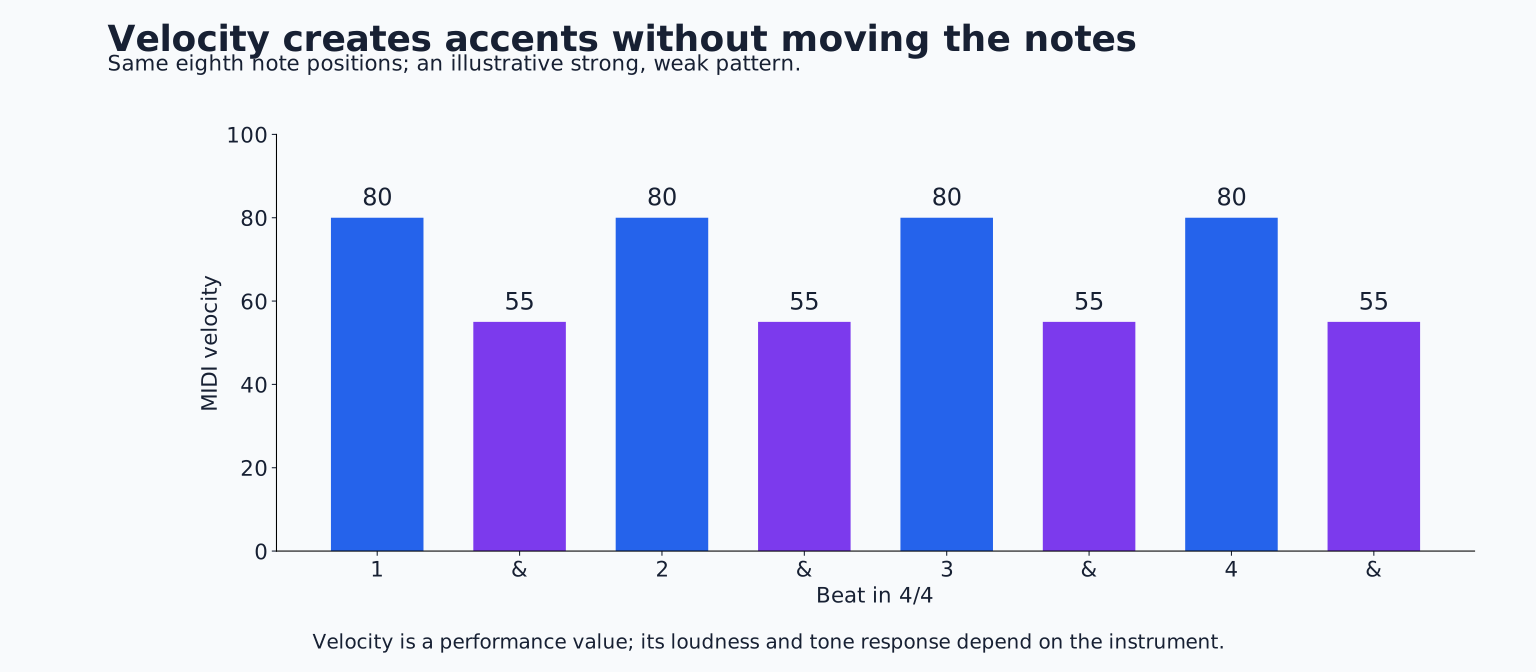
MIDI velocity is a performance value that often changes loudness and may also change timbre. It is not a universal decibel control. On a sample instrument, lower velocities may simply play the same sample more quietly; on another instrument, they may select softer recordings.
Try hat velocities alternating between 80 and 55 on successive eighth notes. These values are illustrative. Listen for a clear strong, weak pattern. If your hat instrument barely responds, adjust its velocity mapping or change volume directly instead.
Keep the main snare accents consistent initially. Add a much softer snare on step 12 of bar 2, immediately before beat 4. This quiet supporting hit is often called a ghost note. If it sounds like a new main accent, reduce its level or remove it.
Compare the accented version with every hat at the same velocity. Neither is universally superior. Repeated identical hits can be exactly right for a rigid electronic feel, while alternating accents may create a more lilting motion.
Introduce swing carefully
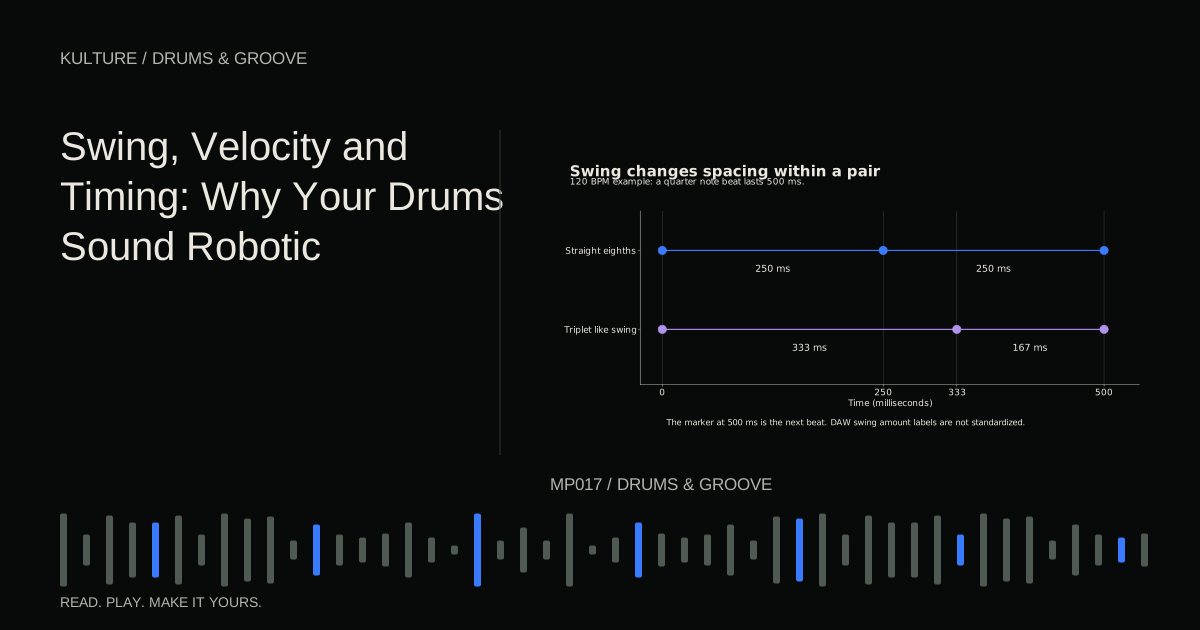
Swing changes the spacing within repeated subdivisions, often delaying every second eighth or sixteenth note. It does not simply make the whole track late, and it is not identical to changing every event to a triplet grid.
Apply a modest sixteenth note swing to the hats while leaving kick and snare unchanged. If the hats are only on eighth note positions, a particular sixteenth swing setting may affect none of them; add a pair of sixteenths to hear the difference. This is why choosing the right swing base matters.
Ableton's groove documentation separates timing, velocity and randomization controls. Other DAWs use different interfaces, but the listening principle transfers: change one dimension at a time and compare against the straight version.
Do not humanize everything automatically. Random offsets can weaken a purposeful accent pattern. For a more detailed treatment, read Swing, Velocity and Timing.
Note lengths can change the groove
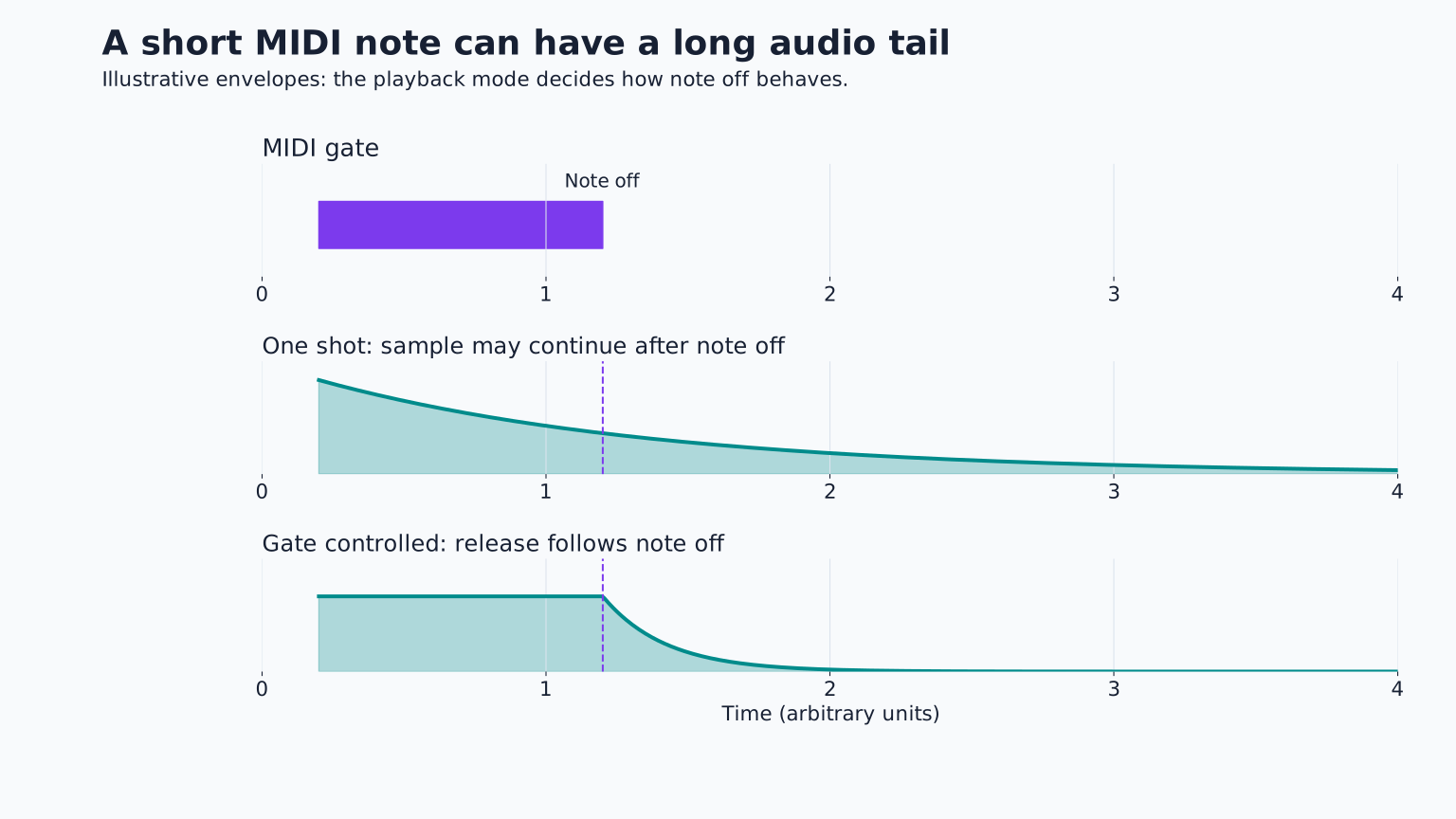
A MIDI drum note often triggers a complete one shot sample regardless of its drawn length. In other playback modes, the note end closes an envelope and shortens the sound. Check how your instrument behaves before assuming a shorter rectangle means a shorter drum.
An open hi hat can ring over several subdivisions. A choke group makes another sound, commonly the closed hat, stop that ringing. This can create the impression of a physical hi hat closing, but it can also cut notes unexpectedly if several pads share the group.
Listen to the silence between hits. A long kick tail can make two separate kicks feel like one continuous low sound. Shortening the tail may improve the groove more than moving the MIDI events.
Create a fill through subtraction
At the end of an eight bar section, remove the hats for the final half bar and place two short snare hits on the “and” and “a” of beat 4. Then let the normal groove return on the next bar's first beat.
The missing hats create room for the fill. The return of the kick provides the arrival. You do not need a long roll on every instrument. If the fill obscures the next downbeat, shorten its last sound or leave the final sixteenth empty.
A useful fill changes the listener's expectation and then resolves it. Its complexity should fit the music around it. How to Make Drum Fills explores several small transition designs.
Test the drums with the rest of the track
Add a simple bass part and one chord sound. The drums may need fewer notes now that other parts supply movement. If a bass attack lands with every kick, the combination may be punchy or congested depending on their envelopes and frequencies.
Do not judge all drum choices in solo. A bright hat that sounds exciting alone may compete with a vocal. A snare that seems plain alone may sit perfectly in a busy arrangement. Change the part or sound before assuming every conflict requires an effect.
Check transitions too. A loop that feels good for two bars can become tiring after thirty two. Remove a hat layer for one section, change the kick variation near a phrase ending, or let a fill announce an important arrival.
Troubleshoot by asking one question at a time
If the beat feels stiff, check accents and note lengths before applying random timing. If it feels messy, mute all but kick and snare and restore elements one by one. If it sounds late, inspect sample start silence and processing that changes the attack.
If the pattern feels weak, the problem may be too many equal accents rather than insufficient volume. Decide which two or three events define the groove and make other hits support them. If every sound is wide, reverberant and long, simplify the sound choices.
Build a finished practice sketch
Create eight bars from your two bar pattern. Use the basic version in bars 1 to 2, the extra kick version in bars 3 to 4, a quieter hat pattern in bars 5 to 6, and a small fill at the end of bar 8. Add bass and listen from the beginning without editing.
Write down the one moment that most clearly needs attention. Fix that moment, export a listening copy, and stop adding notes. You have practiced pulse, subdivision, syncopation, accents, swing, articulation and phrase structure inside one small piece.
TAKE IT INTO YOUR OWN MUSIC
Your next session.
Create eight bars from your two bar pattern. Use the basic version in bars 1 to 2, the extra kick version in bars 3 to 4, a quieter hat pattern in bars 5 to 6, and a small fill at the end of bar 8. Add bass and listen from the beginning without editing.
Notes and progress stay in this browser.

![Beats, Bars and BPM Explained With Examples: Kick, snare and closed hat triggers on a sixteen step grid: [[1, 9], [5, 13], [1, 3, 5, 7, 9, 11, 13, 15]].](/assets/guide-art/beats-bars-and-bpm-explained-with-examples-c10817166b.svg)
![How to Make a Four on the Floor Beat: Kick, snare and closed hat triggers on a sixteen step grid: [[1, 5, 9, 13], [5, 13], [3, 7, 11, 15]].](/assets/guide-art/how-to-make-a-four-on-the-floor-beat-07323d4554.svg)